 Do Son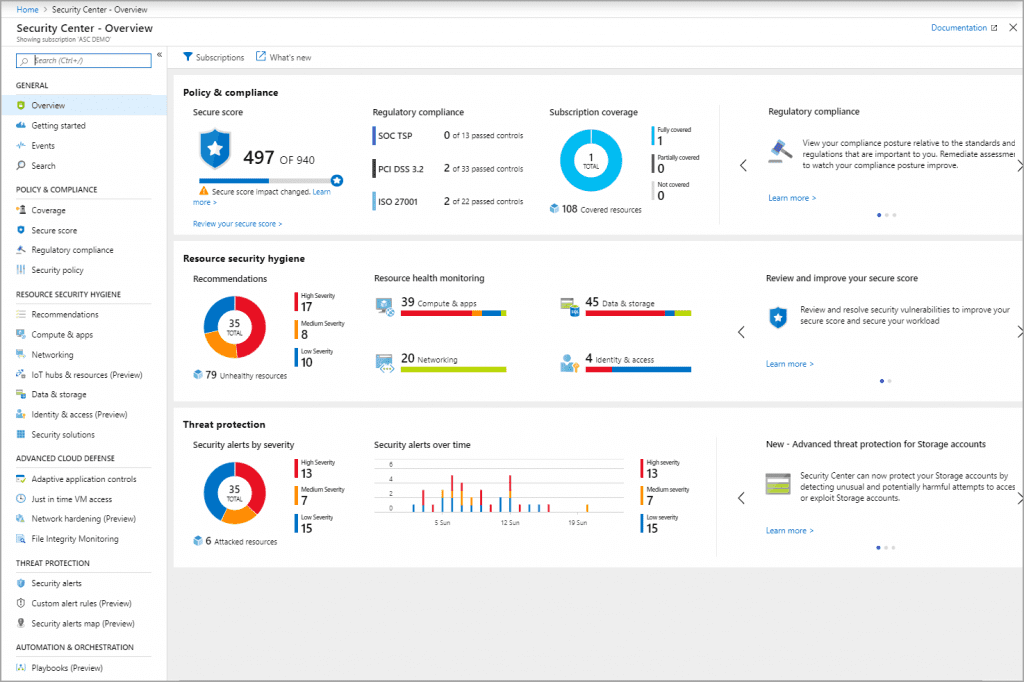
Azure Security Center sample (Source: Microsoft docs)
As the world moves towards adopting cloud services, security has always been the top concern. And just like other cloud services, Azure too has its fair share of security concerns. As one of the largest cloud service providers, Azure makes for a lucrative target for cybercriminals. Cloud and Azure Pentesting has thus become more important now than ever.
Azure security covers a wide range of topics such as cyber threats, data safety & more. Microsoft Azure offers a range of capabilities for securing data and infrastructure as well as operational and physical management. Using these solutions and a few basic security protocols you can create a secure Azure solution. This guide contains the top Azure security practices that we swear by to protect users. But before we do so, let’s know what Azure security is all about.
Understanding Azure security
Similar to other cloud services, Azure too has a shared responsibility model for security. Based on the type of service, the weightage of responsibility oscillates between the user and Azure. Let’s understand how the responsibilities are shared:
- In Software as a Service (SaaS): Azure has more responsibilities which include the operating system, physical security, application, and network controls. With the customers, Azure would share directory infrastructure and identity details.
- As Platform as a Service (PaaS): Azure has control over the operating system and physical security, while the user shares with Azure the directory identity and infrastructure, application, and network controls.
- In Infrastructure as a Service (IaaS): In this case, Azure is only responsible for physical security which includes networks, data centers, and hosts.
The above details show that the customer has a higher share of responsibility in IaaS, as compared with SaaS or PaaS. However, in all cases, the user is responsible for areas such as data governance, access and account management, and security at the endpoint.
7 Azure security best practices we believe in
1. Data protection through access control and encryption
- Always grant access to users based on the scope and control the extent of the access. By using Azure RBAC, for example, you can assign a user to manage the keys in the vault by assigning a predefined key vault contributor role and if the user has to use the keys they can be granted permission only for the data plane.
- By using Azure Resource Manager you can keep your certificates safe across Azure virtual machines. You can also set policies to control who gets access to your certificates.
- You can protect data at rest by using Azure disk encryption and always encrypt the drives before storing data on them. For protecting data in transit, use site-to-site and sit-to-point VPNs. You can also use ExpressRoute as it will provide data encryption by using SSL/TLS for added protection.

2. Managing identities using Azure Active directory
- To protect from cyber attacks such as phishing and credential theft, it is important to use multi-factor authentication in all possible scenarios. The bare minimum is to use multi-factor authentication for users of Azure Active Directory with administrative privileges since these users will have the authority to create and update user permissions and other important resources.
- Auditing custom roles are important since there is a chance we might lose track of users belonging to these roles. The audit should ensure that no unnecessary user gets administrative access through these roles.
- Also, reviewing users in the Azure Active Directory is important to weed out any unnecessary guest users present. These might be exploited by cybercriminals as entry points into the system. In case, guest users are required, ensure that their privileges are limited and are unable to add new users or escalate privileges.

- In case you use the Azure Active Directory Federation service, users can log into Azure AD-based services with their on-premises credentials. However, it is equally important that you keep reviewing the security through periodic audits of your on-premise Azure Active Directory.
3. Utilizing Azure Security Center
- You can find a number of security features and tools in Azure Security Center that can help us in strengthening Azure security. Most of the necessary security measures are switched on by default, while we need to activate the rest.
- Using the monitoring agent function’s automatic provisioning enables the virtual machine security protocols. Additionally, make sure that all recommendations are enabled in the security policy. Enabling these recommendations is important since they cover a range of Azure security settings, including enabling encryption and patching operating systems with required security updates.
- Also, periodically review the recommendations under the Security Center tab, to make sure that there are no pending security tasks, and all updated options are enabled.
- An important point is to update security contacts in the Security Center Policy. This will help Azure contact you during any security-related concerns.

4. Using Microsoft SQL Server for networking
- Securing your network security groups is essential to protect against cyber attacks such as brute force attacks. A common piece of advice for all cloud platforms, keep ports 3389 and 22 closed to the internet.
- A firewall is always a good idea to protect your systems. Apart from an external firewall, and if you are using a Microsoft SQL server, there is a SQL Server firewall. Audit this firewall to ensure that open internet access and redundant blocks are blocked.
- Conducting vulnerability scans on the infrastructure including host and infrastructure-based vulnerabilities, by following pen-testing rules, will reveal any security flaw that might be present.
5. Logging activities in Azure environment
- In Azure, there are multiple ways to log activities that can later be used for compliance and auditing purposes. You should enable logging in each network security group as well as in each SQL server database auditing should be enabled. For each logging operation, ensure that the accounts are encrypted using Storage Service Encryption and Secure Transfer Required.
- Also, create activity alerts for specific actions that can alert you regarding the user and type of behavior. Some events for which you can create activity alerts: Policy assignment creation, updating/creating/deleting network security groups/rule, updating/creating/deleting SQL server firewall rule, updating security policies, removing security solutions
6. Securing the virtual machine
- For securing virtual machines, Azure uses the virtual machine agent that keeps gathering security details. Always make sure that the agent is running for a proper overview of your assets.
- For virtual machines too, the basic security protocols apply, including updating the operating systems and applications, running and maintaining endpoint protection, encrypting files and disks, etc.
7. SQL Server integration with Azure
- One of the best features of Azure is the easy integration of Microsoft SQL. As discussed before, enabling SQL Server firewall and activity logging helps in strengthening Azure security. Another feature is the threat detection capability of SQL Server within Azure. This is a paid feature but helps in providing a better defense. If you are looking for professional help here checkout Astra’s pricing for Vulnerability Assessment and Penetration Testing
Conclusion
These best practices form a basic secure foundation for your Azure environment. Although these methods will protect your systems from several cyber attacks, if you discover more advanced attacks, you will need to add additional Azure security measures.