 Do Son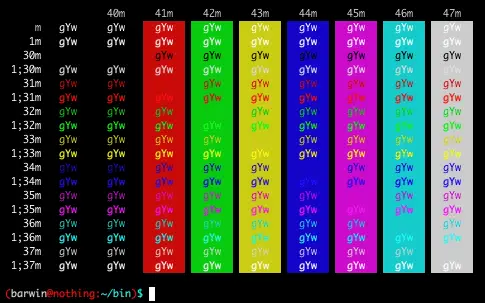
Write some scripts when the output of too much information, some important information with color tips will be more friendly.
Text color
For example, you want helloin on the console output is red, execute the following command
echo -e “\033[31mhello\033[0m”
\033[31m Indicates that the display color of the character is changed to red
\033[0m Indicates that the display color of the character is changed to normal
You can see \033[ and the last mare the same, there are differences is the middle number, this number represents the color to be displayed, the following meanings
| 30 | black |
| 31 | red |
| 32 | green |
| 33 |
light red
|
| 34 | blue |
| 35 | purple |
| 36 | light blue |
| 37 | gray |
Background color
The background color and the foreground color are the same, just use the numbers differently
| 40 | black |
| 41 | red |
| 42 | green |
| 43 | light red |
| 44 | blue |
| 45 | purple |
| 46 |
light blue
|
| 47 | gray |
If you need to set the foreground color and background color at the same time, for example, the output text color is red, the background color is green string, need to separate the two numbers by semicolon,
echo -e “\033[31;42mhello\033[0m”
Support Our Threat Intelligence
Find our tech and OS security coverage helpful? Support our work today and unlock a 100% ad-free reading experience!
 Buy Me a Coffee
