How Do I Stop Getting CAPTCHAs Every Time I Use a VPN? Shared, Dedicated or Home IP
 Do Son
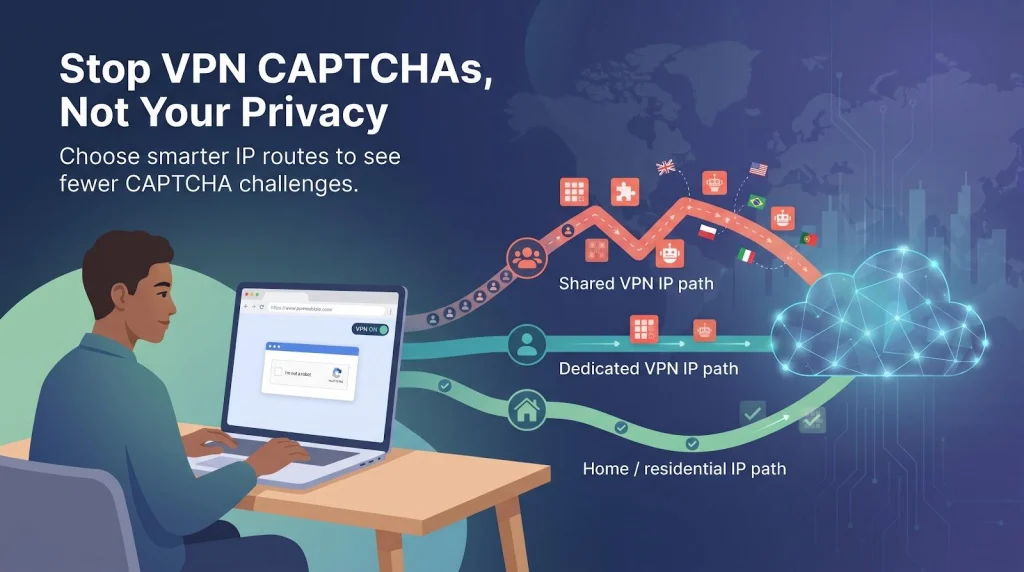
You open your VPN, load Google, and an endless “I’m not a robot” box blocks the page again. There’s no single switch to kill every CAPTCHA, but one quiet server in your usual country, a steady connection, and a clean browser clear most puzzles in seconds. If a site still nags you, the issue is usually a browser signal or a strict site rule, not a leak in your tunnel. We’ll show you how to shrink those prompts and decide when a static, dedicated, or residential IP is worth the privacy trade-off.
At a glance
Use these four moves to cut VPN-related CAPTCHAs fast:
- Switch to a lower-load server in your usual country, then keep that connection steady.
- Allow the challenge scripts to run: turn on JavaScript, permit first-party cookies, and disable heavy blockers while you test.
- Check the browser itself if puzzles persist: profile, extensions, and stored data trigger more loops than the IP does.
- Upgrade to a dedicated or residential IP only when time outweighs privacy; treat paid addresses as the final step, not the starting point.
With the quick fixes queued up, we can now unpack why each one works.
Five-minute fixes before you change your VPN plan
Run these five no-cost tweaks first; most VPN-related CAPTCHAs vanish once you do.
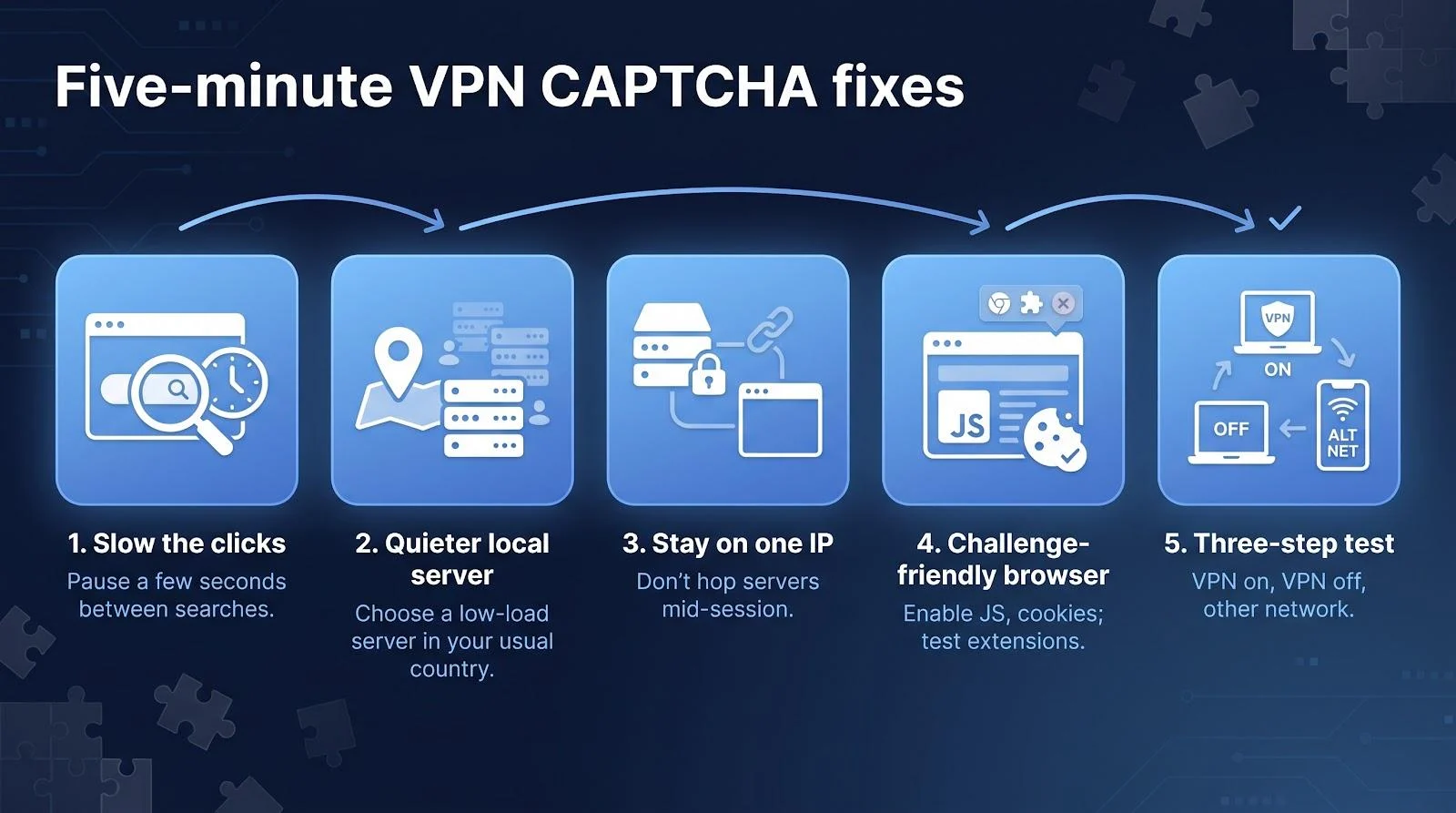
1. Slow the clicks
Solve the CAPTCHA once, then pause a few seconds before you refresh or search again. Google warns that it may trigger an “unusual traffic” check when it sees “many searches in a short time” from the same IP or VPN exit, according to Google Search Help. Treat the page like a real person would: steady, not scripted, and you will clear most robot flags here.
2. Pick one quieter domestic server and stay on it
Choose a lower-load server in the country where you usually browse. Fewer users mean less inherited “bad-neighbor” reputation, and a domestic exit avoids the sudden cross-border leap that risk engines flag. After that single switch, keep the connection stable for the rest of the session; Cloudflare notes that a verification token can fail if the next request comes from a different IP.
3. Keep the same VPN IP for the entire session
Stay on one server from login to logout. Cloudflare notes that a CAPTCHA token can break if the next request comes from a new IP, and search engines treat sudden address jumps as potential automation. Keep the tunnel anchored until you finish checkout or research; even one mid-session hop can restart the risk score.
4. Make the browser challenge-friendly
Turn JavaScript and first-party cookies on, then test again. Cloudflare warns that its CAPTCHA widget fails if either is blocked or cleared, according to Cloudflare documentation. Next, disable script blockers, privacy extensions, or spoofers one at a time so you can spot the offender. When the CAPTCHA stops appearing, re-enable only the add-ons you trust.
5. Diagnose with a three-step test
- VPN on: Load the site behind your VPN.
- VPN off or split tunnel: Visit the same page with your real IP. Google suggests this to confirm whether an “unusual traffic” warning is tied to shared VPN addresses.
- Same browser on another network: Use a mobile hotspot or different Wi-Fi.
- If the CAPTCHA appears only with the VPN, you are dealing with exit-IP reputation.
- If it follows the browser, check extensions, cookies, or local storage.
- If only one site triggers it, its own firewall or fraud policy is the culprit.
Pinpointing the trigger here saves you from chasing fixes that do not fit the problem.
Why websites flag VPN traffic
More than 53 percent of all web requests came from bots in 2025, and 40 percent were outright malicious, according to the 2026 Thales Bad Bot Report. To separate humans from scripts, risk engines score several signals at once, and shared VPN exits can trip many of them:
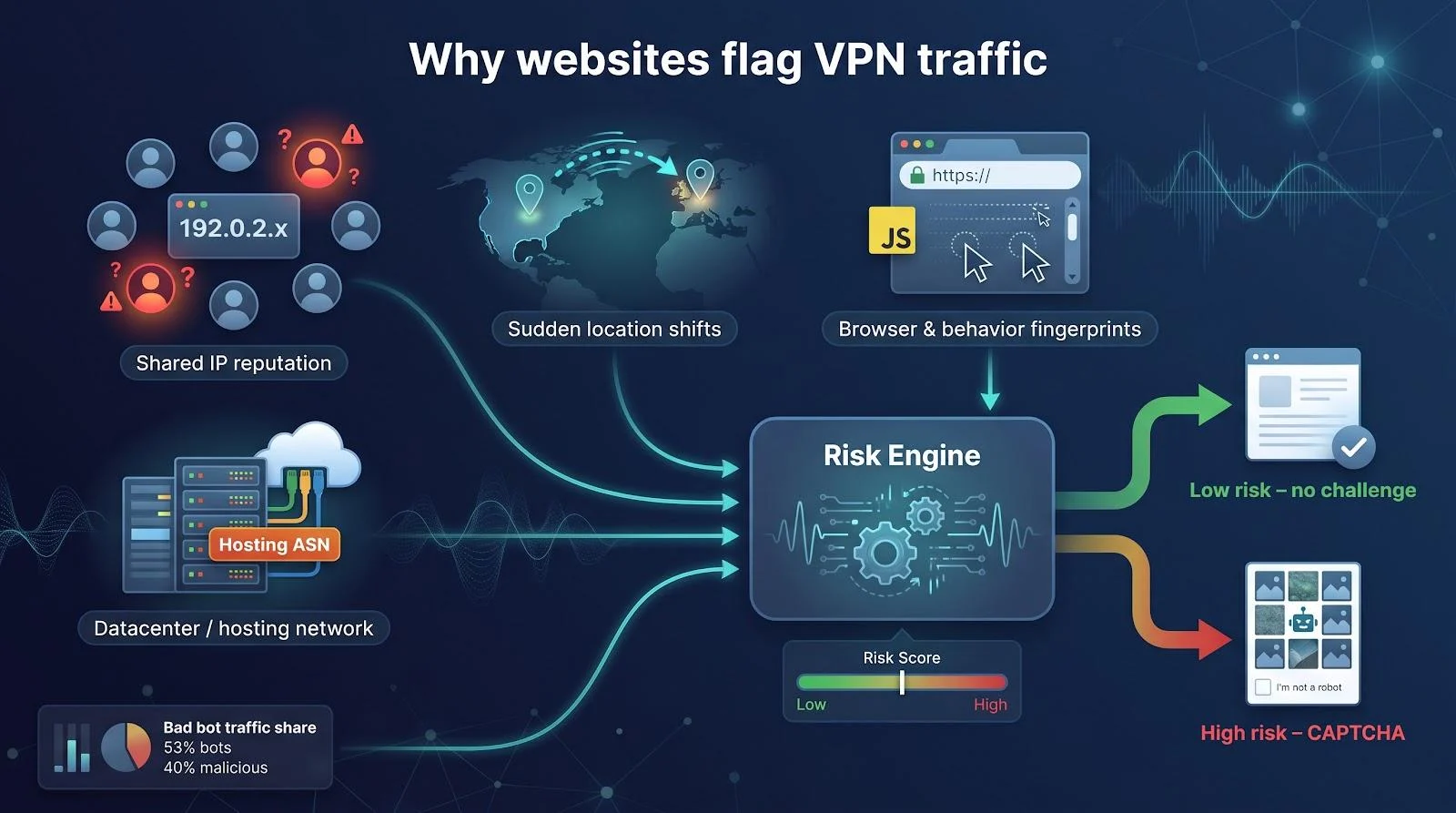
- Shared-IP reputation. Hundreds of users share the same public address. When a few scrape or brute-force a site, the whole IP inherits their “rap sheet,” so the next human sees a CAPTCHA.
- Hosting-network flag. Most VPN exits sit in datacenter ASNs that also host crawlers and attack infrastructure. Requests from those networks start with a higher risk weight.
- Sudden location shifts. Jumping from New York to Frankfurt in seconds looks like a hijacked session, so account systems demand extra proof.
- Browser and behavior fingerprints. Cloudflare notes a challenge fails if the solve request comes from a different IP, and its bot engine also watches TLS fingerprints, JavaScript execution, click speed, and scroll patterns.
That mix explains why swapping to “one clean IP” helps only temporarily. The score still updates on every request. Stability and human-like browsing matter as much as address choice, which is why the quick fixes came first and paid IP upgrades stay last.
Decoding IP terminology
Three traits define any VPN exit:
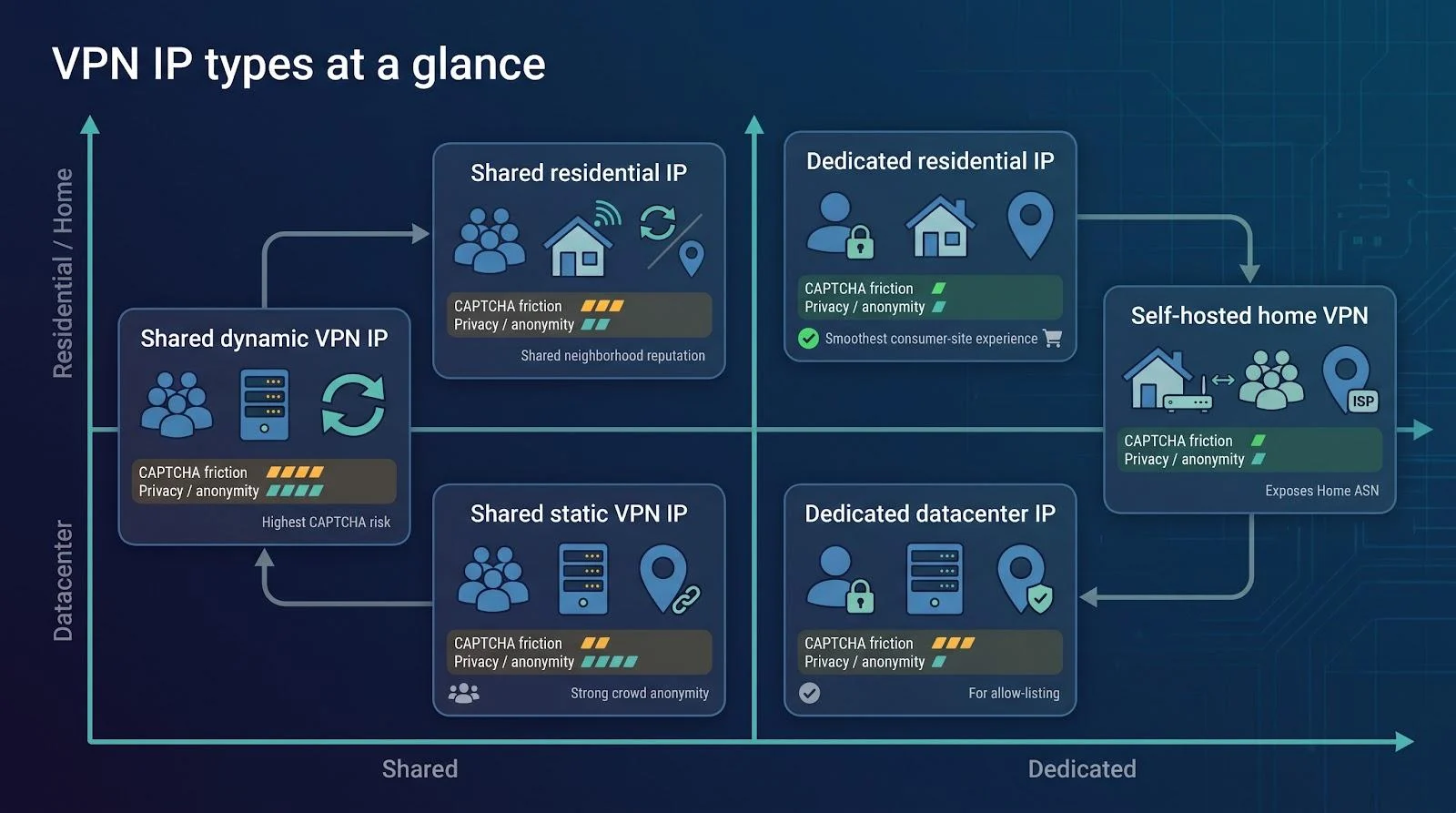
- Who uses it (shared vs. dedicated). A shared address routes traffic from dozens or sometimes thousands of subscribers, so one scraper can stain everyone’s reputation. A dedicated address is tied to a single customer, removing “bad-neighbor” risk while creating a stable fingerprint.
- How often it changes (dynamic vs. static). Dynamic IPs rotate on each connection or a daily schedule, hiding patterns but breaking continuity. Static IPs stay put, which helps session trust yet links every visit to the same address.
- What network owns it (datacenter vs. residential). Datacenter ranges belong to hosting ASNs that also run crawlers and test rigs, so they start with a higher risk weight. Residential ranges look like ordinary home broadband and usually face fewer checks, yet MaxMind and other vendors now sell separate blocklists for residential-proxy traffic, according to MaxMind release notes.
Every commercial VPN exit blends these axes.
TorGuard VPN lists its residential IP VPN at $7.99 a month, or $6.99 a month on annual billing. Those addresses come from ISP networks such as Spectrum, AT&T and RCN, so they carry the reputation of an ordinary home connection, which tends to draw fewer bot checks than a busy shared datacenter exit. That price gives you a concrete sense of what ditching shared-pool puzzles can cost.
The real question is which mix fits your use case. The next section stacks the common combinations side by side and shows how each one affects CAPTCHA odds.
Comparing common VPN IP setups
Scan the matrix below to see how sharing, stability and network class combine to affect CAPTCHA rates and privacy.
| Setup | IP stability | Users on the address | Network class | Typical CAPTCHA impact* | Key privacy note |
| Shared dynamic VPN IP | Rotates often | Dozens to thousands | Datacenter | Highest when the pool is crowded | Strong crowd anonymity, no continuity |
| Shared static VPN IP | Fixed | Few to many | Datacenter or residential | Fewer prompts than a rotating pool, neighbor risk remains | Persistent fingerprint plus some crowd cover |
| Dedicated datacenter IP | Fixed | One | Datacenter | Removes “bad-neighbor” traffic but still classified as VPN or hosting | Easy to correlate, useful for allowlists |
| Shared residential IP | Fixed or rotating | Multiple | Consumer ISP | Usually smoother than datacenter exits | Reputation still hinges on other users, sourcing varies |
| Dedicated residential IP | Fixed | One | Consumer ISP | Best odds of passing consumer-site checks, never a guarantee | Stable unique identifier, limited locations |
| Self-hosted home VPN | Usually fixed | Household only | Consumer ISP | Avoids crowded VPN pools | Exposes real home ASN, requires secure upkeep |
*Websites now purchase residential-proxy blocklists, so “residential” means lower friction, not invisibility. MaxMind added a dedicated residential-proxy database on 27 August 2026, highlighting this shift.
Next, we will pinpoint when a dedicated or residential IP helps and where each one falls short.
Which option fits your use case
Use this quick decision list to match the IP mix to your task:
- Stay with a shared, rotating VPN IP when anonymity is the priority and CAPTCHAs appear only occasionally. You blend into a large crowd and start each session fresh.
- Choose a shared static IP when you need the same address for banking, RDP, or VoIP logins yet want some crowd cover.
- Select a dedicated datacenter IP when a work SaaS or firewall must allow-list one address. It removes bad-neighbor noise, but the IP carries a clear VPN or hosting label.
- Switch to a residential IP if consumer shopping or ticket sites block datacenter ranges. Start with a shared residential exit; pay for a dedicated one only when repeated prompts cost more time than the fee. Recent MaxMind data shows sites now buy residential-proxy blocklists, so call it lower friction, not invisible.
- Split-tunnel a single stubborn site outside the VPN before you buy anything new; this is often the fastest zero-cost fix.
Diagnose the problem by symptom
Random fixes waste time; match the symptom to its root cause, then apply the exact tool.
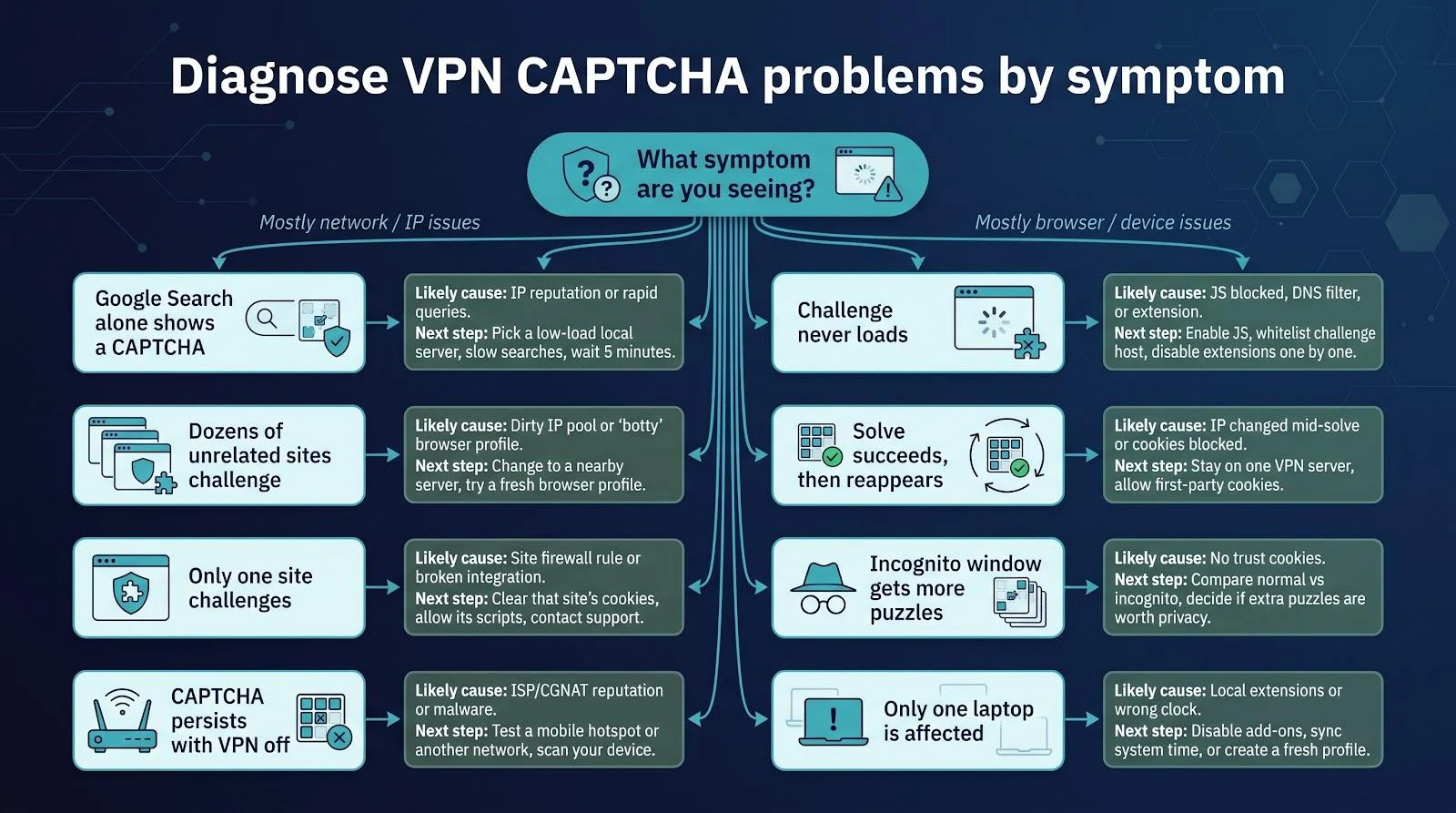
| Symptom | Likely trigger | Quick test or next step |
| Google Search alone shows a CAPTCHA | Exit IP’s search reputation or rapid-fire queries | Switch once to a lower-load domestic server, slow searches, wait five minutes (Google Search Help) |
| Dozens of unrelated sites challenge | Dirty IP pool or a browser profile that screams “automation” | Pick a nearby server, then try a fresh browser profile |
| Only one site challenges | Site-specific firewall rule or broken integration | Clear that site’s cookies and storage, allow its scripts, ask support for details |
| Challenge never loads | JavaScript blocked, DNS filtering, or extension interference | Enable JS, whitelist the challenge domain, disable extensions one at a time |
| Solve succeeds, then reappears | IP changed mid-solve or cookies blocked | Keep the VPN connected, allow first-party cookies, retry without hopping servers |
| Incognito window gets more puzzles | Blank profile lacks trust cookies | Compare with a normal window, decide whether privacy gain outweighs extra puzzles |
| CAPTCHA persists with VPN off | ISP or CGNAT reputation, or device malware | Test on a mobile hotspot or another device, run a security scan |
| Only one laptop is affected | Local extensions or wrong system clock | Disable suspect add-ons, sync the clock, or create a fresh profile |
Advanced tip: If IPv6 is active, repeat the test with IPv6 temporarily disabled. If the CAPTCHAs stop, your browser was reaching some sites over an IPv6 address outside the tunnel.
Break the Cloudflare loop
A Cloudflare page that reloads each time you click Verify usually fails for one of three reasons:
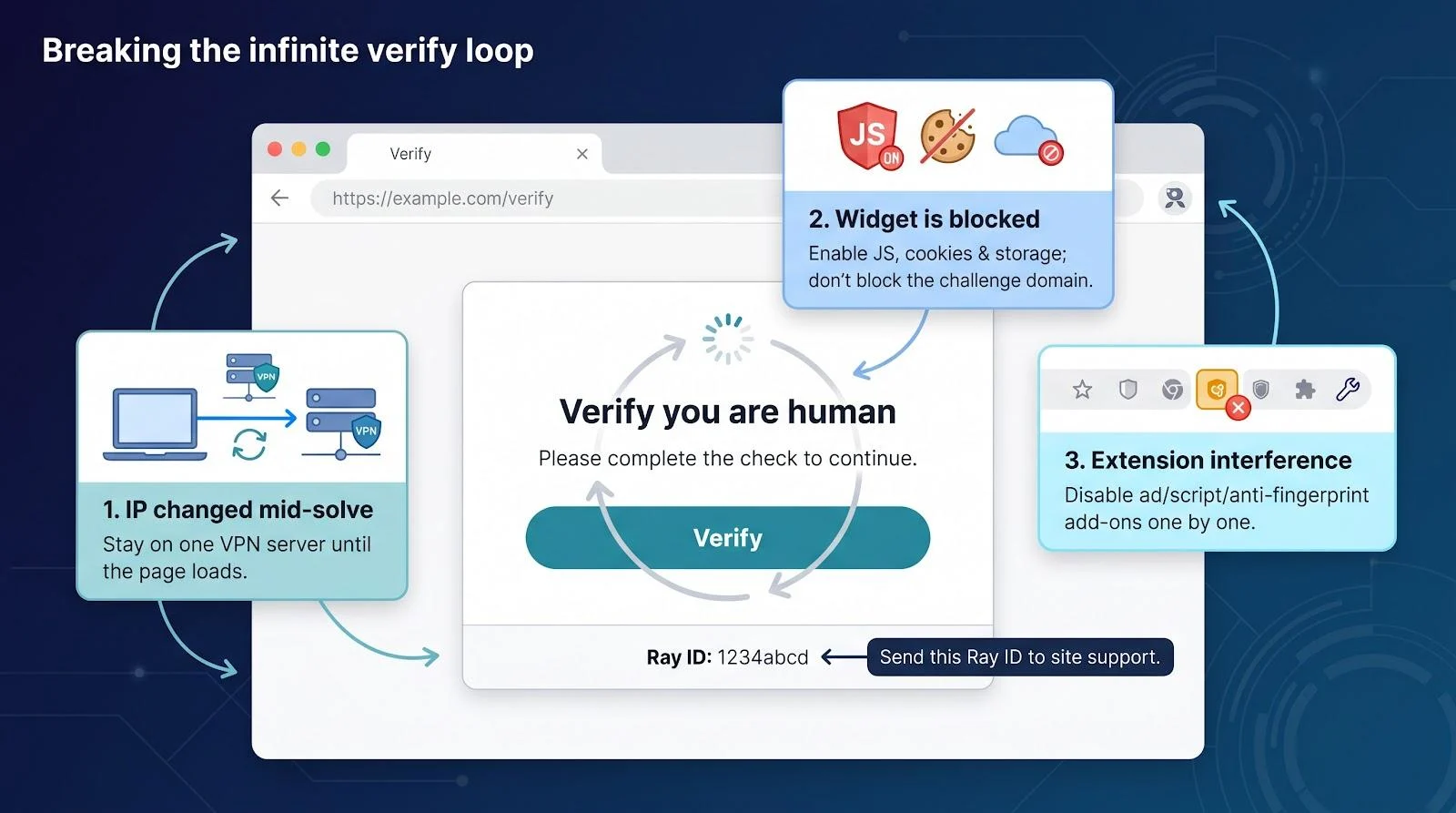
- You changed IPs mid solve. Cloudflare voids a token if the request that solves the challenge comes from a different IP than the one that received it. Stay on the same VPN server until the page loads.
- The widget cannot run. JavaScript, cookies, and DOM storage must be enabled. Blocking *.challenges.cloudflare.com with a DNS filter, Pi-hole rule, or corporate firewall also breaks the handshake.
- An extension rewrites headers. Ad blockers, script blockers, canvas spoofers, or VPN browser add-ons can confuse the challenge. Disable them one at a time, refresh, and watch the status bar.
If the grid still stalls, copy the Ray ID from the error box and send it to the site’s support team; it pinpoints exactly where the solve failed.
Most loops clear once the IP is stable and the browser environment is clean. No secret bypass tool required.
Common myths and why they do not fix VPN CAPTCHAs
- “Keep switching servers.” One deliberate change can land on a cleaner IP, but constant country hopping resets session trust and looks automated. Cloudflare’s challenge documentation notes that a solve fails when it arrives from a different IP than the one the challenge was issued to.
- “Change the VPN protocol.” Swapping OpenVPN for WireGuard alters how your network sees the tunnel; the website still sees the same exit IP, ASN, and reputation.
- “Use a public DNS resolver to clean the IP.” Public DNS helps only when the challenge domain is blocked. It cannot rehabilitate an IP that already has a poor reputation.
- “Nuke all cookies every time.” Erasing every cookie wipes the continuity signals that prove you are the same user. Clear only the site that is looping.
- “Install an auto-solver extension.” Handing CAPTCHA tokens to an unvetted add-on trades annoyance for a security risk; Microsoft logged millions of phishing attempts that hid behind fake CAPTCHA flows.
One stable server and a cooperative browser solve more CAPTCHA loops than any of these “tricks.”
Private access tokens: life after picture puzzles
Verification is shifting from “prove it right now” to “carry quiet credentials as you browse”.
- Apple Automatic Verification (2022). Recent iOS, iPadOS, and macOS versions automatically send a Private Access Token (PAT) to participating sites, confirming that the request comes from genuine Apple hardware without revealing your identity.
- Cloudflare Turnstile (2023 to present). Any modern browser can receive an anonymous token after a quick background check; only higher-risk sessions see an interactive challenge.
- Private Access Control Tokens (PACT, announced June 2026). Cloudflare, Mozilla, Google, Microsoft, and Shopify are drafting a cross-browser standard so every site can accept these anonymous trust tickets. The spec remains in early discussion, so do not hunt for a toggle in Chrome yet.
Bottom line: invisible tokens are on the way, yet you still need the IP hygiene covered above. Stay on one stable server, keep a cooperative browser, and switch to a dedicated or residential IP only when required.
Spot the fakes before they spot you
Attackers spoof CAPTCHA pages to push malware or steal credentials. A real challenge stays inside the browser; a fake drags you into the operating system.
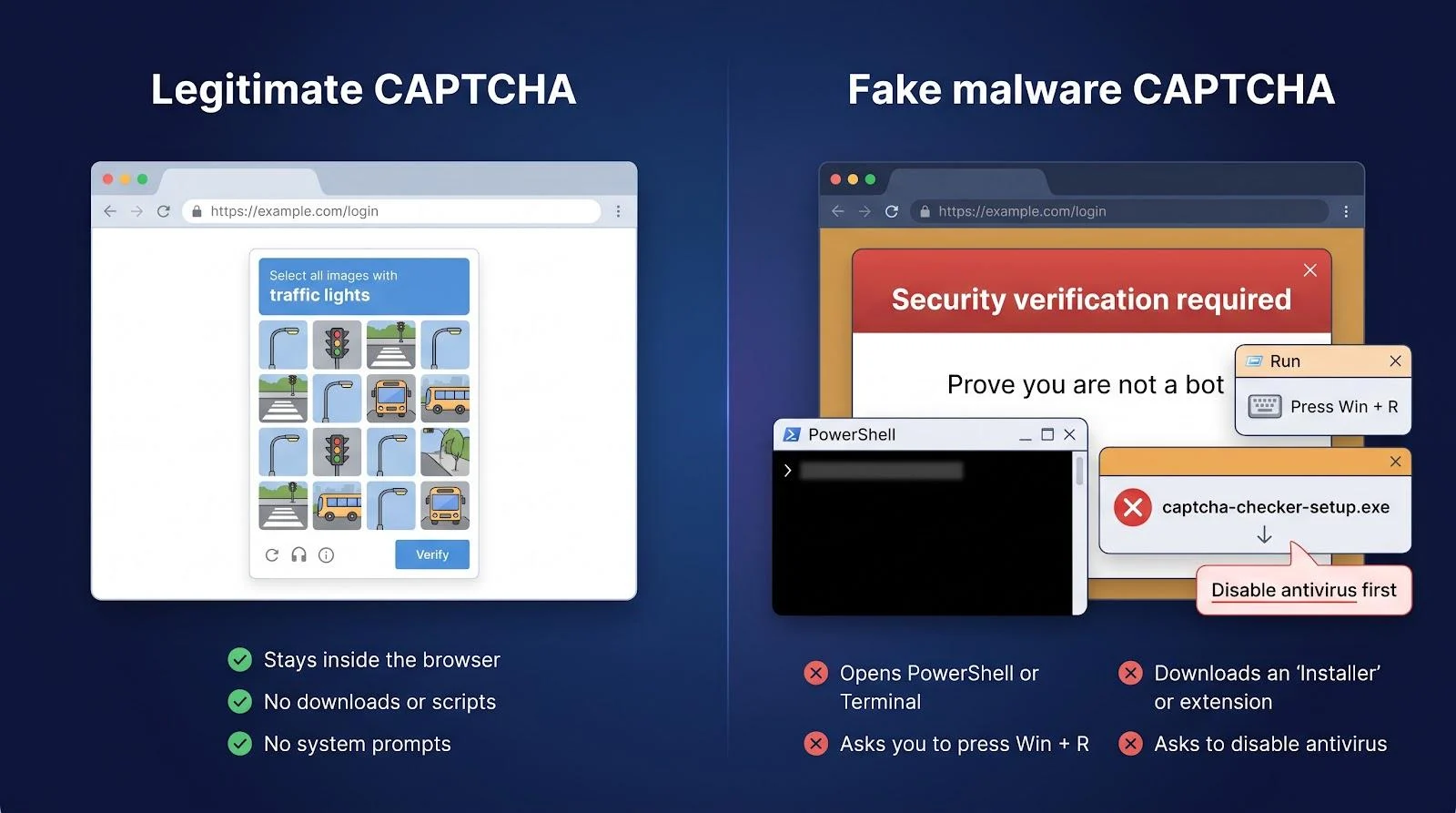
Red flags to close right away
- Prompts you to open PowerShell, Command Prompt, or Terminal
- Tells you to press Win + R or paste a script
- Downloads an “installer” or browser extension as part of “verification”
- Asks you to disable antivirus or Gatekeeper first
Legitimate challenges stop at check boxes, image tiles, or a quick background scan. Microsoft recorded 100 million CAPTCHA-gated phishing attempts between July 2025 and June 2026, according to the Microsoft Digital Defense Report 2026, so healthy skepticism helps.
If anything feels off, close the tab and scan your device. It is safer to reload a real page than to let a fake one load malware.
A quick word for site owners and network admins
For site owners
- Treat a VPN flag as a clue, not a conviction. Combine IP reputation with rate limits, session history, and browser signals before you challenge or block a user.
- Track your false-positive rate alongside bot-detection success; every wasted solve chips at conversion and goodwill.
- Provide an accessible alternative when an interactive CAPTCHA is required. WCAG 2.2 recommends offering another sensory path or trusted-device flow.
- Add a short feedback form or Ray ID field so legitimate users can report lockouts.
For corporate network admins
- One NAT or VPN exit for the entire office can inherit a poor reputation if automated tests or scraping tools share the pipe.
- Segregate high-volume tasks onto their own egress, or assign a dedicated outbound IP, before frustration drives staff to shadow IT.
- Monitor both block events and solve times; long puzzles hurt productivity as much as outright denies.
Frequently asked questions
Can a VPN bypass CAPTCHAs completely?
No. A VPN only changes the risk signals a site sees; the site still decides whether to challenge you. Aim for fewer puzzles, not zero.
Will a dedicated IP stop CAPTCHAs?
It removes bad-neighbor traffic from your address, so you often see fewer prompts. It cannot override datacenter classification, browser fingerprints, or strict site policy.
Is a residential IP better than a dedicated datacenter IP?
For shopping and ticket sites, residential exits usually trigger fewer checks. They cost more, offer fewer locations, and create a stable identifier that links sessions together.
Does a CAPTCHA mean my VPN is leaking?
No. The destination still talks to the VPN’s public exit. A challenge simply asks for extra proof.
Why do I get more CAPTCHAs in incognito mode?
A fresh profile lacks the cookies and history that lower your risk score. Use private windows to diagnose issues, then decide whether the privacy gain outweighs extra puzzles.
Will changing DNS or VPN protocol help?
Public DNS helps only when the challenge domain is blocked; protocol swaps rarely change the exit IP’s reputation. They alter only how the tunnel looks to the local network.
Do free VPNs trigger more CAPTCHAs?
Crowded free servers can inherit poor reputations, but what matters is how many users share the IP and what they do with it. “Free” or “paid” alone is not destiny.
Why do puzzles continue after I change servers?
The new IP might also be flagged, or the real trigger may live in your browser, behavior, or the site’s own firewall. Use the symptom table above to isolate the root cause.
Conclusion
Cutting CAPTCHA friction comes down to four deliberate steps:
- Browse at a human pace.
- Anchor to one lower-load server in your usual country.
- Keep JavaScript, cookies, and trusted extensions working.
- Upgrade to a static, dedicated, or residential IP only when the time cost outweighs the privacy cost.
Climb those rungs in order, and you will spend less time solving puzzles and more time accomplishing tasks without overspending or overexposing your identity.