 Do Son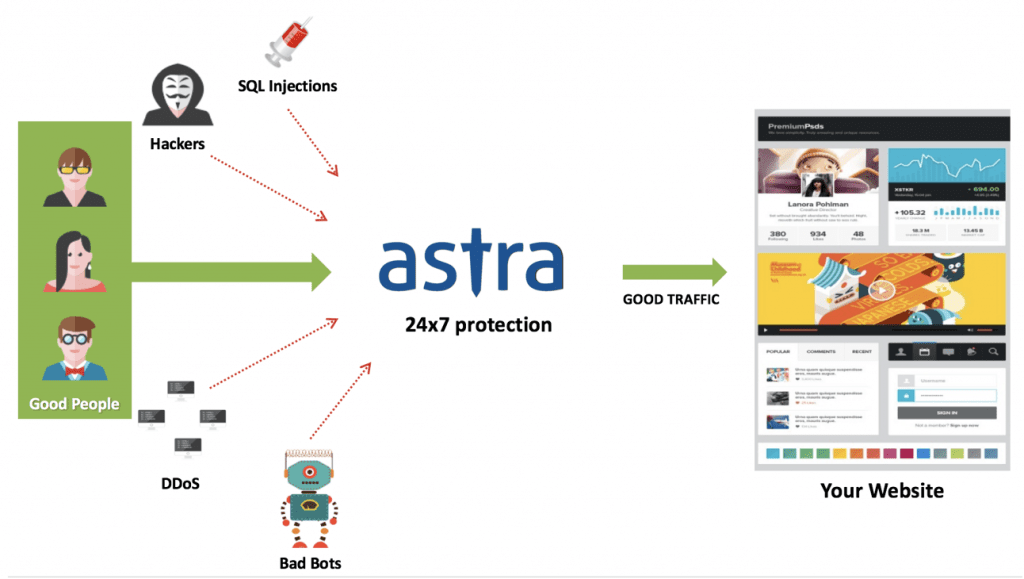
Whenever one thinks of digitalization, the word “WordPress” always comes to mind. After all, WordPress is the most popular CMS today. More than 63% of the websites in the present date are powered by WordPress. But sadly, 56% of these sites have major website security issues.
It is indeed difficult to believe that a popular host like WordPress can be proven to many website security issues. These threats and weak links have given cyber-criminals a huge advantage over the website owners.
In this post, we will discuss how the most dominated CMS is affected by cyber-crime and how we can put a stop to it.
Hacking Statistics in WordPress
Before we dig into the vulnerabilities of WordPress, let’s see how many websites were victims of these website security issues over the past years.
According to CVE Details, XSS (38.1%) remains the biggest threat in WordPress, followed by code execution (15.3%) and bypass something, gain info (12.7%) tying for the third spot.
WordPress plugins make our work very simple and quick. But according to 2019 hacking statistics, 56% of the hacks were made via different plugins.
All these statistics force normal users like us to question the world’s most dominated CMS and its security practices. With this post, we will try to resolve some of these questions and find out the solutions to these website security issues.
Weak Links In WordPress
“People Are And Will Continue To Be The Biggest Security Issue With WordPress.”, Dre Armeda while discussing WordPress Security
Website security is not just about risk elimination, but it is also about risk reduction. Most of the users believe that just by installing an SLL certificate for the website, they can provide 100% security towards all types of website security issues and threats. Through this post, we will aim to clear this myth and provide real solutions to all security issues.
The most dangerous type of WordPress security issue occurs before or just after your site has been compromised. The motive of a hacker is to gain unauthorized access to your WordPress site and harm your site on an administrator-level.
Let us dig deep and find the roots of all these website security issues.
5 Common Website Security Issues to Know:
- Brute Force Attacks
WordPress brute force attacks are nothing but the trial and error method of entering multiple usernames. Hackers use various password combinations over and over until a successful combination is discovered.
The brute force attack technique is developed to exploit in the simplest way to get access to your website: Your WordPress login page.
However, WordPress, by default, doesn’t limit login attempts. So, bots can attack your WordPress login page using the brute force attack method.
Even if these attacks are unsuccessful, it can still wreak havoc on your server. This is because login attempts can overload your system and slow down your website.
- File Inclusion Exploits
Another website security issue is due to the vulnerabilities in the WordPress website’s PHP code. These attacks are the next common security issue that can be exploited by attackers.
PHP is the code that is responsible to run your WordPress website, along with your plugins and themes.
File inclusion exploits occur when a faulty code is used to load remote files. These loaded files further allow attackers to gain access to your website.
Due to this, hackers can gain access to your WordPress website’s wp-config.php file. This, as we all know, is one of the most important files in the WordPress installation.
- SQL Injections
 Your WordPress website uses a MySQL database to operate. SQL injections in wordpress occur when an attacker gains access to your WordPress database. This further exploits all your website data.
With an SQL injection, an attacker can create a new admin-level user account. With its help, the attacker gets complete access to your WordPress website.
These injections can also be used to insert new data into your database, which includes links to malicious or spam websites.
- Cross-Site Scripting (XSS)

84% of all the website security issues on the entire internet are called Cross-Site Scripting or XSS attacks.
WordPress plugins are filled with Cross-Site Scripting.
Mechanism:
When the user, knowingly or unknowingly, loads web pages with insecure javascript scripts, these scripts are then used to steal data from their browsers.
An example of a Cross-Site Scripting attack would be a hijacked form that appears to reside on your website. If a user inputs data into that form, that data would be stolen.
- Malware
Malicious software is code that is used to gain unauthorized access to the targeted site. These
codes enter the website to gather sensitive data.
However, there are thousands of types of malware infections on the internet. WordPress is not vulnerable to all of them.
But still, there are four common WordPress malware infections:
- Backdoors
- Drive-by downloads
- Pharma hacks
- WordPress Malicious redirects
Lucky for us, WordPress is aware of all of these website security issues. It gives the user various options and techniques to ensure security against cybercrime.
WordPress Security in 3 Easy Steps:
- WordPress Backup Solution:
Backups are your first defense against any website security issue.
Remember, nothing is 100% secure.
- Install a Web-Application Firewall:

A website firewall blocks all malicious traffic before it even reaches your website.
Web Application Firewall (WAF) is an application layer security solution that checks traffic coming to your server.
It takes the necessary action to protect it from hackers and malware.
Astra Security is one of the top companies which provides this service with effective results.
- Disable File Editing
WordPress comes with a built-in code editor which allows you to edit your theme and plugin. These files can be edited right from your WordPress admin area. If the access lands in the wrong hands, it can cause many website security issues. Thus, it is recommended that you turn this feature off.
Waiting For Your Move
With all the details being mentioned, it is your turn to secure and fill all the security cracks in your WordPress Website. It is your turn to secure your website and your company.
So, what are we waiting for? Let us take the steps towards a secured internet.