 Do Son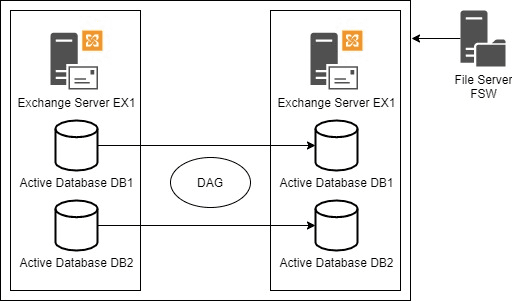
Exchange Server provides high availability and disaster recovery using Database Availability Group (DAG). This provides replication of databases, and you can also balance out databases to multiple servers. With the Database Availability Group, you will always have an active copy while the other nodes will have a passive copy. If the active server has any issues, the next candidate will serve as the active copy of the database, if the database is in full sync and there are no issues.
The number of servers depends on your choice but the minimum nodes can be three. The reason behind it is that for a cluster to remain active, you will need half plus one. So, in a cluster of 3 nodes, you need to have two servers always up. This will ensure that the voting majority sticks and the services are healthy. In the case of a three-node cluster, there is no need to have three Exchange Servers as you can have two Exchange Servers and a file share witness which will be used as the third node.
Like any server in the infrastructure, an Exchange Server needs to be updated with the Windows patches as well as the Exchange Server patches. In this article, we will be discussing the process of how to reboot the servers without impacting the user.
One would need to reboot a server during office hours, apart from Windows patches and Exchange Server patches, due to the following reasons:
- Emergency patching and vulnerability notices from Microsoft and other vendors
- Hardware upgrades, replacement, and maintenance
- Hardware failure and other issues, like power failure
- Testing of failover procedures. Having a failover and high availability in place requires the implementation of testing and simulations. It is important to have these included in the business annual procedures to ensure that if something happens, the business continuity is ensured.
In a normal environment, if the main server fails, all the passive databases on the secondary server will become active and the changeover is seamless to the users. Hence, it can be done during office hours.
Here are the steps:
Step 1: Set the main server on maintenance mode
Firstly, you need to make a failover to the secondary server and set the main server on maintenance mode.
To put a server in maintenance mode, you need to run the PowerShell command as given below.
Set-ServerComponentState -Identity <ExchangeServerName> -Component HubTransport -State Draining -Requester Maintenance

This will drain all the pending messages and put the server in maintenance mode.
Step 2: Redirect messages and queued message to the secondary server
The next step is to redirect messages and queued message to the secondary server. For this, you need to use the Redirect-Message PowerShell command (as given below) using the target as the full FQDN of the server.
Redirect-Message -Server <currentservername> -Target <newservernameFQDN>

Since this is a cluster, you also need to pause the server in the cluster. It is to be noted that you just pause it and not evict the server as this would cause several issues. To do so, use the Suspend-ClusterNode PowerShell command as given below.
Suspend-ClusterNode <computername>

This will just pause the node in the cluster.
Step 3: Disable the database automatic activation
The next step is to disable the database automatic activation. At this stage, the process will set the databases on the server as passive and will change the passive databases as active on the second node. This process is not immediate. It may take a few minutes until the move is fully operational. For this, you need to use the Set-MailboxServer PowerShell command as given below.
Set-MailboxServer <computername> -DatabaseCopyActivationDisableAndMoveNow $true

Set the server to prevent the database from getting active automatically. This can be done by using the below command.
Set-MailboxServer <computername> -DatabaseCopyAutoActivationPolicy blocked

This will ensure that all databases on the source server are dismounted. If any of the mailboxes are still mounted, then you need to perform a manual switchover using the below given PowerShell command.
Move-ActiveMailboxDatabase -Server <CurrentActiveServer> -ActivateOnServer <NewServer>

To verify that all databases are not mounted on the main server, you need to run the below command.
Get-MailboxDatabaseCopyStatus -Server <currentdatabaseserver> | Where {$_.Status -eq “Mounted”}

Step 4: Checking the transport queue
After the main databases have been moved, you need to make sure that all queues are empty by checking the transport queue. All queues must be empty since you will be disabling the server components on the server in question. Any emails which are still pending after the next step will be delayed in their delivery until the server is set online again. To check the queues, you can use the Get-Queue command.
Step 5: Put the server in maintenance mode
The last step is to put the server in maintenance mode. This can be done by using the below command.
Set-ServerComponentState <servername> -Component ServerWideOffline -State Inactive -Requester Maintenance

At this stage, with all the users working on the secondary server and the main server is in maintenance mode, you can go ahead and restart, install Windows Updates/Exchange Updates, or upgrade the hardware or replace it.
During the update process or any server changes, there could be issues with the server. For example, when you will be doing the reverse to put the server out of maintenance mode, the database will not replicate or not mount. Hardware and update issues might hinder the health of the server which can damage or corrupt the transaction logs and the database on the server. Apart from these issues, there is also the human element. You may skip a step to put the server in maintenance mode.
In such cases, you need to make sure that you have the right tools in hand. The best recovery tool is Stellar Repair for Exchange. This tool guarantees recovery from any Exchange Server database version – healthy or not. You can export all or specific mailboxes to PST and other formats. You can also export directly to a live Exchange Server database or Office 365.
You will never know when disaster will strike. Therefore, it’s always best to have in hand the right companion app that can help to restore the services with the least impact on the users and business.