 Do Son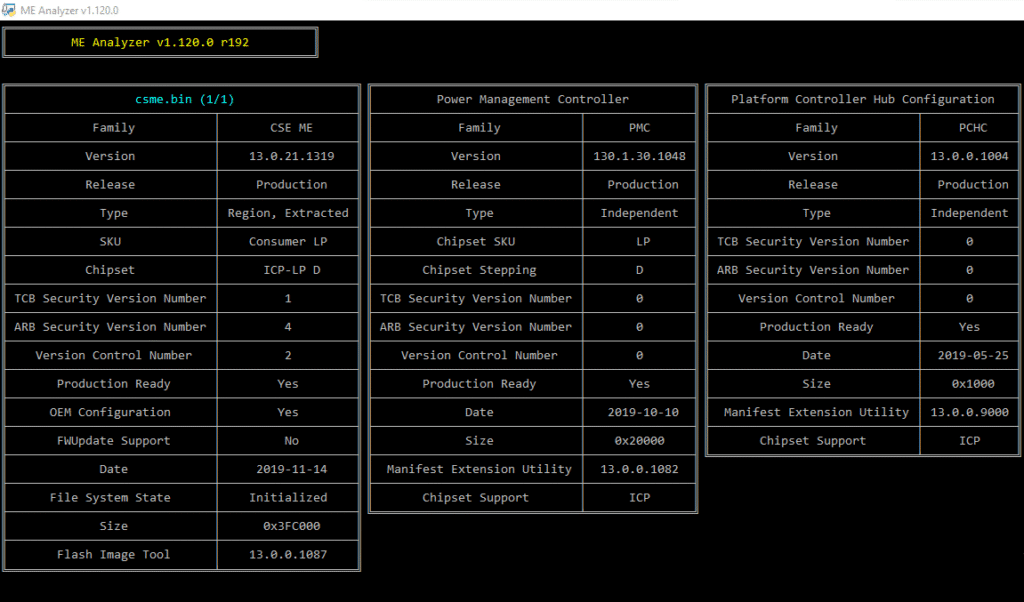
ME Analyzer is a tool which parses Intel Engine firmware images from the Converged Security Management Engine, Converged Security Trusted Execution Engine, Converged Security Server Platform Services, Management Engine, Trusted Execution Engine & Server Platform Services families. It can be used by end-users who are looking for all relevant firmware information such as Family, Version, Release, Type, Date, SKU, Platform etc. It is capable of detecting new/unknown firmware, checking firmware health, Updated/Outdated status and many more. ME Analyzer is also a powerful Engine firmware research analysis tool with multiple structures which allow, among others, full parsing and unpacking of Converged Security Engine (CSE) firmware, Flash Partition Table (FPT) & Boot Partition Descriptor Table (BPDT/IFWI), advanced Size detection etc. Moreover, with the help of its extensive database, ME Analyzer is capable of uniquely categorizing all supported Engine firmware as well as check for any firmware which have not been stored at the Intel Engine Firmware Repositories yet.
A1. ME Analyzer Features
- Supports all Engine firmware Families (CS)ME 1-12, (CS)TXE 1-4, (CS)SPS 1-4
- Supports all types of firmware images (Engine Regions, SPI/BIOS etc)
- Detection of Family, Version, SKU, Date, Revision, Platform etc info
- Detection of Production, Pre-Production, ROM-Bypass etc Releases
- Detection of Region (Stock/clean or Extracted/dirty), Update etc Types
- Detection of Security Version Number (SVN), Version Control Number (VCN) & PV
- Detection of Intel SPI Flash Descriptor region’s Access Permissions
- Detection of whether the imported Engine firmware is updated or not
- Detection of unusual Engine firmware (Corrupted, Compressed, OEM etc)
- Ability to unpack CSE firmware CSME 11+, CSTXE 3+ and CSSPS 4+
- Ability to validate Engine RSA Signature and Region table checksums
- Advanced detection & validation of Engine region’s firmware Size
- Ability to detect & analyze Integrated Firmware Images (IFWI/BPDT)
- Detection of CSME 11+ Flash Image Tool platform configuration by OEM
- Detection of CSME 11 PCH-LP firmware Power Down Mitigation (PDM) erratum
- Ability to analyze multiple files by drag & drop or by input path
- Detection of unique mobile Apple Macintosh Engine firmware SKUs
- Detection of multiple Engine regions in input file, number only
- Detection of special Engine firmware BIOS GUIDs via UEFIFind
- Ability to detect & categorize firmware which require attention
- Supports CodeRush’s UEFIFind & Lordkag’s UEFIStrip utility integration
- Reports all firmware which are not found at the Engine Firmware Repositories
- Reports any new, unknown, problematic, incomplete etc Engine firmware images
- Features command line parameters to enhance functionality & assist research
- Features user-friendly messages & proper handling of unexpected code errors
- Shows coloured text to signify the importance of notes, warnings & errors
- Open Source project licensed under GNU GPL v3, comment assisted code
A2. Engine Firmware Repository Database
ME Analyzer allows end-users and/or researchers to quickly analyze and/or report new firmware versions without the use of special Intel tools (FIT/FITC, FWUpdate) or Hex Editors. To do that effectively, a database had to be built. The Intel Engine Firmware Repositories is a collection of every (CS)ME, (CS)TXE & (CS)SPS firmware we have found. Its existence is very important for ME Analyzer as it allows us to continue doing research, find new types of firmware, compare the same major version releases for similarities, check for updated firmware etc. Bundled with ME Analyzer is a file called MEA.dat which is required for the program to run. It includes entries for all Engine firmware that are available to us. This accommodates primarily three actions: a) Detect each firmware’s Family via unique identifier keys, b) Check whether the imported firmware is up to date and c) Help find new Engine firmware sooner by reporting them at the Intel Management Engine: Drivers, Firmware & System Tools or Intel Trusted Execution Engine: Drivers, Firmware & System Tools threads respectively.
B. How to use ME Analyzer
There are two ways to use ME Analyzer, MEA executable & Command Prompt. The MEA executable allows you to drag & drop one or more firmware and analyze them one by one or recursively scan entire directories. To manually call ME Analyzer, a Command Prompt can be used with -skip as a parameter.
B1. ME Analyzer Executable
To use ME Analyzer, select one or multiple files and Drag & Drop them to its executable. You can also input certain optional parameters either by running MEA directly or by first dropping one or more files to it. Keep in mind that, due to operating system limitations, there is a limit on how many files can be dropped at once. If the latter is a problem, you can always use the -mass parameter to recursively scan entire directories as explained below.
B2. ME Analyzer Parameters
There are various parameters which enhance or modify the default behavior of ME Analyzer:
- -? : Displays help & usage screen
- -skip : Skips options intro screen
- -check : Copies files with messages to check
- -mass : Scans all files of a given directory
- -enuf : Enables UEFIFind Engine GUID detection
- -adir : Sets UEFIFind to the previous directory
- -pdb : Writes input file DB entry to text file
- -dbname : Renames input file based on unique DB name
- -dfpt : Shows info about the FPT and/or BPDT headers (Research)
- -dsku : Shows debug/verbose SKU detection info for CSME 11 (Research)
- -unp86 : Unpacks all CSE Converged Security Engine firmware (Research)
- -ext86 : Prints Extension info during CSE unpacking (Research)
- -bug86 : Enables debug/verbose mode during CSE unpacking (Research)
The following are Windows specific:
- -extr : Lordkag’s UEFIStrip mode
- -msg : Prints only messages without headers
- -hid : Displays all firmware even without messages (-msg)
B3. ME Analyzer Error Control
During operation, ME Analyzer may encounter issues that can trigger Notes, Warnings and/or Errors. Notes (yellow/green color) provide useful information about a characteristic of this particular firmware. Warnings (purple color) notify the user of possible problems that can cause system instability. Errors (red color) are shown when something unexpected or problematic is encountered.
C. Execute/Download ME Analyzer
ME Analyzer is developed using Python 3.6 and can work under Windows, Linux and macOS operating systems. It consists of two files, the executable (MEA.exe or MEA) and the database (MEA.dat). Regarding the executable, already built/frozen/compiled binaries are provided by me for Windows only (icon designed by Those Icons). Thus, you don’t need to manually build/freeze/compile ME Analyzer under Windows. Instead, download the latest version from the Releases tab, the title should be “ME Analyzer v1.X.X”. You may need to scroll down a bit if there are DB releases at the top. The latter can be used to update the outdated DB which was bundled with the latest executable release, the title should be “DB rXX”. For Linux and macOS or courageous Windows users, the build/freeze/compile instructions for all three OS can be found below.
Note: To extract the already built/frozen/compiled ME Analyzer archives, you need to use programs which support RAR5 compression!
Anti-Virus False Positives
Some Anti-Virus software may claim that the built/frozen/compiled MEA executable contains viruses. Any such detections are false positives, usually of PyInstaller. You can switch to a better Anti-Virus software, report the false positive to their support, add the MEA executable to the exclusions, build/freeze/compile MEA yourself or use the Python script directly.
Download
Copyright (C) 2016 platomav
Support Our Threat Intelligence
Find our zero-day alerts and CVE reports helpful? Support our work today and unlock a 100% ad-free reading experience!
 Buy Me a Coffee