 Do Son
Whether you’re designing, promoting, or even creating a simple PowerPoint, a clean, professional logo is essential.
Want to watermark your product? But the logo edges always end up jagged and discolored. Trying to cut it out with the Pen Tool? All those twists and turns are incredibly frustrating.
A powerful tool revolutionizes this process: UltraPic. Effortlessly get a logo with a transparent background that seamlessly integrates into any visual composition.
Challenges of Traditional Logo Background Removal
Before the popularization of AI tools, removing background from logo usually depended on professional design software. The threshold for using Photoshop is not low
Photoshop is indeed powerful, but the reality is:
- High learning costs, easy for beginners to make mistakes
- The operation steps are cumbersome and the efficiency is unstable
- It is difficult to process complex logos (gradients, shadows, hollows).
- Not suitable for batch processing
For operators, e-commerce sellers or entrepreneurs, it is not cost-effective to learn a whole set of PS processes just to remove background from logo.
AI One-Click Background Removal for Logos
UltraPic is more than just a photo background remover tool—it’s an AI-powered solution that intelligently identifies and segments images. Specifically optimized for logos with distinct edges and high contrast, it excels at removing backgrounds from these graphics.
AI precision image removal
Automatically identifies the boundary between the logo subject and background with pinpoint accuracy. Even complex hairline edges, semi-transparent effects, or subtle shadows are cleanly separated, preserving maximum detail of the original logo with pixel-level precision.
Ease of use
No need to learn complex Photoshop layers or pen tools. UltraPic’s intuitive interface simplifies the process to three steps: “Upload → AI Processing → Download.”
True one-click operation enables users with zero experience to achieve professional results in seconds.
Fast speed
Typically processes a logo image in just 2-5 seconds. Supports batch uploads and processing, delivering immediate efficiency gains when handling series of brand icons or product logos.
How to remove backgrounds from logos with UltraPic – 3 steps
Step 1: Upload Your Logo Image
Navigate to the UltraPic BG Remover page. No download required—just open the webpage and start removing backgrounds online.
Select the logo file you want to process from your device. Supported formats include JPG, PNG, WEBP, and BMP.
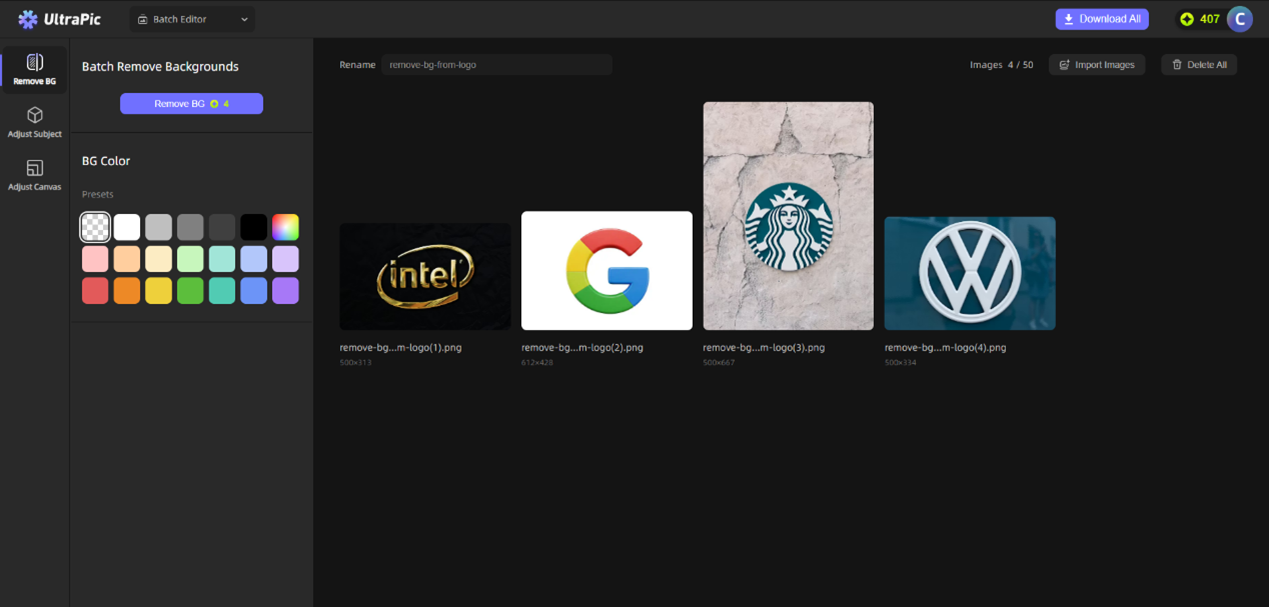
✍You can dump dozens of files at once, and it will still swiftly batch-process background removal.
Step 2: AI Automatic Analysis and Removal
After uploading, UltraPic’s AI background remover engine immediately gets to work.
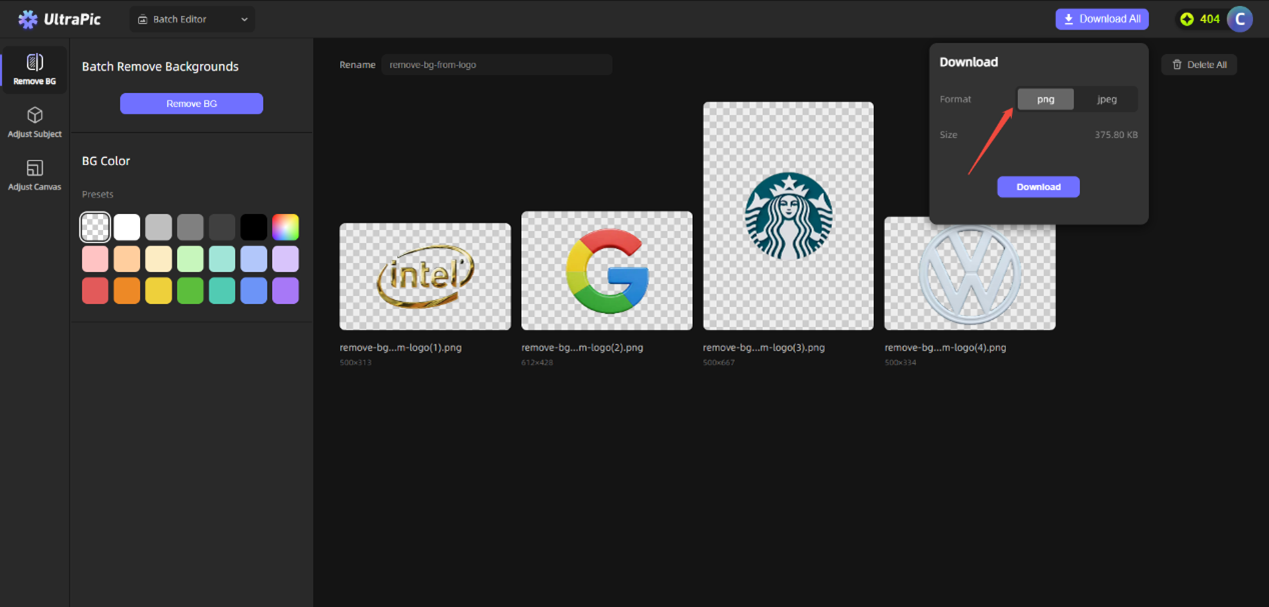
In the blink of an eye, the background is automatically removed, appearing as a gray-and-white checkerboard pattern (a transparent background).

It doesn’t resort to crude, one-size-fits-all removal; instead, it flawlessly handles even the subtlest details like hollowed-out fonts and intricate icon edges.
Step 3: Download and Use
If you’re satisfied with the AI-removed background image, click Download All (recommended PNG for transparent backgrounds).
The processed high-definition logo with transparent background can be immediately applied to your design projects.
UltraPic’s capabilities extend far beyond this. Around your processed logo, you can also perform a series of optimization operations directly within its platform:
🟣Smart Background Replacement: Quickly place your logo against solid colors or AI-generated custom image backgrounds, unleashing your creativity without limits.
🟡Batch Resizing: Generate a logo suite in various sizes suitable for different websites and platforms with a single click.
🟠Basic Color Adjustment: Fine-tune your logo’s brightness and contrast to better adapt it to new background environments.
Is UltraPic Ideal for You?
Although removing the background from a logo seems like a “simple” requirement, it is used by a wide range of people.
🧑Entrepreneurs and SMEs
Without a full-time designer, and not wanting to repeatedly outsource the modification of the logo, UltraPic can quickly solve the problem of brand material organization.
🛒E-commerce sellers and operators
Logos are frequently used in product detail pages and store decoration. Removing the background can make the page cleaner and more branded.
🎉Marketing and Content Team
When making PPT, promotional materials, and social media content, a logo with a transparent background can significantly improve the overall visual quality.
Conclusion
Ultimately, the true value of a tool is to make people more focused. The emergence of tools like UltraPic is restoring “removing the background” from a “technical job” to the “basic action” it should be.
Next time you’re stuck with a logo background, maybe you can try a different solution. Leave the tedious work to the tools. When the logo is free from the constraints of the background color, our inspiration may also take off lightly.