 Do Son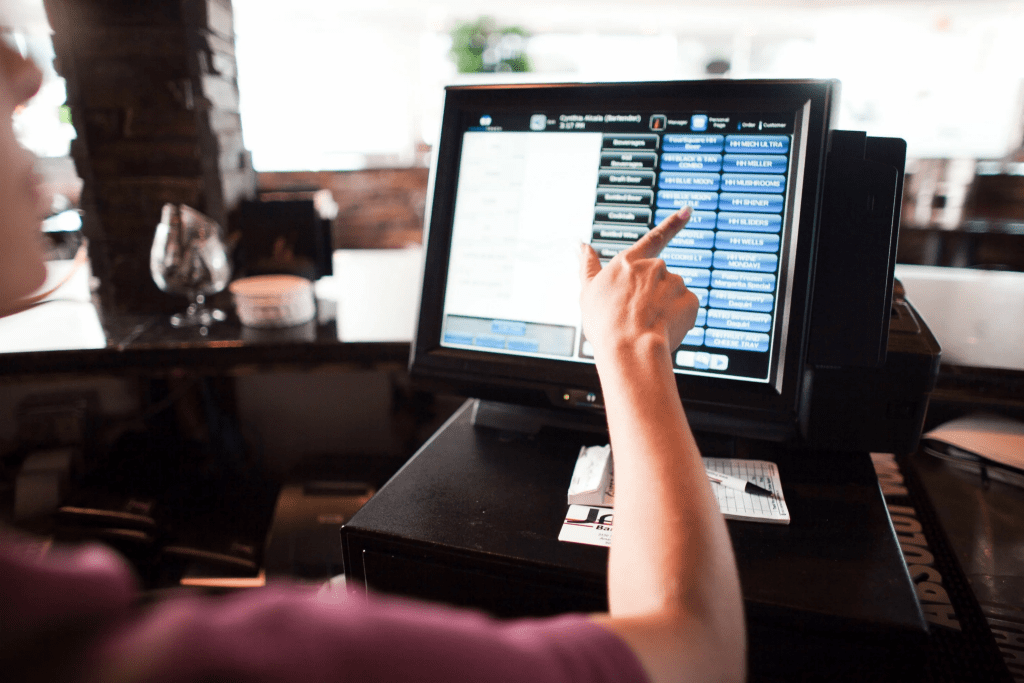
Stores with many items and high throughput are difficult to do only with online cash registers and terminals. POS systems can help — they are a complete solution for automating sales. Here you would find what it is, what functions it performs, and how much it costs.
What is a POS System
It is a set of equipment united by common custom POS software. It constitutes a full-fledged cash area. The task of the POS terminal is to accept payments made by bank cards. The system can do more:
- Generate sales reports — analyze the performance of salespeople, seasonality of sales, search for the most popular goods, etc. There are ready-made report templates, but you can set up any you like.
- Control inventory balances — the POS software keeps up-to-date information about the goods in the store and the warehouse. You can set up an automatic order at ten positions: the system will leave an application for replenishing the remnants after reaching this amount.
- Calculate a discount — thanks to the POS software, and it is possible to implement a system of discount cards.
- Supervise the work of the staff. To start working with the POS, and the employee has to be authorized. To do this, you are given a card and a password.
- Perform the functions of an online cash register — accounting and delivery of goods, receiving and giving out money, return, transfer of fiscal data, and receipt printing.
- Act as a terminal to accept cashless payment.
- Detect goods by barcode — convenient for the cashier so that he does not have to remember all the terminology the company sells;
- Weigh the goods.
Checkout POS-system — a “cash register computer” with a wide range of functions, depending on the connected equipment. Sometimes the system is called a point of sale.

What does a POS system consist of?
A POS system is not just a bunch of gadgets connected to the computer. POS systems may be modular or monoblock. All the modular system devices can be positioned so that it is convenient for the cashier to work with it: he does not have to reach for something or look for it. All the devices are enclosed in one body with a monoblock, so you can not change the location.
The location of the modules depends on the type of seating of the cashier. The most popular solution — frontal, when the cashier sits facing the buyer. But sometimes, you can find versions of the cashier sitting sideways and working standing.
Let’s understand the components of POS systems.
POS Сomputer
It is the heart of the whole POS system, as the unit of the home PC. But in contrast to the home computer, this machine is designed to work like a cash register. It has reduced power consumption, compact size, intelligent cooling — all you need to make the POS computer work long and smoothly.
Fan-powered POS computers are less expensive. They blow out hot air and draw in cool air to cool. But the device fails faster because dust and dirt get into the case along with the air.
Fanless solutions are quieter and last longer.
Software
Without POS software, the system is of no use. Cash register software provides the work of all trade processes: receiving money, scanning goods, weighing, returns, etc.
The POS software allows you to do inventory and configure discount programs. The program is also responsible for the system’s security — it updates in time, prevents illegal actions of the cashier, and stores the data.
POS-monitor
The module displays all the information to the cashier. Monitors come in different styles. The most popular are LCD and touch screen. With the latter, you do not need a POS keyboard.
Customer Display
An information output device is directed to the buyer. It displays information about the product, quantity, and price. The customer will see the purchase information and will not distract the employee with unnecessary questions.
POS-keyboard
Each button is designed for specific tasks. Such keyboards, unlike office ones, have a high key life. Each key can withstand about 10-15 million keystrokes. Some keyboards are equipped with magnetic card readers. It is used for discounts on plastic cards or to authorize the cashier.
Check Printer
The printer can print coupons, booklets, receipts, forms, etc. For example, you can print a voucher with a discount on the next purchase along with the check, as Magnit, Lenta, or Pyaterochka do.
Expensive printers allow you to customize the design of the receipt, which is important for cafes, restaurants, or luxury stores.
Fiscal Recorder
This is a device with a fiscal recorder that stores the checks issued and transmits them to the tax office. It is usually integrated with a receipt printer since the seller must provide the customer with a receipt upon purchase.
Barcode Scanner
The scanner is needed to automate commerce by reading information from a barcode. The system will automatically put the price and reduce the number of goods in the inventory by recognizing the interests.
Scanners can be different:
- contact or photo scanners — are cheap, but they don’t recognize curved or fuzzy barcodes well;
- Laser — more expensive, they work well with curved and small barcodes. They are sensitive to shocks and drops and have low speed;
- image or 2D scanners — the only ones that can read barcodes from alcohol. If you plan to trade alcohol, you can’t do without such a scanner. The code on the product must be scanned and sent to the database EGAIS;
- multiplane — stationary scanners, work as fast as possible but have a high cost and large size.
POS-Terminal
Module for receiving cashless payment. This can be a full-fledged POS-terminal or PIN-pad — a remote keyboard with a card reader. We told more about the terminals in our article.
How to Choose a POS Software
When choosing a POS system, be guided by:
- The number of transactions per day — the more of them, the more productive you need the system so that it does not hang up and do not restart;
- The need to integrate all the cash registers into one network — clarify this possibility with your supplier;
- The need to integrate with accounting or warehousing POS software;
- Staff qualification — we recommend looking for a system with a user-friendly interface — this way the staff will quickly learn to use it and make as few mistakes as possible.
When choosing POS software, your type of business is also important.
Retail Stores
Stores need a lot of functions and modules. Do not forget about the magnetic reader; you can run a system of discount plastic cards with it. And a 2D scanner for common and excisable goods, a scale, a cash drawer, a terminal, a customer display, etc. Store systems should provide stable operation throughout the day.
For Restaurants and Cafes
Catering, first of all, pay attention to the POS software. It should meet the requirements — there is a binding order to the table, a waiting list of payment, the customer’s address can be entered into the check if delivery is planned, etc. The software should support various bonus systems: discount cards, points, etc. It is also worth looking for a cash register with protection against water. But the scales or the scanner are not needed.

Can You Build Your POS System?
You can assemble a POS system yourself. There are three ways to do this:
- Buy a POS computer and supplement it with the necessary modules. You can connect a monitor, scanner, printer, keyboard, and customer display to the computer. Such a computer is suitable even for alcohol sales because it is equipped with the appropriate POS software.
- Use a smart terminal: connect a scanner, PIN-pad, and scales to it. Its performance is enough for small retail outlets — stalls, cafes, islets in shopping malls, etc.
- Using an ordinary PC as a basis. But here, there is a complexity with ports for modules, their configuration, and integration. Also, office PCs are not designed to work in continuous mode, so they will not last long.
Summing up the above, we note that the POS systems market is rapidly developing, and bulky devices are gradually being replaced by compact models based on laptops and mobile devices.