Selfyz AI Review: Fast New-Model Support, Ready-Made Templates, and One Pricing Catch
 Do Son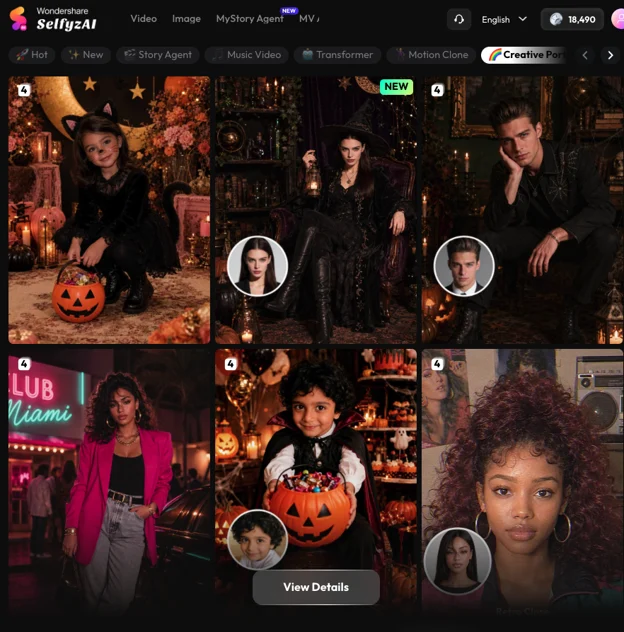
Quick verdict
SelfyzAI is the AI creation platform I recommend when someone asks me for one account that covers images, short videos, and story-style videos — and, crucially, keeps up when new models drop.
Its strongest habit is speed of adoption. When a new image or video model becomes available, Selfyz tends to add it to the picker quickly, with a “New” tag, rather than leaving users waiting for a quarterly update. Its weakest habit is pricing transparency in practice: a subscription does not mean unlimited everything, and you need to understand credits before you commit.
If you only need one image model and you generate twice a month, this is probably more tool than you need. If you make social content weekly and you care about trying the newest model in the same week it matters, that’s exactly where Selfyz earns its place.
Review scorecard
| Dimension | My rating | One-line note |
| New-model speed | 4.5 / 5 | Vidu Q4 and Nano Banana 2.1 appeared in the pickers promptly after their releases; Kling 4.0 was already in internal testing before its public rollout |
| Templates and effects | 4.5 / 5 | Large trending-effects library; viral formats like hotel lobby and seasonal Halloween templates save real setup time |
| Ease of use | 4.5 / 5 | One workspace for image, video, and agents; model picker can overwhelm first-timers |
| Output quality | 4 / 5 | Strong for short social clips and portraits; face consistency still needs careful prompts |
| Value for money | 4 / 5 | Fair monthly pricing, but credits are a second cost layer — read the pricing page carefully |
| Agent workflows | 4.5 / 5 | Story and MV agents turn a photo or a song into a structured video, not just a single clip |
Ratings are my personal judgement, not an aggregate score. Model availability was checked in the Selfyz pickers in October 2026 and changes frequently.
Good fit if you:
- Post AI images or videos weekly and want new models without switching tools
- Like starting from a template or trending effect, then customising it
- Want to turn personal photos into a short story video or a music video
What stands out: new models, fast
This is the point I keep coming back to, because it’s the difference between a platform that feels current and one that feels like last quarter’s demo.
In October 2026, the pattern was clear in the pickers I checked: Vidu Q4 showed up in the image-to-video picker marked “New,” and Nano Banana 2.1 arrived in the image picker on October 9, shortly after its public release — with its strengths in text-image composition, subject consistency, and fast understanding, according to Selfyz’s own product-team testing notes. Kling 4.0 is the other name in this story: Selfyz had already secured internal testing access during its preview phase, which is why I watch this platform first when a Kling update lands, even though public picker availability for any single model can lag its announcement by days.
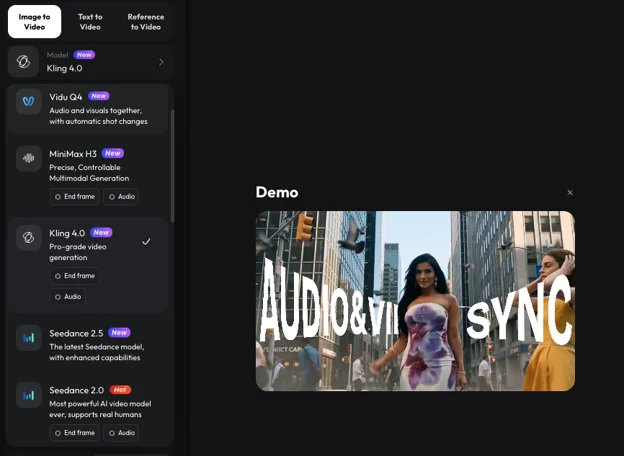
Why does that speed matter in practice? Because trending formats move in days, not months. If a new model is meaningfully better at faces, motion, or text rendering, the creators who can try it in week one have an advantage over those still waiting for their usual tool to add it in month two. Selfyz’s model list — spanning Kling, Seedance, Veo, Vidu, Hailuo, MiniMax, and its own SelfyzAI model on video, plus GPT Image, Nano Banana, and Seedream families on images — is unusually broad for a single subscription, and that breadth is the point: you test the new model in the same account where your old prompts already live.
One correction to a common misunderstanding: a long model list is not the same as every model being best for every job. Vidu Q4, Seedance, Kling, and Veo behave differently on motion, faces, and style. The smart workflow is to test the same prompt on two models with a cheap pass, then commit credits to the winner — not to assume the newest name wins automatically.
Templates: the part busy creators will actually use
Model speed gets headlines, but templates are what save time on a deadline.
Selfyz ships a large library of trending AI effects and templates — the platform describes it as 1,000+ trending effects — and the practical value is that viral formats arrive as starting points, not as tutorials you have to rebuild. The hotel lobby trend is the recent example everyone recognises: a polished, cinematic walk-through style that spread across social feeds, available as a template you can adapt with your own photo rather than prompting from scratch. With Halloween approaching, the same logic applies to seasonal templates: instead of writing a long prompt for a haunted portrait or a costume transformation, you start from a Halloween template, swap in your own image, and adjust the details.
That matters for two reasons. First, templates encode prompt knowledge — lighting, camera, pacing — that a beginner wouldn’t write on day one. Second, they make results more repeatable. A template that worked for one photo is a much better starting point for the next five than a brand-new prompt each time.
The limit is real, though: a template is a starting point, not a finished personal style. If you use the most popular template unchanged, your output will look like everyone else’s. Change the subject, the lighting, or the pacing, and it becomes yours.
Agents: from a clip to a story
Beyond single image and video generation, Selfyz offers agent-style workflows, and this is where it differs most from a simple “type a prompt, get a clip” tool.
The Selfyz AI MV Agent workflow family — including MyStory-style story videos and music-video agents — is built for a different job: turning personal material into a structured short video. A MyStory video can run roughly 15–90 seconds in vertical, horizontal, or square formats, while an MV workflow takes a song (roughly 15–160 seconds), analyses lyrics and mood, builds a storyline and consistent characters, generates scenes, and syncs them to the track, with per-scene regeneration if one shot misses.
In plain terms: single generation gives you a clip; an agent gives you a sequence with a beginning, middle, and end. For a birthday story, a travel recap, or a personal MV, that structure is the hard part — and it’s the part most single-prompt tools leave to you.
The honest downside: credits
Here’s the catch I’d want in any honest review: a subscription is not unlimited everything.
Selfyz’s paid plans (Pro at $12.99/month and Max at $25.99/month as of the pricing page I checked, with a discounted annual Max option) include monthly credits and, on paid tiers, watermark-free downloads and up to 4K export. But generations across most third-party models still consume credits, the cost varies by model, length, and resolution, and purchases are non-refundable. Older user feedback about this platform has repeatedly flagged the same confusion — “unlimited” in marketing, credits in practice — and while the current pricing page is clearer than old app-store listings, you should still do the maths for your own volume before subscribing.
My rule: start with the smallest commitment that lets you test the models you actually care about, track how many credits a typical week costs you, and only then decide between monthly and annual.
Two smaller gripes: the model picker, with 15 options in image-to-video alone at my last check, can overwhelm a first-time user — a “recommended for beginners” default would help. And because models arrive and change so fast, any review — including this one — goes stale quickly. Treat model claims as “as of October 2026” and re-check the picker before you buy for a specific model.
Bottom line
SelfyzAI earns a recommendation from me for one specific reason: it combines fast new-model adoption, a deep template library for trends like hotel lobby and Halloween, and agent workflows that turn photos and songs into structured short videos — all in one account. The price is fair if you generate regularly, but only if you go in understanding credits.
If you try it, try it for a week with a real project — a Halloween set, a story video, a template remake — not just a single test image. That’s how you’ll know whether the model speed and templates are worth the credit maths for you.
FAQ
Is Kling 4.0 available on Selfyz right now?
Selfyz had internal testing access during Kling 4.0’s preview phase, and its track record with Vidu Q4 and Nano Banana 2.1 was prompt public-picker support. Because picker availability changes by mode and date, check the video picker on the official site for the current status rather than relying on a review’s date.
Do I need the most expensive plan for templates?
No — templates and effects are a platform feature, not a top-tier exclusive in the way I use them. The plan choice matters more for credits, parallel tasks, and export quality.
Can I cancel?
Subscriptions auto-renew and can be cancelled in account settings, remaining valid until the end of the paid period, per the official FAQ. Purchases themselves are non-refundable, so test before committing annually.