THE HORROR EMAIL: WHEN SITEGROUND DECIDED TO SHUT DOWN MY ENTIRE SITE DUE TO 20 LINES OF MALWARE CODE – AND THE 3 THINGS I LEARNED
 Do Son
When comparing the difference of a shared server to a private server configuration one thing that people never consider is the fact that on a shared host – your host CAN shut down your entire server for a number of reasons – this happened to me recently and I wanted to explain what happened and how this works if it were to happen to you.
Firstly I was on SiteGround – and I was using their ‘GrowBig’ package (the middle one). Now firstly I want to say I really like SiteGround – and this is not to disparage them in any way – in fact when speaking to clients I recommend SiteGround as a very good hosting option (along with VentraIP – which is an Australian based company).
But let’s get straight to the email:
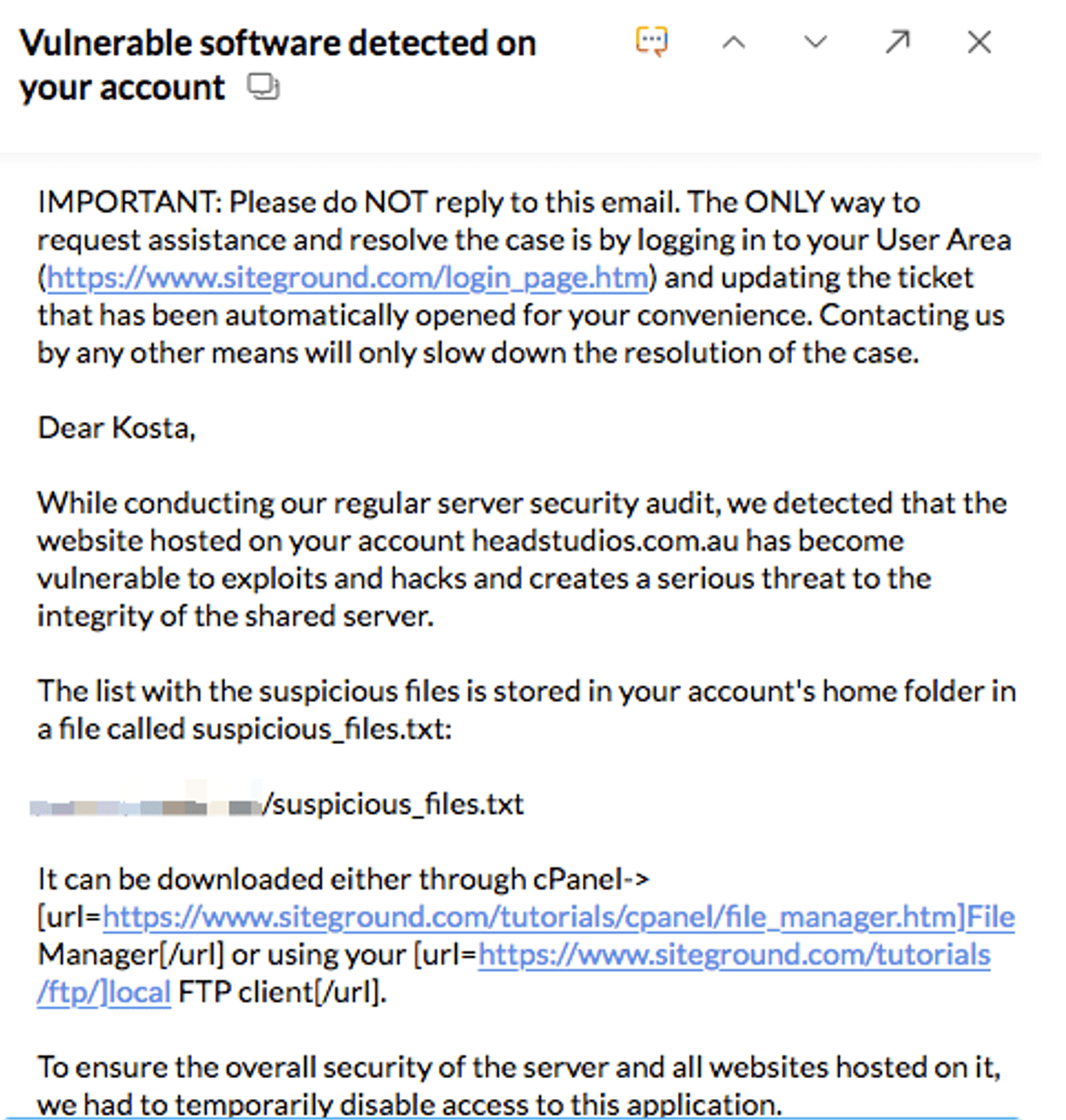
Now let me just make this very clear – when they say they have ‘temporarily disable access to this application’ – what they mean is they have shut down the entire server. And not just the particular application or website on which they have found these errors – but every single other website that was hosted on my shared server.
Yeah – it wasn’t fun. So here are the 5 Things I learned:
Lesson #1: No Call For You – Miss the Notification email and you’re toast
It was just lucky that I happened to be working that evening when this event happened and casually checked my emails. Now – let me be clear. I NEVER check my emails in the evening – generally speaking, I check them in the late morning (around 10:30 am) and late afternoon (about 4:00pm). This particular email came at 8:39 pm – if I didn’t check my email and started actioning this issue that evening – my entire site (not to mention the sites that rely on my hosting) – would have been down for the entire night and most of the morning!
Unfortunately there is no call – there is just an email – and if you miss it then you will be down for a long time – after all – how many people actually check if their websites are up on a regular basis.
Note: there is a tool called Pingdom that checks whether your site is up – however, the price for this starts at $42AUD a month – which is beyond my budget. One other tool I have found is called Uptime Robot – and these guys claim to check your site every 5 minutes. One thing I like about Pingdom is that if the site is down they send you an SMS rather than an email – so that you are notified immediately (since at the end of the day it’s easy to miss emails). It’s up to you if this expense is worth it. Pingdom includes 50 endpoints as part of their $42AUD monthly plan and there are discounts for yearly payments.
Lesson #2: Don’t Do Favors For Your Friends For Hosting
The reason this issue happened in the first place was because I had given a friend a free WordPress installation. They were starting a business and I had set them up with a quick site and some hosting space on my server – I knew they would most likely not get a whole ton of traffic.
However, the one thing I didn’t count on is that doing a friend a favor and giving them some storage space meant that really I would have to be responsible for updating their WordPress security plugins. Unfortunately – I did none of that. And whatever happened the majority of the viruses had popped up on my friend’s server. After I had given my friend access to their WordPress admin they were able to install any plugins they wanted – that along with the fact that WordPress was not updated automatically.
It didn’t make it better that I didn’t install a security plugin like WP Security Ninja or Wordfence.
Basically a recipe for disaster – one thing I’ve learned is never to do favors for my friends on my hosting space!
Lesson #3: Have a Security Audit Procedure – Even if it May slow down Your Site
So I have this belief about WordPress security – as an SEO guy – basically I would not sacrifice site speed for WordPress security – as I know how important site speed is in getting Google results – and I have personally seen the rankings climb for clients when site speed was improved.
One time – when I had an issue with speeding up a site on VentraIP hosting – after pulling my hair out about why this was happening and going back and forth with the support team I got this email:
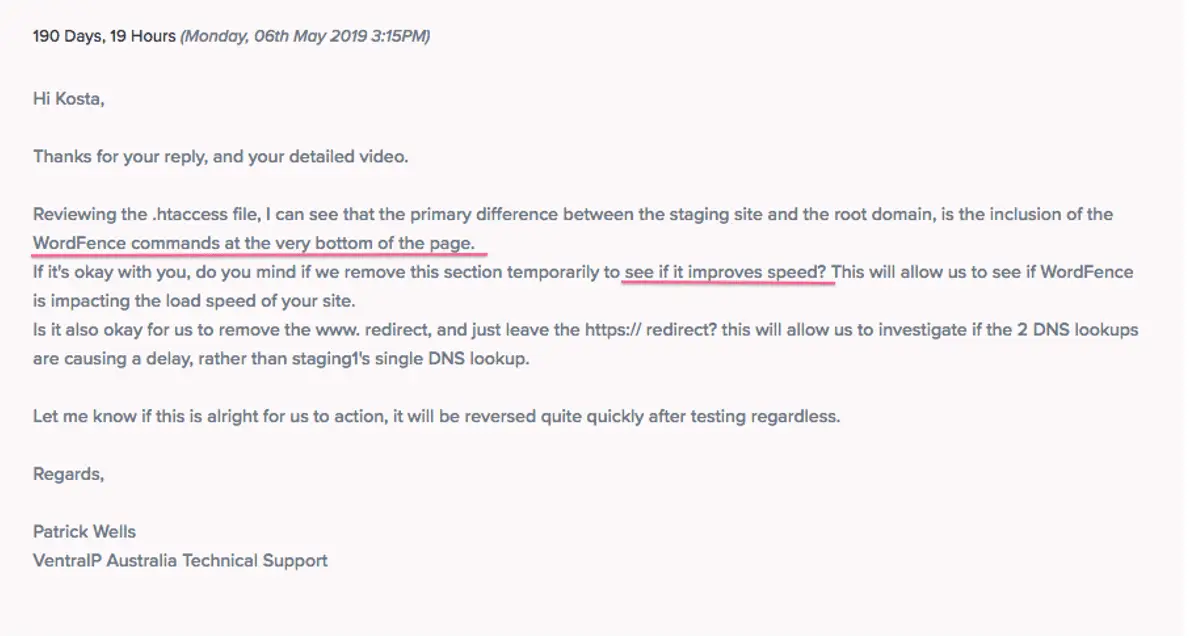
Yep – you see Wordfence (a WordPress security plugin) was adding certain commands to the htaccess file that was slowing down the site.
Suffice to say I moved away from Wordfence after that – simply put I didn’t know when they would add random htaccess commands – and if it meant that it would slow down my site I didn’t want it. The way I saw it – since VentraIP/SiteGround and most good hosts have a simple one-click restore option – where you can restore your site to any day in the previous 30 days – if there was ever an issue where the site would get compromised – I could simply do a backup of the files and all would be well – but I didn’t want to risk the possibility of the site slowing down.
My Plan Going Forward
From now on – I am looking at engaging with a security plugin that doesn’t slow down my site – or alternatively some software that can scan the files on my site (not a plugin) and identify any issues. My top options are WP Security Ninja or a full scanning solution like Sucuri that can scan my files and fix any issues as they occur.
Hope this helped you – and made you realize what can happen when viruses on your system aren’t cleaned up – yes – your entire server can get shut down! Luckily for me, I was able to quickly remove the offending code – however it could have been much worse and my site could have been down for a lot longer.
So make sure you protect and encrypt!
Has anything like this ever happened to you?
Author:
Kosta Kondratenko is a web developer working for his company Head Studios – https://www.headstudios.com.au. He is responsible for wordpress development in Sydney and is also an SEO expert. He has over 10 years of experience and loves to write blog posts about topics happening in his industry. He’s passionate about sharing his knowledge and helping others achieve their goals.