 Do Son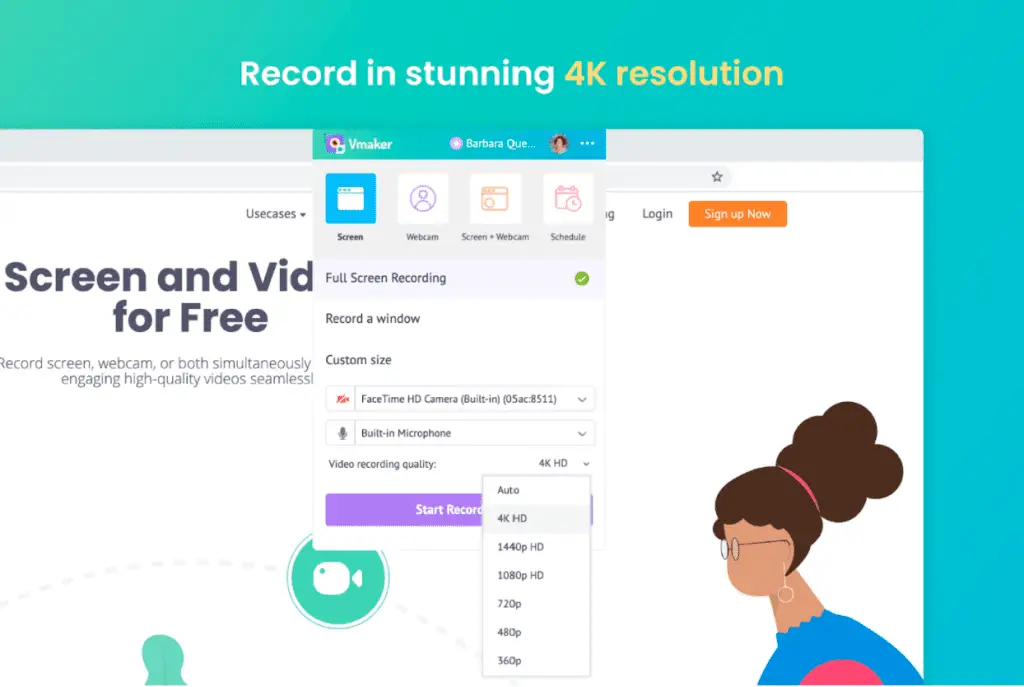
The best way of defining screen recording is “a video that shows what’s going on in your screen.” It’s that simple, but in spite of its plain appearance, screen recording videos are popular with many users. Reason? It facilitates communication. It makes it so easy to show others what you’re trying to say.
With growing popularity, screen recording tools have also upgraded themselves. Most of the advanced screen recording tools in the market today are armed with additional features that have made users’ life even easier.
In this article, we will be talking about one such tool, Vmaker. Vmaker is a free screen recording tool that is giving a tough fight to the veterans in the industry. It’s relatively new in the market, but the kind of features it offers to its users at a very attractive price point makes it a strong contender in the market.
Before we go deep in understanding Vmaker, let’s spend some time on its background.
The team behind Vmaker
Vmaker is built by pioneers in the video marketing industry. They are called Animaker, and recently they crossed the milestone of 12 million users. The inspiration behind Vmaker is to transform the way people communicate today. Synchronous communication is instant, but too much of it causes mental fatigue. With Vmaker, people will still get the feeling of video chatting with someone but in an asynchronous way. That’s why they use a very apt tagline — “video chat without a chat” for Vmaker.
Compatible devices
Vmaker screen recorder is compatible with both Mac and Windows OS.
Mac users, have to sign up on the Vmaker website. Then, download the Vmaker application, and follow simple instructions to complete the installation. Once they are done with that, they can log in and start using the app.
Here’s a video tutorial for reference:
Windows users can use Vmaker as a Google Chrome extension. The Vmaker team is working on the Windows application, and they will be rolling out very soon.
Adding Vmaker to your Google Chrome toolbar is the same as adding any other extension from the Chrome Web Store. If you’re not familiar with the process, then here goes the video on how to do that:
Who can use Vmaker
One word answer: Anyone
That’s true. Vmaker is made for everyone. You may be a YouTuber, Educator, Student, Gamer, Marketer or someone who is just sick and tired of the synchronous video chats.
What makes Vmaker a great tool is its user-friendliness. The interface is smooth and easy. You won’t find yourself spending a lot of time figuring out the options or buttons. So once you’re on board, you can kick start immediately.
What are the pricing plans
Vmaker is a free tool. However, it does offer paid plans for users who want to explore its more advanced features. It’s important to mention that the pricing plans are very judicious. So if you decide to go for their higher-tier plan, you don’t have to worry about burning a hole in your pocket.
Here are the pricing details of the paid plans –
Lite — $0
Starter — $7 billed annually
Team — $10 billed annually
Enterprise — Customized
For complete details, we recommend checking out their Pricing page.
What are the features of Vmaker

Vmaker is a powerhouse. In spite of its simple looks, its features make it a steal. It’s difficult to list down all the features of Vmaker, but here’s a compilation of the features that we found the best –
— Unlimited recording duration
— Unlimited recording storage
— Record only webcam or screen or both
— Choose dimension between complete screen, a specific window, or a customized area
— Record 4k quality video
— No watermark on the videos
— Use screen annotations to highlight areas
— Help your users track mouse movements with mouse emphasis feature
— Get noise-free recordings with the noise control option
— Add different frames to webcam view
— Edit videos with the in-built editor
— Share videos on social media from your dashboard
— Upload videos on YouTube after you’re done recording
— Create a custom domain name
— Schedule a recording so that it starts without even you being present
This is just a gist. There are many such features that you can explore yourself.
We recommend checking out their features page to get complete details.
Final note
Vmaker is a tool that shouldn’t be missed. Even if you’re not a big fan of using screen recordings, Vmaker can come in handy when you’re tired of recurring synchronous calls. Besides, the number of features it offers in its free plan is a perfect fit for anyone.
If you’re a regular user of screen recording tools, then we can’t stress enough on trying out Vmaker. This tool is an eye-opener. You might be paying a premium amount for getting access to the basic features in other tools, but Vmaker offers you, in fact, gives much more than that free of cost.
If this doesn’t sound convincing to you, we don’t know what will. For us, Vmaker is the tool to go for. Doesn’t matter if you’re a beginner or a Pro.