 Ddos
Ddos 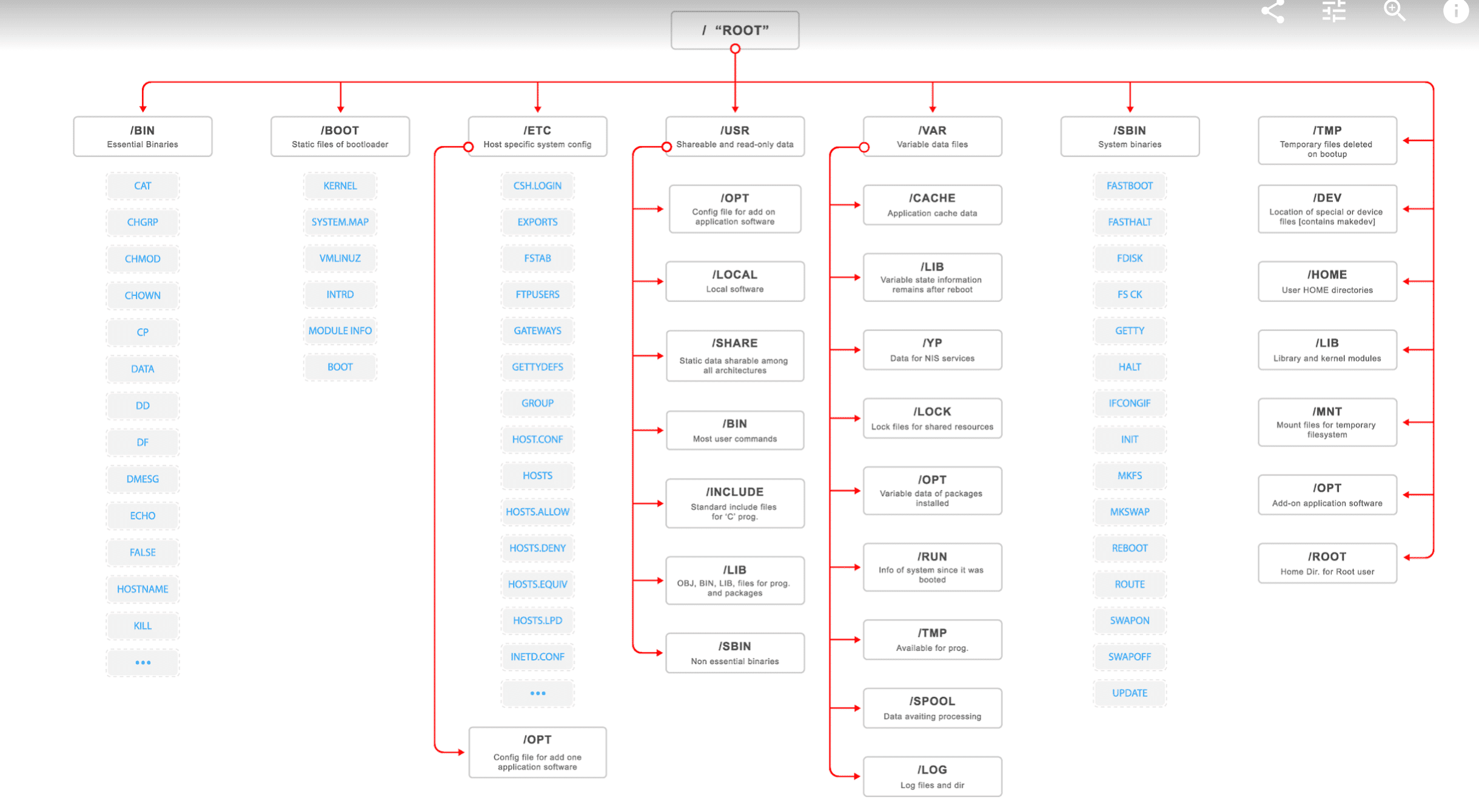
/
/ Is at the top of the Linux file system tree structure, it is the Linux file system entry, all the directory, files, equipment are in / below.
/bin
This directory stores the most commonly used commands of the system, the equivalent of DOS internal commands, but they are in the form of independent documents exist. For example: ls, cp, mkdir and other orders. The files in this directory are executable and are commands that ordinary users can use. As the system’s most basic commands are placed here.
/usr
The directory is where the system is stored, such as normal commands, help files, installed software, and so on. There are a lot of files and directories in this directory. When we install a Linux distribution official package, most of the installed here. When there is a configuration file that involves the server, the configuration file is installed in the /etc directory. /usr directory includes the font directory /usr/share/fonts, help directory /usr/share/man or /usr/share/doc and so on.
/var
The content of the directory is constantly changing, /var/log directory used to store the system log directory. The /var/www directory is used to define the Apache server site storage directory. /var/lib is used to store some library files.
/sbin
Most of the commands involved in system management are stored in the directory, it is super-privileged user root executable command storage, the general user does not have permission to execute the order of the order, all directory sbin contains the order is root authority implemented.
/root
Linux super privilege user (system administrator) root home directory.
/home
Ordinary users of the main directory are stored in the directory by default, such as: a user called ddos, then its home directory is /home/ddos, you can also use ~ddos.
/etc
The directory is the location of the system configuration file, some of the server’s configuration file is also here, such as: user account and password configuration files.
/boot
Linux kernel and boot system procedures required documents are stored in the directory, such as vmlinuz, initrd.img and other documents are located in this directory. In general, GRUB or LILO system boot manager in this directory.
/opt
The directory is optional package installation directory, some software package we can install it in the directory.
/tmp
The directory is used to store temporary files, sometimes when the user runs the program, it will produce some temporary files. /tmp is used to store temporary files. /var/tmp directory and the role of the directory is similar.
/lost + found
In the ext2 or ext3 file system, when the system accidental crash or machine accident shutdown, and some of the file fragments generated in the directory. When the system starts in the process the fsck tool will check here and fix the damaged file system. Sometimes a problem with the system, there are a lot of files to be moved to this directory, may be used to repair the manual way, or moved to the original location of the file.
/lib
This directory is used to store library files, which store the most basic shared library of the system, which acts like a .dll file in Windows. Almost all applications need to use these shared libraries.
/mnt
The directory is used to store the mount storage device mount directory, the system provides this directory is to allow users to temporarily mount other file systems, such as cdrom and other directories.
/proc
When the operating system is running, the process (running program) information and kernel information (such as cpu, hard disk partition, memory information, etc.) stored here. / Proc directory is disguised file system proc mount directory, proc is not a real file system. Therefore, this directory is a virtual directory, it is the system memory mapping, we can directly access the directory to obtain system information. In other words, the contents of this directory is not on the hard disk but in memory.
/misc
The directory can be used to store miscellaneous files or directories, that is, those files or directories whose uses or meaning is ambiguous can be stored in that directory.
/media
The mount point for the Plug and Play storage device is automatically created in that directory. Such as USB disk system automatically mount, will be in this directory to produce a directory; CDROM / DVD automatically mount, will also create a directory in this directory, similar to cdrom this directory. This directory is only available on the latest distribution.
/initrd
The kernel before the boot is compressed (this is related to ramdisk), when the system starts to extract, the directory is unzipped when the temporary directory, when the boot and then clear the directory.
/usr/man
This directory is the storage directory of the Linux system help documentation.
/proc/cpuinfo
Information about the processor, such as type, manufacturer, model, and performance. Such as cat /proc/cpuinfo
/proc/devices
A list of all the devices that are currently running by the kernel.
/proc/filesystems
The currently running kernel is configured for the file system.
/proc/dma
The current DMA channel is being used.
/proc/interrupts
The number of interrupts being used and how many interrupts were there.
/proc/ioports
The I/O port currently being used.
/etc/init.d
This directory is used to store the system or server in System V mode to start the script, which in the System V mode to start or initialize the system common. Such as RedHat Fedora.
/etc/xinetd.d
If the server is running through xinetd mode, its script should be placed in this directory. Some systems do not have this directory, such as Slackware, some old version did not. In Redhat Fedora in the relatively new version exists.
/etc/rc.d
This is the Slackware release in a directory, is the BSD way to start the script to store, such as the definition of network cards, server open scripts.
/etc/x11
Is the X-Window related configuration file storage.
/usr/bin
This directory is the executable program directory, ordinary users have the authority to implement. When we install a program from the system’s own package, most of his executable files will be placed in this directory. A similar directory is the /usr/local/bin directory. Sometimes /usr/bin in the file is /usr/local/bin link file.
/usr/sbin
This directory is also a directory of executable programs, but mostly stores commands that involve system administration. Only root privileges can be executed, the similar directory is /sbin or /usr/local/sbin or /usr/X11R6/sbin and so on.
/usr/local
This directory is generally used to store the user self-compiled software installation directory. Usually through the source package installed software, if not specified in the installation directory, it is generally installed in this directory.
/usr/lib
The directory and the /lib directory are similar to the repository directory of the library file. Store some commonly used shared libraries.
/usr/share
The directory used to store the system shared things, such as /usr/share/fonts is the font directory, is the user are shared.
/usr/share/doc
This directory is the place where Linux is shared.
/usr/share/man
The directory is where the shared help file is stored.
/usr/src
The directory is the kernel source code storage, the following kernel source directory, such as linux, linux-2.xxx.xx directory. Some systems will also install some source code packages here, such as Redhat Fedora. In addition Redhat 4.0 / 5.0, its kernel source package directory is located in /usr/src/kernels directory under a directory (only installed after the corresponding directory).
/var/adm
Such as package installation information, log, management information, etc. stored in the directory, in the Slackware operating system is the directory. There seems to be no in Fedora.
/var/log
This directory is used to store system logs.
/var/spool
Printers, mail, proxy servers and other spool directory stored in the directory.
Install one of these Linux photo editors to work with Linux directory structure and practice with commands.
Support Our Threat Intelligence
If you find our CVE report and cybersecurity news helpful, consider supporting our work.
 Buy Me a Coffee
PayPal
Buy Me a Coffee
PayPal
