 Do Son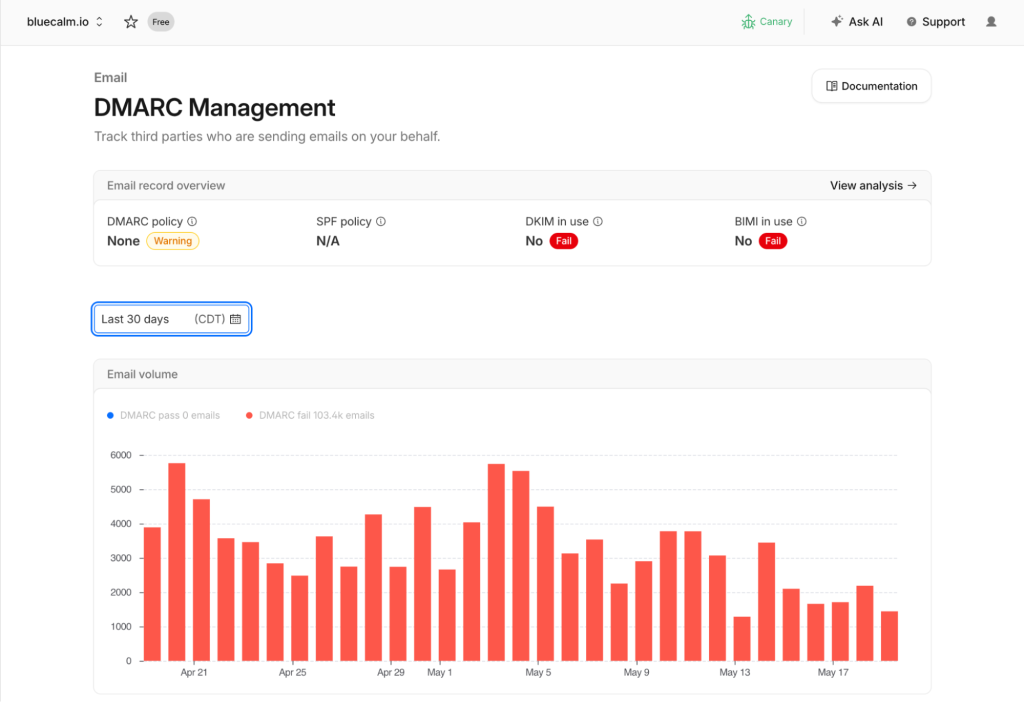
Image: CloudFlare
Network service provider Cloudflare recently announced a major milestone. Their highly anticipated DMARC Management feature has officially reached General Availability (GA). Therefore, this robust tool is now fully ready for production environments. Concurrently, Cloudflare significantly enhanced the overall user experience. They introduced a completely redesigned and intuitive interface. This elegant upgrade empowers users to effortlessly implement comprehensive DMARC enforcement policies. Consequently, custom domain owners can reliably prevent their outbound emails from landing in spam folders. Receiving email providers will no longer unjustly reject these authenticated messages.
Why DMARC Is Increasingly Crucial
DMARC serves as a vital email authentication protocol. It works seamlessly alongside established SPF and DKIM frameworks. Together, these protocols effectively prevent malicious actors from using your domain for phishing and spoofing attacks. Recently, major email service providers like Google and Microsoft tightened their internal verification requirements. If a sending domain lacks proper DMARC configuration, legitimate emails face severe consequences. The system might flag them as spam or reject them entirely.
Cloudflare firmly believes that every internet domain deserves robust email authentication protection. Therefore, the company offers DMARC management completely free of charge to all users. You do not need to purchase expensive additional services. Furthermore, you can avoid hiring specialized network consultants to deploy your DMARC authentication.
Key Highlights of the General Availability Update
The recent DMARC Management GA update introduces several powerful investigative tools. Users gain unparalleled visibility into essential reporting metrics. You can now intuitively inspect the DMARC, SPF, and DKIM alignment for every single sending source. Additionally, the dashboard displays specific Source IP addresses alongside the sending provider’s name. A convenient one-click integration routes you directly to the Cloudflare Investigate panel. There, you can instantly review crucial IP threat intelligence, geographical locations, and ASN details.
Unified Health Status and Intelligent Remediation
The updated interface provides a unified health status overview. It clearly displays passes, warnings, or failures for your SPF, DKIM, DMARC, and BIMI records. Moreover, the system offers crystal-clear remediation advice. It uses accessible language to guide users through error resolution, entirely avoiding confusing RFC terminology. The platform automatically detects DKIM key formatting errors and SPF record issues. It even provides proactive BIMI configuration recommendations.
Advanced SPF Auditing Tools
Strict SPF specifications limit single evaluations to a maximum of ten DNS queries. Exceeding this rigid limit inevitably causes evaluation failures. Fortunately, the new SPF auditing tool tracks every single query chain within your SPF records. This invaluable feature helps users easily identify nested include mechanisms. Consequently, you can optimize your configurations to remain safely below the strict DNS query limits.
How to Enable DMARC Management
To utilize this powerful feature, users must host their domains directly on Cloudflare. You must modify your domain’s DNS servers to point to Cloudflare’s provided infrastructure. Once the domain propagation completes, navigate to the domain console. From there, access the Email section and select DMARC Management. Simply follow the intuitive setup wizard to activate the feature. Subsequently, you can immediately begin receiving and analyzing comprehensive DMARC reports. Finally, Cloudflare promises to continuously expand this feature. Future updates will include deeper forensic reporting, smarter recommendations, and profound integrations with other advanced Cloudflare security products.
Support Our Threat Intelligence
Find our tech and OS security coverage helpful? Support our work today and unlock a 100% ad-free reading experience!
 Buy Me a Coffee
