 Do Son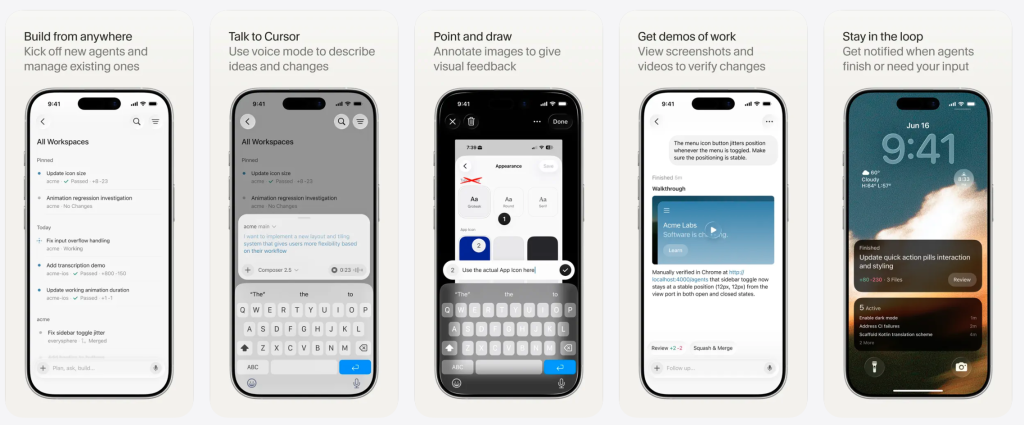
Recently, the AI-driven coding tool Cursor launched an iOS beta version. Fundamentally, this mobile application solves a major problem for developers. Previously, programmers had to carry their laptops everywhere to remain available. Now, the app connects remotely to development machines effortlessly. Thus, users can issue tasks, monitor progress, and merge code directly from their phones. You can download the Cursor iOS app to experience this unprecedented freedom.
Core Features of the Application
Launch Smart Agents Instantly
First, developers can select a repository and launch agents directly on iOS. Furthermore, the application supports cutting-edge models and voice dictation. Consequently, users can guide task directions easily using simple slash commands.
Remote Control for Local Machines
Second, the remote control feature empowers users to command multiple agents running on their computers. To ensure a stable connection, developers should activate the keep awake setting on their PCs. Therefore, the system avoids automatic sleep mode interruptions.
Seamless Cloud Collaboration
Finally, cloud agents operate within isolated virtual machines. Specifically, these virtual environments feature complete development setups. As a result, they support asynchronous, long-term iterations and generate ready-to-merge pull requests.
Practical Workflow Scenarios
Currently, the Cursor team uses this remote control feature to create highly efficient workflows. For example, a developer might receive a critical alert during lunch. Immediately, they can launch an agent to investigate the issue and draft a fix. By the time they return to their desk, the problem is already solved. Alternatively, a client might report a software defect. Then, the developer can reproduce the bug on their phone, review the code, and push an update. Additionally, users can capture screenshots of UI feedback on social media. Afterward, they send these images to the agent as context for quick design changes.
Tracking Progress and Future Updates
Once an agent starts, the user can walk away without waiting for a response. Conveniently, the app utilizes iOS Live Activities and push notifications to display task progress. Specifically, it alerts you when tasks finish, require input, or need review. Moreover, cloud agents generate helpful demonstrations, screenshots, and system logs. Consequently, developers can verify results immediately and merge changes within the app. In the future, the team plans to eliminate minor differences between cloud and local operations. Soon, the app will also support simple chats without requiring a specific code repository.
Support Our Threat Intelligence
Find our threat intelligence and malware analysis helpful? Support our work today and unlock a 100% ad-free reading experience!
 Buy Me a Coffee
