 Do Son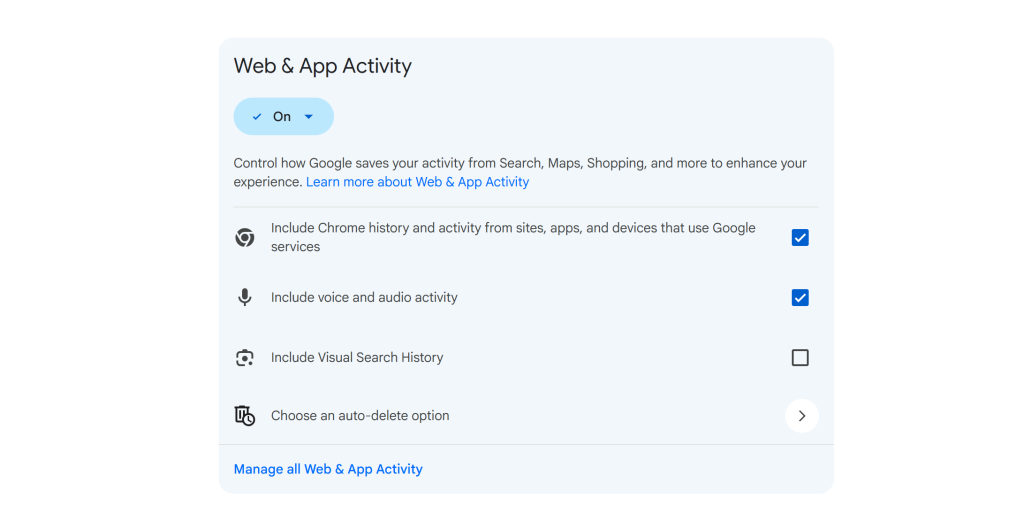
Back in May, Google changed how Search handles your uploads. To train AI models and improve the experience, Google Search now collects the files and media you submit during a search. It saves them to your search history. The change drew little attention at the time. Now, however, Google has begun showing pop-up notices about it on Android. For example, when you use Circle to Search, a notice warns that the screenshot content will be saved.
Google’s Pop-Up States the Data Trains AI
The pop-up is direct about the purpose. In short, it says your Search Services History now saves media. Files, images, or audio from your interactions with Search services are now kept alongside that history. Google uses them to improve the Search experience for you and for everyone. Crucially, the notice adds that this includes training AI models.
Which Services Are Covered
The Search services span a wide range. They include Google Search, Maps search, Shopping search, Flights search, Translate, and Google News. You can disable saved media at any time in your Google account privacy settings. You can also turn off saving all history. On its help pages, Google says it collects this data mainly to improve Google for everyone. The company plans to use the collected data to train AI models, and it will keep that data for up to four years.
How to View and Turn Off Saved Media
You can manage this through the Google Search services settings page at myactivity.google.com/search-services/settings. There, you can see every service currently turned on for your account. When Search Services History is on, you will find the “Save Media” option. Simply uncheck “Save Media” to stop it. After that, Google will no longer save your uploads or use them to train AI models.
Review and Delete What’s Already Saved
The same page lets you review what Google has already stored. Click the option to view and delete saved history to manage it. On the sub-page, the delete button lets you clear your current saved search records. Other controls live here too. For instance, you can disable personalized ads and turn off Search personalization. For a full walkthrough, 9to5Google published a clear step-by-step guide.
Why This Is Worth Checking
This setting is on by default, so it deserves a look. If you use Circle to Search, Lens, or voice queries often, Google now holds a growing archive of your images and audio. Deleting your history does not undo training already done, though. So the sooner you adjust the setting, the better. The choice, in the end, is yours to make.
Support Our Threat Intelligence
Find our tech and OS security coverage helpful? Support our work today and unlock a 100% ad-free reading experience!
 Buy Me a Coffee
