• About WordPress
    • WordPress.org
    • Documentation
    • Learn WordPress
    • Support
    • Feedback
Skip to content
May 26, 2026
  • Linkedin
  • Twitter
  • Facebook
  • Youtube

Daily CyberSecurity

Zero-hour alerts. Unmatched analysis.

Primary Menu
  • Home
  • CVE Watchtower
  • Cyber Criminals
  • Data Leak
  • Linux
  • Malware
  • Vulnerability
  • Submit Press Release
  • Vulnerability Report
Light/Dark Button
  • Home
  • Technique
  • LogCatTool | Android Log Analysis Tool
  • Technique

LogCatTool | Android Log Analysis Tool

Ddos June 8, 2017 4 minutes read
logcat

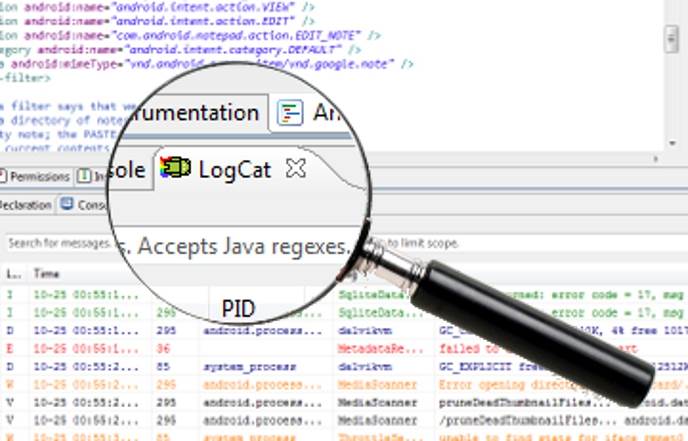
Android common development tools Eclipse and Android Studio itself comes with a log view tool LogCat, the general use of basic meet the requirements. However, if the depth of the development of Android in the long term, will find their own tool content buffer is limited, will result in the loss of historical data, and can not be information filtering and log header automatic extraction classification.

In order to solve these problems, and therefore developed this software, the software not only solve the above problems, but also to support the log file offline analysis and export backup, support for log content horizontal filtering and vertical filtering, and through the ADB tool straight Even the physical equipment for log monitoring and analysis, without relying on development tools. In addition, the software for the complete self-development, the latter if the new functional requirements can be very convenient for functional expansion and maintenance.

Introduction to features

  1. On the left of the filter for the header header filter bar, when the log file will automatically identify;
  2. The log content will automatically show different colors according to the print level to distinguish;
  3. You can set the upper right corner of the log level to filter out more than equal to the level of print information;
  4. Through the search box in the upper search log content, search rules: any string, case insensitive;
  5. You can set the time and time of the filter to filter out all the log information in the time range;
  6. You can set the information filter switch to select whether to display the corresponding information;
  7. Through the toolbar in the mode switch button in the “offline view mode” and “real-time terminal mode” to switch between;
  8. Through the toolbar ADB connection button, the ADB device scanning, connection, disconnect and other operations;
  9. The bottom of the software shows the status of the current work, such as: working mode, ADB device status, the current open log file path;
  10. When you exit the real-time terminal mode, you can export the log cache file;
  11. You can configure the path of the external ADB tool in the software settings;
  12. After the contents of the log analysis, can provide: line number, time, level, PID process number, Tag, text information;
  13. In the real-time terminal mode, the ADB device can be automatically re-connected 3 times after the device is disconnected or lost, and the contents of the log are automatically restored. If the ADB device fails, the ADB environment will exit.
  14. You can preview the complete information of the tag by moving the mouse over an item in the Tag list bar;
  15. The file loading process has a progress bar prompt;
  16. The file can be opened quickly by the recently opened file option in the menu bar;
  17. You can quickly jump to the specified line via the shortcut key “Ctrl + G” or the corresponding icon in the toolbar;
  18. Support the preservation of the software’s global configuration attributes and important data to the configuration file, until the next time the software starts to restore the last operating environment; if the file does not exist, it will automatically generate the configuration file;
  19. Supports backup and import of software configuration files;
  20. Support shortcuts Ctrl + C copy the currently selected log content;
  21. Support process filter, that is only show the process associated with the selected log information;
  22. Support the use of the software on a computer with an encryption policy;
  23. [Note] real-time terminal mode, each time only continuous real-time monitoring 1 hour, more than the time due to the log file is too large, resulting in a relatively long analysis time, can not achieve real-time display effect; but the background is still the log output to Cache file, you can wait for the implementation of the file after the export can be analyzed offline.

Share this article:

Facebook Post LinkedIn Telegram

Related posts:

  1. “Pig Butchering” Scam: Cybercriminals Prey on Mobile Trading Enthusiasts
  2. Google’s Antitrust Showdown: DOJ Demands Chrome Separation, Android Reforms
  3. Nextcloud vs. Google: Fight Over Android File Access Permissions
  4. ChromeOS Isn’t Dying: Google Clarifies Android Integration for Enhanced Laptop Experience
  5. The Hacker’s Dream: NexPhone Debuts with Triple-OS Boot and 2036 Support
Tags: android logcat

Search

Translation

CVE WATCHTOWER
🚨

Receive alerts for vulnerabilities being exploited in the wild.

⚑

Get notified instantly when a Proof of Concept (PoC) exploit is published.

πŸ”

Access critical info on vulnerabilities even when marked as "RESERVED".

🧠

Insights powered by decades of expertise and global intelligence sources.

🎯

Customize alerts with up to 10 keywords for your specific tech stack.

πŸ“Š

Export the raw CVE database for SIEM integration and reporting.

Upgrade Package

πŸ”΄ Live Critical Threats

  • CVE-2026-7374CVSS 9.9
    A flaw was found in KubeVirt's virt-handler component. This vulnerability allows an...
  • CVE-2026-45247CVSS 9.8
    Mirasvit Full Page Cache Warmer for Magento 2 before version 1.11.12 contains...
  • CVE-2026-9543CVSS 9.8
    A vulnerability has been found in Totolink N300RH 6.1c.1353_B20190305. Affected is the...
  • CVE-2026-42773CVSS 9.3
    Improper Neutralization of Special Elements used in an SQL Command ('SQL Injection')...
  • CVE-2026-42774CVSS 9.3
    Improper Neutralization of Special Elements used in an SQL Command ('SQL Injection')...
  • CVE-2026-9478CVSS 9.8
    A weakness has been identified in Totolink A8000RU 7.1cu.643_b20200521. Impacted is the...
  • CVE-2026-9477CVSS 9.8
    A security flaw has been discovered in Totolink A8000RU 7.1cu.643_b20200521. This issue...
  • CVE-2026-9476CVSS 9.8
    A vulnerability was identified in Totolink A8000RU 7.1cu.643_b20200521. This vulnerability affects the...
  • CVE-2026-9475CVSS 9.8
    A vulnerability was determined in Totolink A8000RU 7.1cu.643_b20200521. This affects the function...
  • CVE-2026-9458CVSS 9.8
    A vulnerability was identified in Totolink A8000RU 7.1cu.643_b20200521. The impacted element is...
Powered by CVE WATCHTOWER

Recent Zero-Day Vulnerabilities

  • Exploited in the Wild: Critical OWA Spoofing Flaw (CVE-2026-42897) Hits On-Premises Exchange Servers
  • Exploited in the Wild: Maximum CVSS 10 SD-WAN Flaw (CVE-2026-20182) Grants Admin Control
  • Exploited in the Wild: Critical 9.8 CVSS RCE Hits Canon GUARDIANWALL MailSuite
  • Exploit Code Released: Public PoC Dumps for Windows BitLocker Bypass and SYSTEM Elevation Zero-Days
  • Exploited in the Wild: “Dirty Frag” Linux Vulnerability Grants Instant Root Access
  • Under Active Attack: Ivanti EPMM Zero-Day Exploited in the Wild via Harvested Admin Credentials
Our Websites
  • Penetration Testing Tools
  • The Daily Information Technology
  • Daily CyberSecurity

    • About SecurityOnline.info
    • Advertise with us
    • Announcement
    • Contact
    • Contributor Register
    • Login
    • About SecurityOnline.info
    • Advertise on SecurityOnline.info
    • Contact Us

    When you purchase through links on our site, we may earn an affiliate commission. Here’s how it works

    • Disclaimer
    • Privacy Policy
    • DMCA NOTICE
    • Linkedin
    • Twitter
    • Facebook
    • Youtube
    Copyright Daily CyberSecurity Β© All rights reserved.