New Windows 11 Tools: Point-in-Time Restore & Network-Enabled Recovery Environment
 Do Son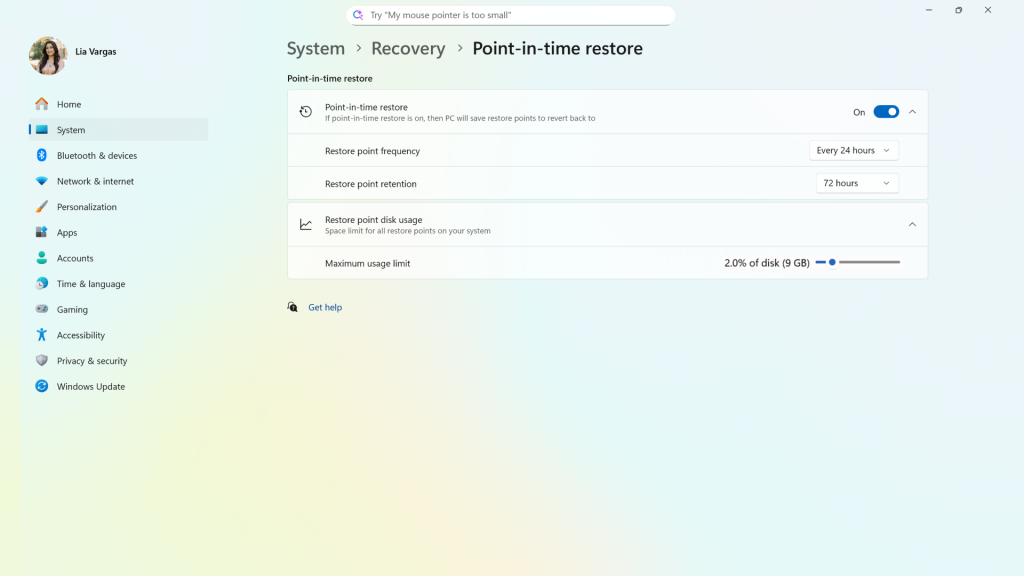
Microsoft has announced that Windows 11 will soon introduce an array of new recovery tools and capabilities designed to help users restore their systems to a functional state after catastrophic failures. The company outlined these enhancements, emphasizing that they will help keep PCs operational—or recover them even when updates or drivers cause the system to crash.
The first feature is Point-in-Time Restore, which allows users to roll their computers back to the exact state of an earlier moment. Microsoft notes that this feature should help resolve a wide range of issues, including those caused by faulty updates, problematic drivers, or configuration errors.
This feature will be enabled by default and will automatically capture a snapshot every 24 hours. After a crash, users will be able to restore directly from these snapshots within the WinRE environment. Each snapshot will persist for 72 hours. While similar in concept to the existing System Restore function, it is also distinctly different.
The second feature is network-enabled WinRE Recovery Environment support. Although WinRE technically already supports networking, it requires users to manually inject network drivers—an unrealistic expectation for many beginners. In the improved version, WinRE will automatically extract the necessary network drivers from the primary Windows installation.
This means that once users enter the WinRE recovery environment, they will be able to connect to the Internet without performing extra steps. Initial support will be limited to Ethernet, with WPA2/3 Wi-Fi connectivity to follow.
The third feature is Cloud Rebuild, aimed primarily at enterprises. IT administrators will be able to configure operating-system installation data so that all user data is preserved during reinstallation through the OneDrive for Business service.
Microsoft is also introducing a new capability for commercial display devices. This feature will automatically hide Windows error dialogs that appear on public-facing screens, ensuring that no error messages are exposed to viewers. Essential diagnostic and recovery messages will be displayed for only 15 seconds before disappearing automatically—unless a keyboard or mouse is connected to re-enable them.
Related Posts:
- Microsoft Fixes Task Manager That Wouldn’t Close in Windows 11
- Emergency Fix: Microsoft Rushes Patch for Critical Windows Recovery Bug
- Critical Windows Update KB5066835 Breaks Keyboards in Recovery Mode
- Get Early Access: Ubuntu Now Releasing Monthly Development Snapshots!
Support Our Threat Intelligence
Find our tech and OS security coverage helpful? Support our work today and unlock a 100% ad-free reading experience!
 Buy Me a Coffee
