The Zena Evolution: Linux Mint 22.3 Arrives with Cinnamon 6.6 and Kernel 6.14
 Do Son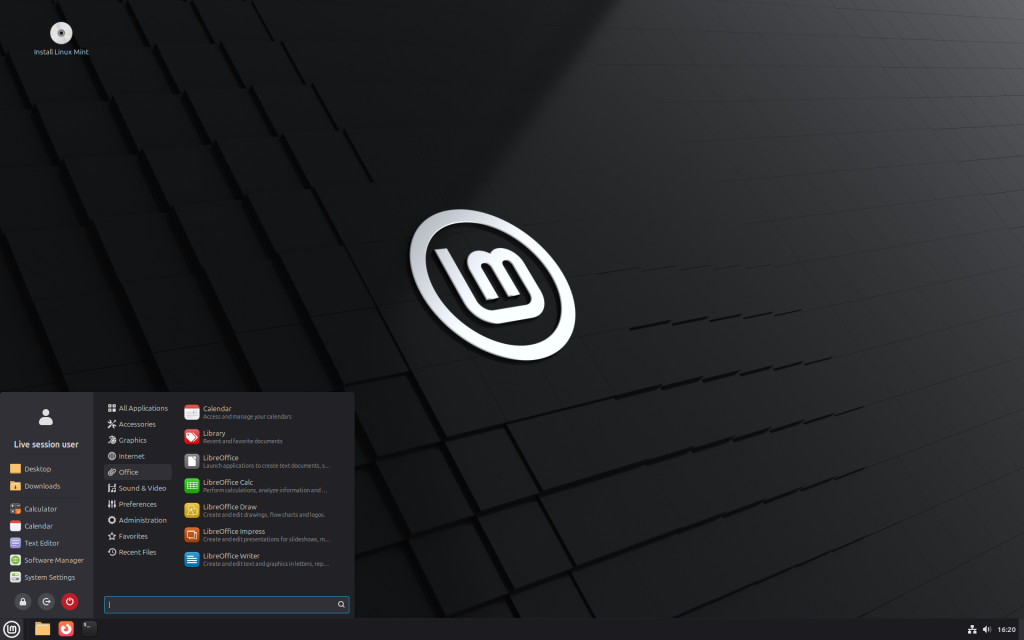
If you have long contemplated a transition to Linux Mint, the present moment offers a sublime opportunity to experience the system or perform an upgrade, following the debut of version 22.3, elegantly codenamed Zena. While maintaining its steadfast foundation upon Ubuntu 24.04 Noble, Mint 22.3 distinguishes itself with the integration of the refined Cinnamon 6.6 flagship environment, bolstered Wayland support, and a myriad of enhancements designed to enchant both the novice and the meticulous power user.
The release of Zena was formally proclaimed on Tuesday, although installation images appeared briefly beforehand. This update encompasses all three traditional editions—Cinnamon, MATE, and Xfce. In a move toward organizational elegance, the project has consolidated its documentation; rather than disparate pages for each variant, a singular, comprehensive repository now delineates new features and release notes, ensuring essential information remains centrally accessible.
Adhering to its heritage, Mint remains closely aligned with the Ubuntu Long Term Support (LTS) branch. However, the project has recalibrated its methodology regarding point releases: starting with version 22.0, Mint updates now incorporate more contemporary kernels and drivers directly from Ubuntu’s respective point releases. A significant practical consequence of this shift is that the specialized EDGE images are no longer requisite. Mint 22.3 is predicated upon Ubuntu 24.04.3, thereby inheriting Linux Kernel 6.14 from the Ubuntu 25.04 lineage.
Several advancements span the entirety of the Mint ecosystem. The venerable System Reports utility has been reimagined and rechristened as System Information, now featuring dedicated modules for USB peripherals, graphics adapters, PCI devices, and firmware details. Complementing this is the newly introduced System Administration tool, which facilitates a user-friendly interface for modifying bootloader parameters and menu configurations—a rare and welcome luxury for those accustomed to the rigors of manual boot configuration. Furthermore, a novel applet for Thunderbolt management has been introduced to streamline the identification and authorization of high-speed peripherals.
The system’s aesthetic cohesion has been reinforced with the introduction of XApp Symbolic Icons. This endeavor was born of necessity; as the GNOME project excised specific icons from the Adwaita theme deemed superfluous to its own goals, Mint faced potential visual inconsistencies. By developing its own suite of monochrome symbolic icons, Mint has effectively insulated itself from such external architectural shifts.
Native applications have likewise received subtle yet sophisticated polishes. Timeshift, the system’s sentinel for restoration snapshots, now possesses the ability to pause and resume operations. Mint Backup introduces an option to encompass hidden files within its archives, while Warpinator, the local file transfer utility, now embraces IPv6 and integrated text messaging. Hypnotix, the IPTV application, now surreptitiously conceals the cursor during full-screen playback, and the Update Manager provides a clear visual indicator when a system reboot is necessitated by recent installations.
As is customary, the zenith of innovation resides within the Cinnamon edition. Zena features Cinnamon 6.6.4, offering unparalleled ease of personalization. The application menu has become a paragon of flexibility: the sidebar can be extensively customized, labeled, or entirely sequestered, while menu categories can be rearranged at will. Taskbar icons now feature status badges to denote unread notifications, and the workspace switcher has been redesigned for clarity. For those utilizing fractional scaling, the interface now offers a choice between upward or downward scaling directions, alongside refined window management and “Night Light” controls.
A profound emphasis has been placed on internationalization, particularly for users of non-English locales. Previously, the Wayland session was largely restricted to American English layouts; however, this release significantly expands localization support. The system now demonstrates a sophisticated understanding of complex character sets and alternative input methods. Coupled with a new on-screen keyboard, Cinnamon is rapidly approaching a state of comprehensive readiness for daily productivity within Wayland.
The Nemo file manager has also undergone a meticulous evolution. File operations can now be paused and resumed, a template manager has been introduced, and search functionality now supports masks and regular expressions. While other editions remain faithful to their respective managers—Thunar for Xfce and Caja for MATE—Nemo’s excellence is such that it is frequently sought after by users of other distributions.
Ultimately, Linux Mint remains one of the most inviting and sophisticated gateways for those seeking a tranquil migration to Linux. For users already entrenched in any iteration of Mint 22, the transition to 22.3 is a logical and seamless progression. As more individuals contemplate a future beyond Windows 10, Mint presents itself as an exceedingly mature and hospitable sanctuary.
Related Posts:
Further reading
Support Our Threat Intelligence
Find our tech and OS security coverage helpful? Support our work today and unlock a 100% ad-free reading experience!
 Buy Me a Coffee
