 Do Son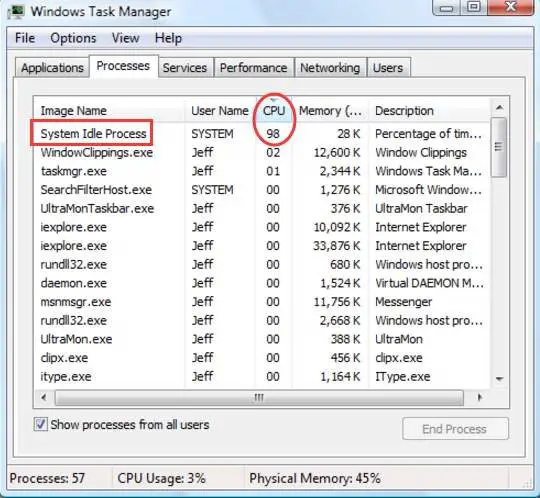
If you open up Task Manager, you’ll see a process called ‘System Idle Process.’ Chances are it’s using a lot of CPU. So what is System Idle Process, and why is it using so much CPU?
If you’re not doing much on your computer, you might see this particular process using up more than 90% of the CPU. You’d think that’s probably a problem, but it really isn’t.
You see, your computer has many processes running in the background that help Windows run the way it does. This process, together with dozens of others, does just that.
What is System Idle Process?
The System Idle Process runs when the computer doesn’t have much to do. It’s a process that basically idles, i.e., does nothing.
What does doing nothing mean? Well, your computer is a machine that has to do something even when you’re not really using its resources much. That’s when it runs this process and idles.
System Idle Process has the lowest priority. Any other program or process can takeover it and get the resources it needs to run.
Now, you’re probably thinking, why is it using so much CPU if it just idles? The CPU usage indicated in the Task Manager is basically the percentage of CPU that’s readily available. Therefore, when this idle process has 90% CPU usage, that only means that 90% of the CPU is available for other processes.
So technically, that 90% mark is actually a good thing. It’s an indication that your PC is available to run other programs such as games, tools, browsers, etc.
You won’t see it in the normal Task Manager on Windows 10, as Microsoft has removed it from that listing. There you’ll see the actual CPU usage. However, when you go into the details tab, you’ll be able to see this placeholder of a process.
Is System Idle Process Making My Computer Slow?
If your PC is running slow and you went to the Task Manager to see what’s going on, you’d think that System Idle Process is taking up a lot of CPU and perhaps making it slow.
Again, the CPU this process is taking up is actually available. Remember, this process has the least priority and is merely just a placeholder.
It’s the operating system’s responsibility to keep the processor busy, and it uses this process to do just that.
There could be other possible reasons for your computer to be slow. Most commonly, it’s the lack of memory. Sometimes it’s slow storage or a virus making the computer incredibly slow.
If the System Idle Process is not using much CPU, check which programs and processes are using a lot of resources. That should give you an indication as to which applications are making your computer slow.
Some applications like Adobe Illustrator, Google Chrome, and animated games take up a lot of memory, graphics memory, and CPU power. If you suffer a slow down when running these applications, it’s perhaps time to scale your resources.
Other Processes
When you see the Task Manager, you’ll also see some other crucial processes, just like System Idle Process:
rundll32.exe
You’ll also probably see a long list of Windows host process rundll32.exe in your Task Manager. If you’re familiar with DLL files, this process basically helps run those DLL files for applications by loading them into memory.
In case you don’t know what DLL files are, Dynamic Link Library or DLL contains application logic that applications share to run properly. You’ll see many of these filed in application folders.
It’s a normal process that typically does no harm. However, it’s also how malware hides in your system. Normally, this process’s directory is a C drive, so that’s one to ensure that the process running is legit rundll.exe.
svchost.exe
The service host process or svchost.exe has a similar purpose as the rundll.exe. It’s also evoked for running DLL files. The reason behind this is that there’s no way to launch a DLL file directly, so Windows must use a .exe file to, in turn, launch those DLL files.
So svchost.exe is basically just a generic host process for running those DLL files that software and games need on your PC.
You’ll see a lot of these processes bundled to create host groups. While all are interlinked, each group is dedicated to something specific.
Much like rundll32.exe and System Idle Process, you don’t really have to do anything about these service host processes. You should not terminate them, as these don’t use so many resources, to begin with.
Conclusion
System Idle Process or other background processes like svchost.exe, rundll32.exe, or Runtime Broker aren’t bad for the computer, rather a necessity. Even if they are using a lot of resources, they probably aren’t causing a slow down of the computer. Ending these processes could freeze your system or cause applications to stop or behave erratically.