 Do Son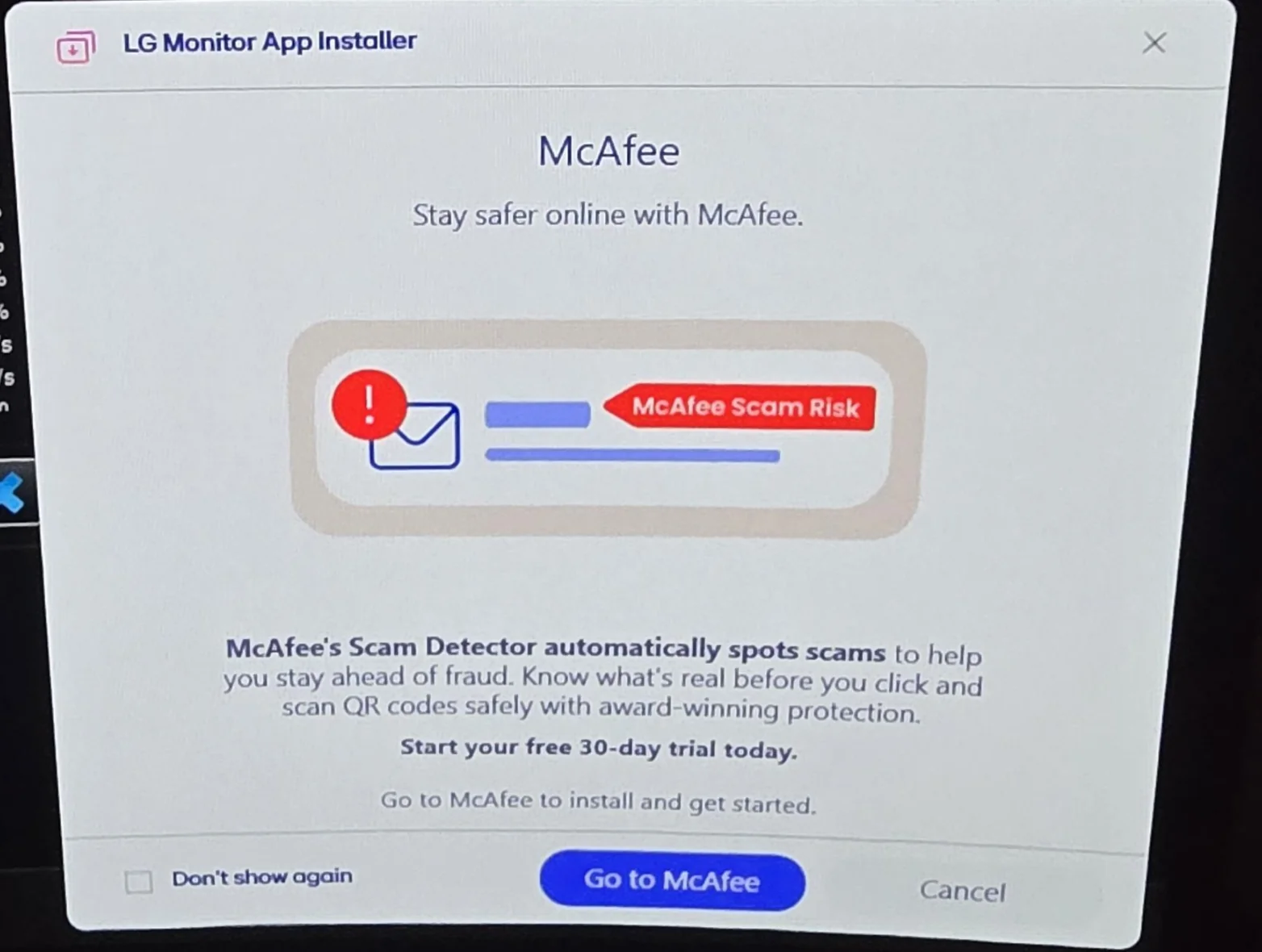
Image: Reddit
Hidden LG Monitor Adware Sparks Outrage
Typically, intrusive pop-up advertisements originate from pre-installed adware or deliberately downloaded junk software. However, modern users face a stealthier threat. Even premium, officially purchased monitors can harbor insidious backdoors. Consequently, these hardware giants exploit their customer base as a lucrative advertising revenue stream. For instance, recent investigations reveal a troubling trend concerning LG monitors. These devices silently download and install adware entirely without user consent. Subsequently, this covert software bombards the desktop with unwanted McAfee promotional pop-ups.
Installation Without User Consent
Consumers recently noticed perplexing McAfee pop-up advertisements plaguing their computers. Furthermore, these individuals had never actively installed any McAfee products. They also discovered no evidence of other malicious software. Consequently, meticulous troubleshooting traced these disturbances directly to newly acquired LG monitors.
The Stealthy Delivery Mechanism
Upon connecting an LG display, the operating system instantly identifies the specific monitor model. Subsequently, Windows automatically installs the requisite companion applications and foundational drivers. Unfortunately, LG deliberately embeds the adware payload directly within this legitimate companion application. Specifically, system event logs illuminate the automated sequence triggered after the monitor’s connection. The operating system utilizes the Microsoft Store and Windows Update functionalities to fetch a specific application. This covert program operates under the name “LG Monitor Application Installer.” Crucially, this seemingly innocuous application serves as the primary engine for generating the intrusive advertisements.
Widespread Community Backlash
Additionally, numerous Reddit users have reported experiencing this exact bloatware issue. In fact, all affected individuals shared one commonality: they were utilizing LG monitors. Effectively banning this deceptive practice by legitimate manufacturers remains highly difficult. Microsoft intentionally permits hardware manufacturers to submit firmware and drivers for seamless Windows 11 installation. For instance, supported ASUS motherboards routinely install the Armoury Crate utility automatically. However, camouflaging commands to download adware within these official installations represents an egregious breach of trust.
Persistent Software Resists Uninstallation
Meticulous troubleshooting revealed another deeply frustrating characteristic of this aggressive software. Although installed via the official Microsoft Store, the LG adware vehemently resists straightforward uninstallation. Fortunately, a practical workaround exists to neutralize this annoying issue.
Effective Strategies to Stop the Ads
Users must initially navigate to the Windows Settings menu. Next, they should access the Apps section and locate the intrusive LG pop-up program. Crucially, they must revoke its automatic startup permissions. Consequently, the adware program will remain dormant when the system initially boots. This decisive action effectively silences the relentless pop-up advertisements.
Advanced Mitigation Techniques
Alternatively, advanced users can implement strict modifications within the Windows Group Policy. This specific modification proactively prevents the system from automatically identifying devices and fetching companion apps. First, users should navigate to Group Policy, Computer Configuration, and Administrative Templates. Then, they must select the System folder, followed by Device Installation. Finally, they must actively enable the policy designed to prevent the automatic download of applications associated with metadata. Ultimately, connecting a new LG monitor will never again trigger the covert installation of related companion apps or adware.
Support Our Threat Intelligence
If you find our CVE report and cybersecurity news helpful, consider supporting our work.
 Buy Me a Coffee
PayPal
Buy Me a Coffee
PayPal

