Does Showing Seconds on Your Windows Clock Drain Battery? LTTLABS Puts Microsoft’s Claim to the Test!
 Ddos
Ddos 
Image: Windows Latest
Previously, Microsoft removed the option to display seconds in the Windows 10/11 time module, limiting users to a display format of year–month–day–hour–minute. The rationale, according to Microsoft, was that continuously calculating and redrawing the clock every second would increase power consumption and potentially degrade system performance.
However, due to persistent user demand for a more precise time display, Microsoft later introduced an optional setting: by default, seconds remain hidden, but users who require them can manually enable the feature in Settings, thereby accommodating a broader range of user preferences.
But does showing seconds truly impact power consumption and system performance? Considering that modern monitors refresh 20 to 30 times per second, updating the time display once per second shouldn’t, in theory, pose a significant issue. So why did Microsoft claim it affects performance?
The more likely explanation lies in the fact that updating the clock every second can prevent the CPU from entering low-power states or trigger more frequent compositor updates. While this reasoning is plausible, it naturally invites skepticism without empirical data. To put the theory to the test, LTTLABS conducted experiments on three different devices.
The test devices included a high-performance ASUS gaming laptop with a dedicated GPU, a standard ASUS laptop with integrated graphics, and a Microsoft Surface Laptop 7 powered by an ARM processor. The results are illustrated in the chart below:
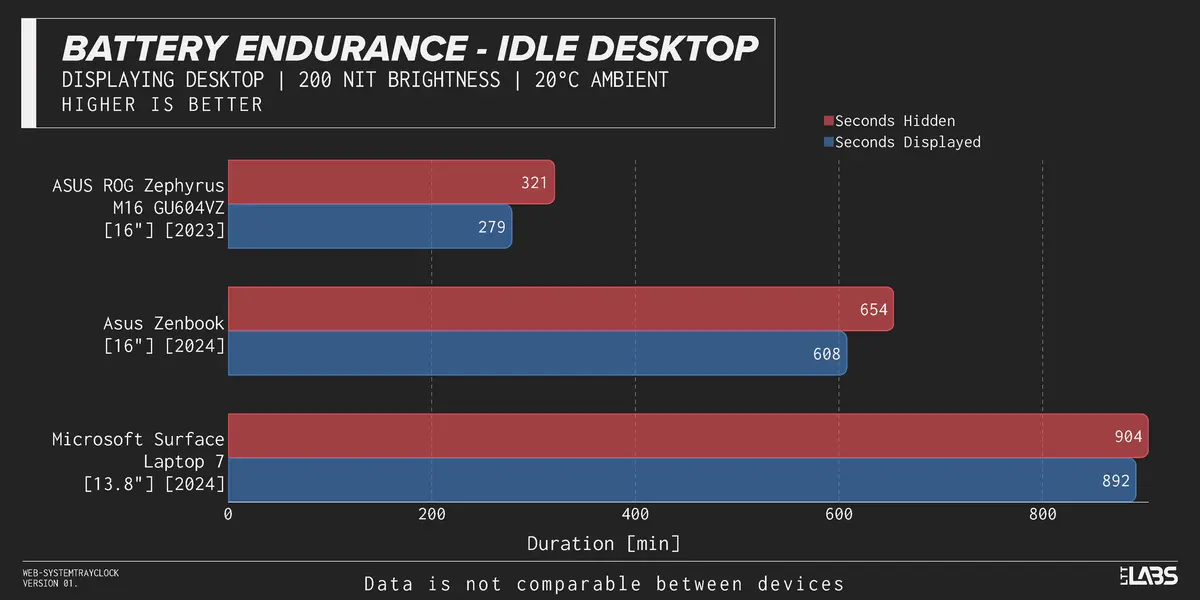
Blue bars represent battery life with seconds enabled, while red bars show battery life with seconds hidden. The data reveals that enabling seconds display led to a measurable drop in battery life across all three devices. The impact was most pronounced on the high-performance ASUS laptop, while the effect on the Surface Laptop 7 was minimal.
Specifically, the ASUS gaming laptop saw its battery life drop from 5 hours and 21 minutes to 4 hours and 39 minutes—a reduction of approximately 13%. The other two devices experienced only minor declines, with the Surface Laptop 7’s battery life decreasing by a mere 1.4%.
If you’re using a desktop computer, this issue is entirely irrelevant. If you primarily use a laptop in an office or home environment where power outlets are readily available, there’s no need to worry—feel free to enable seconds display.
However, if you’re taking your laptop on the go and expect to be without access to a power source for an extended period, it may be wise to disable the seconds display. Doing so could eke out a little extra battery life when you need it most.
Related Posts:
- Lenovo Smart Clock Essential’s SSH Hard-Coded Password Vulnerability
- Apple’s Secret “ACDC” Project: Building Its Own Cloud & Renting Servers with Custom Chips
- Researchers get phone information from phone battery
Support Our Threat Intelligence
If you find our CVE report and cybersecurity news helpful, consider supporting our work.
 Buy Me a Coffee
PayPal
Buy Me a Coffee
PayPal
