 Ddos
Ddos 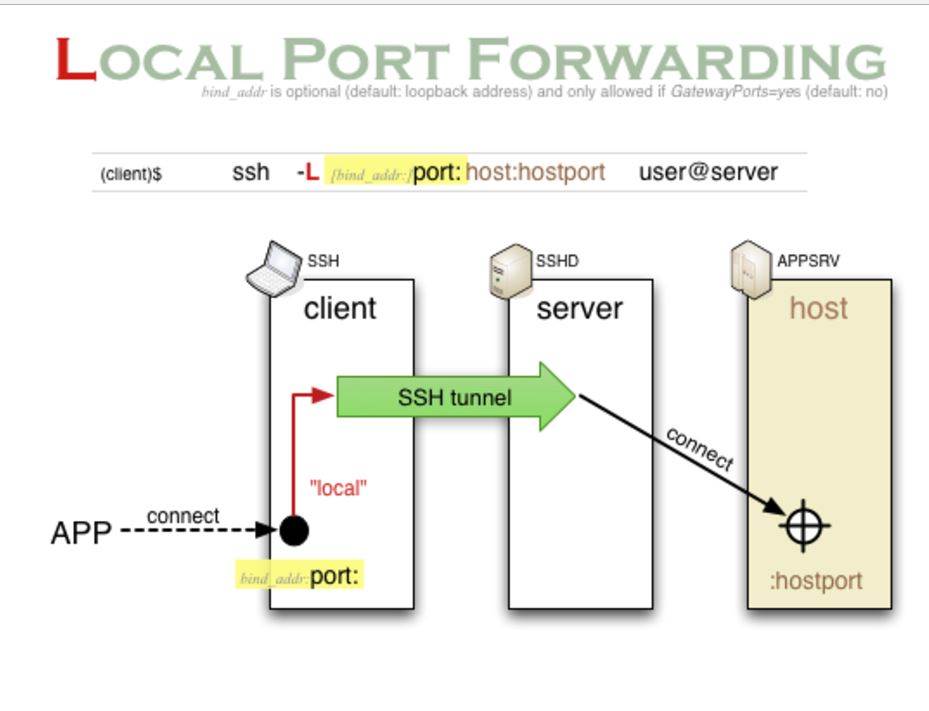
SSH automatically encrypts and decrypts the network data between all SSH clients and the server. This process is sometimes called “tunneling” (tunneling), because SSH for other TCP links to provide a secure channel for transmission and named. For example, Telnet, SMTP, LDAP these TCP applications can benefit from, to avoid the user name, password and privacy information in clear text transmission. At the same time, if the firewall in your work environment limits the use of some network ports, but allows SSH connections, then you can also forward the TCP port to use SSH to communicate.
SSH port forwarding can forward the network data of other TCP ports through SSH link, and automatically provide the corresponding encryption and decryption services.
There are four ways, namely, local forwarding, remote forwarding, dynamic forwarding, X protocol forwarding.
- Local Port Forwarding
SSH connection and application connection The two connections are in the same direction. Localhost parameters can be omitted. The default is 0: 0: 0: 0, but for security reasons, it is necessary to set the localhost parameter. ssh -L [<local host>:]<local port>:<remote host>:<remote port> <SSH hostname> Use 127.0.0.1 as the local listening port.One port of the local machine (client) is forwarded to the designated port of the remote designated machine; the local port forwarding is listening on a port on the localhost, and all the data accessing the port is transmitted to the remote port through ssh tunnel.as follows:
localhost: ssh -L 7001:localhost:7070 sisca@216.194.70.6
Before landing Localhost port Monitoring status:
After landing the localhost port listening status: After the remote host will not listen to the port. Summary: local port forwarding time, the local ssh monitor 7001 port. -
Remote Port Forwarding SSH connection and application connection The two connections are in the opposite directions -R [<local host>:]<local port>:<remote host>:<remote port> <SSH hostname>, localhost parameters can be omitted, the default is 0:0:0:0, for security must use 127.0 .0.1 as a local listening port.One port of the remote host (server) is forwarded to the designated port of the designated machine on the local side; the remote port forwarding is listening on one port on the remote host. All the data of the designated port of the remote server is transmitted to the local counterpart through the ssh tunnel port. as follows:
localhost: ssh -R 7001:localhost:7070 sisca@216.194.70.6
Before landing Localhost port Monitoring status:After landing the localhost port listening status:
Remote host port after listening Status:
Summary: the use of remote port forwarding, the localhost port monitoring and did not change, on the contrary, the remote host began to listen to our designated 7001 port. - Dynamic Port Forwarding
The remote ssh server as a secure proxy server ssh -D [<local host>:]<local port> <SSH hostname>, localhost parameters can be omitted, the default is 0:0:0:0, for security, must use 127.0.0.1 as a local listening port.The establishment of a dynamic SOCKS4 /5 proxy channel, followed by the local monitoring of the port number; dynamic port forwarding is to establish an ssh encrypted SOCKS4/5 proxy channel, any support SOCKS4/5 protocol procedures can use this encrypted Channel to the agent to visit, and now the most commonly used method is to over the wall. as follows:
localhost: ssh -D 7070 sisca@216.194.70.6Before landing Localhost port Monitoring status:
After landing the localhost port listening status:
Summary: When using dynamic port forwarding, the local host’s ssh process is listening on the specified 7070 port. - X Protocol Forwarding
The remote ssh server as a secure proxy server.
ssh -X <SSH hostname>
For example, we may often log on to Linux/Unix/Solaris/HP and other machines to do some development or maintenance, and often need to run some GUI programs, such as the graphical interface to install DB2/WebSphere and so on. This time there are usually two options to achieve: VNC or X window, let us look at the latter. A more common scenario is that our local machine is the Windows operating system, then you can choose to open source XMing as our XServer, and SSH Client can be arbitrarily selected, such as PuTTY, Cygwin can be configured to visit SSH at the same time to establish X forward.SSH port forwarding In addition to the above four representatives of the different working parameters of the parameters, there are some ancillary parameters:-C: compressed data transmission-N: Do not execute scripts or commands, usually associated with -f -f: background authentication user/password, usually used in conjunction with -N, do not have to log on to the remote host, if through other procedures to control the tunnel connection, should avoid the SSH client into the background, that is, remove the-f parameter.
-g: In the -L / -D / -R parameter, the remote host is allowed to connect to the established forwarding port. If this parameter is not added, only the local host is allowed to establish a connection.