 Do Son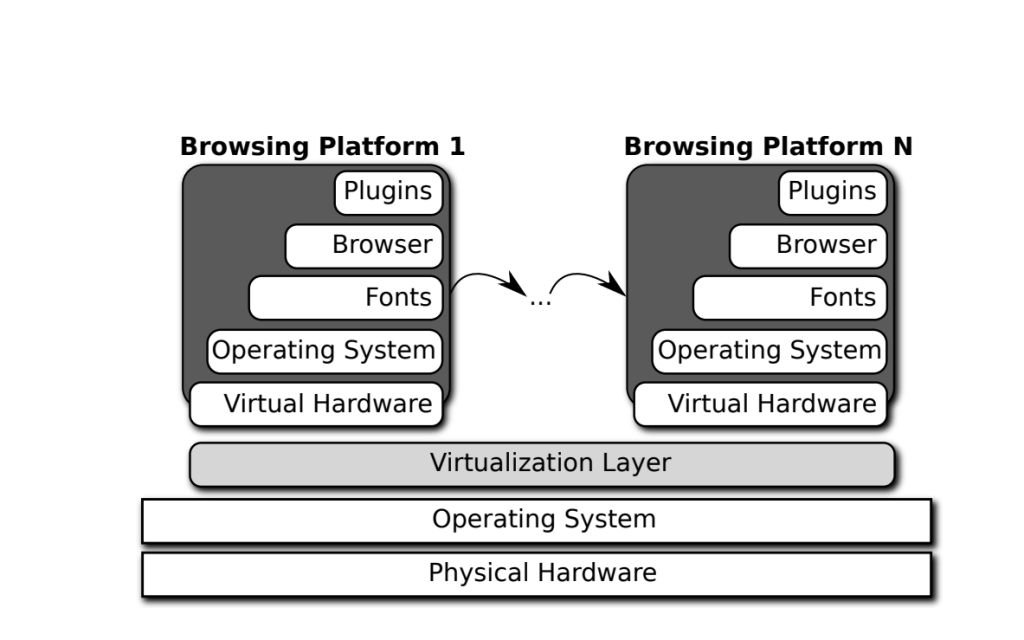
A multi-level view of browsing platforms. Virtualization isolates the user’s system
Browser Fingerprint Tracking is a way to track users over the past five years. In order to counter the browser’s fingerprint tracking behavior, anti-browser tracking technology is evolving. The market for fingerprint-protected browsers is booming. At the end of the year, a list of ant fingerprint browsers for the 2023 market appeared.
The anti-browser fingerprint tracking technology overview
The principle of browser fingerprint recognition is based on different browsing platform used by the hardware type, operating system, browser type, browser configuration is different, to build a unique browser fingerprint. This fingerprint has three characteristics can be used to track the user: First, the fingerprint of certainty, with a very low collision rate, at least from thousands of devices to identify a device; Second, the fingerprint of accessibility, Web pages, Web servers can easily get fingerprints. With the introduction of the browser to update the more powerful API, fingerprint tracking will become easier; Third, the stability of the fingerprint, the user first visit the page.
Anti-browser fingerprint tracking as long as the above three characteristics to break the fingerprint can be:
First, the certainty of fingerprints. To make the two browse the platform to produce exactly the same fingerprint, there is no effective way to find out;
Second, the vulnerability of fingerprints. You can use the browser’s various settings or plug-ins to slow down tracking, but this approach may affect the user experience, such as the inability to use cookies and JavaScript;
Third, the stability of the fingerprint. Dr. Pierre Laperdrix, a researcher at the University of INRIA Rennes in France, proposed a solution that could create a dynamic browsing platform that would give users a different fingerprint every time they visited the web.
And through two ways to break the stability of the fingerprint:
A) Automatically combine and reconfigure multiple levels of software components with virtualization and modular architectures, randomly generate browsing environments, and generate random fingerprints for each browsing session to obscure the actual device’s fingerprints. The author developed a prototype called Blink;
B) The second is to break down the stability of very specific fingerprint technology (Canvas, Audio, JavaScript engine) by introducing enough noise in the fingerprint recognition process so that the tracker can not bind fresh fingerprints to old fingerprints Together, making it impossible to track across multiple sessions. The author developed FPRandom based on Firefox.
Blink principle
There are some differences between the two browsing platforms, and the tracker can locate the tracking user based on this difference. Therefore, the diversity of the browsing platform is the root of the browser fingerprint tracking problem, but it is also the solution to the browser fingerprint tracking Problem of the program. The difference between the many parts of the platform provides the basis for a dynamic browsing platform.
Blink uses virtualisation and modular architectures to automate and reconfigure the components of the browsing platform so that each run produces a different fingerprint, and the tracker can not easily find each other’s links. Figure 1 shows the elements that affect the browsing platform fingerprints: configuration parameters such as language, screen resolution; software components such as browsers, operating systems; hardware components such as graphics cards, microphones; cross-level dynamic attributes can only be collected at runtime , Such as canvas ,AudioContext.
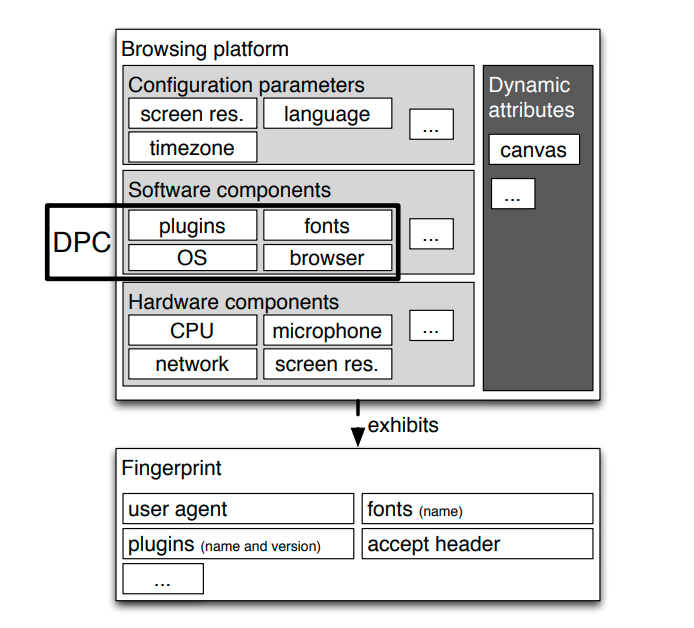
Once the user starts browsing the web, the data is used to create the fingerprint. This is what is generally considered by the browser fingerprint. Researchers found that the most significant factors affecting fingerprints are fonts, plug-ins and user agents. Therefore, the choice to focus on reconfiguring the following factors can be achieved by changing the purpose of the fingerprint: fonts, plugins, browsers and operating systems.
Blink achieves dynamic target defense by automatically reconfiguring the various components of the browsing platform at run time. Dynamic Target Defense requires the browsing platform to use a modular architecture to automate random assembly of the various components, rather than building them in advance. Blink is a dynamic platform, characterized by:
A) The assembled platform always shows a fingerprint that is consistent with the real browser, not forged because the platform is real;
B) automatically select the correct configuration, that is composed of compatible components and the correct operation of the platform;
C) Each time a reconfiguration results in a fingerprint change.
Blink implementation
Blink assembles multiple components at different levels, forming a browsing platform as shown in Figure 2.
Blink uses Docker as the underlying technology because Docker can quickly assemble components at run time while isolating the host system from the platform. Blink assembled components are:
A) Operating system: Due to the official image of DockerHub, many operating systems can be out of the box.
B) Browser: download directly from the network or download from the official package repository, many of the browser used to produce a variety of fingerprints.
C) fonts and plug-ins: Pierre Laperdrix created a variety of fonts and plug-ins library, Blink can create a browse platform to select its fonts and plug-ins. The current version of Blink contains more than 2700 fonts and more than 30 plugins.
In just a few seconds, Blink can produce a new fingerprint, the user can use it like a local browser. In order to avoid the obvious distinction between the ordinary Web client fingerprints, from https://amiunique.org to collect fingerprint data, optimize the Blink configuration file, so Blink generated fingerprints closer to the normal browser generated fingerprints. The results show that Blink produces enough fingerprints to fake. Pierre Laperdrix runs Blink thousands of times, and their fingerprints are different, and commercial fingerprint solutions can not know that these fingerprints actually come from a single user.
Summary
Blink generates a random browsing environment, each session produces a different fingerprint, breaking the fingerprint stability, to slow down the fingerprint tracking. Blink also implemented other anti-tracking methods, such as:
A) In order to prevent cookie tracking, when the user completes browsing, all generated temporary data is deleted.
B) Blink is fully compatible with the Tor network in order to prevent IP tracing. By clicking on a simple button, all Internet traffic with Blink can be redirected through the Tor network.
You can get full “Mitigating browser fingerprint tracking: multi-level reconfiguration and diversification” paper here.