Debian and Ubuntu Patch Critical APT Package Manager Flaw Allowing Root Code Execution
 Do Son
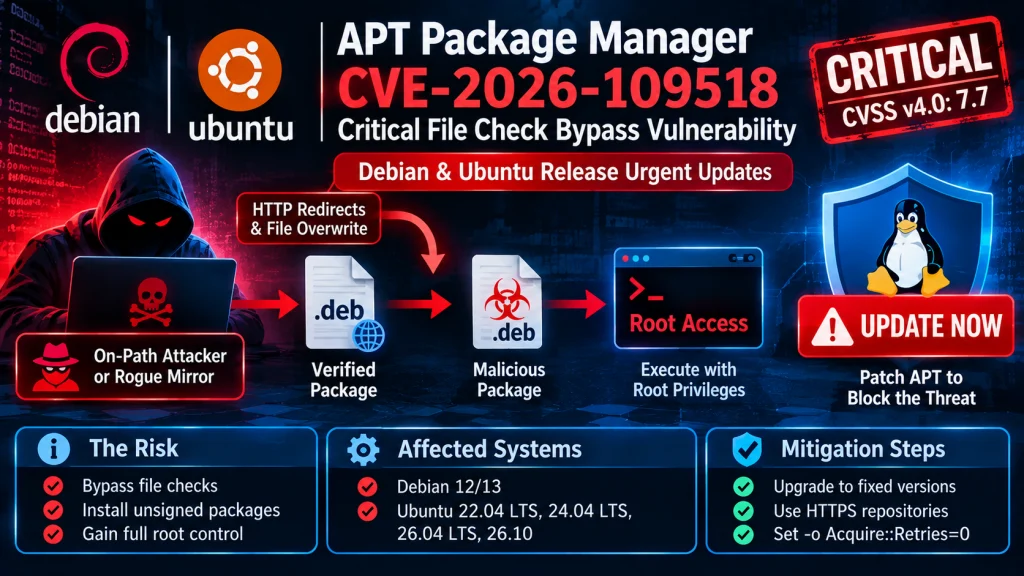
TL;DR
Debian and Ubuntu teams released urgent updates for the APT package manager to fix a severe file check bypass. Tracked as CVE-2026-109518, the flaw lets an on-path attacker or rogue mirror swap verified files with bad code. Because Linux runs package installs as root, an attacker can gain full root control.
- CVE: CVE-2026-109518
- CVSS: 7.7 (High · CVSSv4)
- Product: Debian APT
- Affected: < 1.2.36, 1.4.0, 1.6.0, 1.8.0, 1.8.3, 2.0.0 (+9 more)
- Impact: APT RCE via hard link reuse
- Status: No confirmed exploitation yet
- Patched in: 1.2.36, 1.4.12, 1.6.19, 1.8.2.4 (+16 more)
- Action: Update to 1.2.36, 1.4.12, 1.6.19, 1.8.2.4 (+16 more) now
Why It Matters
The APT package manager serves as the core software installer for Debian, Ubuntu, and many related Linux systems. By default, most systems fetch packages over plain HTTP and use digital signatures to stop tampering. However, CVE-2026-109518 breaks this safety check by letting an attacker overwrite a file after verification passes.
Security researcher Max Justicz found and reported the bug to the vendor teams. Consequently, maintainer Julian Andres Klode posted the Debian APT-2026-11-01 security advisory and rated the flaw critical. Meanwhile, Canonical gave the bug a CVSS 4.0 score of 7.7 in the Ubuntu security blog post. Currently, both teams confirm that no active attacks in the wild or public exploit tools exist. Although exact install counts remain private, industry estimates show that millions of servers and cloud hosts run Debian or Ubuntu.
How the Attack Works
HTTP Redirects and Hardlink Overwrites
First, the attack starts when a target host tries to fetch and install a .deb file over HTTP. An on-path attacker who controls the network path or runs a bad mirror intercepts this traffic. Next, the attacker sends HTTP redirects and standard server errors to force the client to retry the download.
During the retry step, the APT package manager mishandles file checks and overwrites existing hardlinks with an attacker file. As a result, the client installs an unsigned package even when it fails signature checks. When the host installs the rogue .deb file, it runs the package scripts with root rights. Furthermore, the bug affects all tools that use the HTTP backend, including apt, apt-get, and aptitude. In contrast, snap packages and HTTPS or FTP links are safe from on-path network attacks.
Bundled Memory Safety Fixes
Alongside CVE-2026-109518, the APT-2026-11-01 update fixes several out-of-bounds memory bugs and a memory drain issue. For example, broken .deb files lacking a version field could crash local root services like PackageKit or aptdaemon. Moreover, corrupt control lines in deb822 files could trigger a crash during file parsing. In addition, APT series 2.6, 2.8, and 3.0 could drain memory or fill disk logs when retrying delayed items. Therefore, the devs changed that repeated error log into a simple debug path.
Affected Versions
CVE-2026-109518 requires the Acquire::Retries setting to hold a non-zero value so failed downloads retry. This setting is on by default in APT 2.3.2 and newer builds. Consequently, default installs of Debian 12, Debian 13, and Ubuntu 22.04 LTS onward are at risk. Specifically, affected Ubuntu versions include 22.04 LTS, 24.04 LTS, 26.04 LTS, and 26.10.
Older releases like Debian 11 and Ubuntu 20.04 LTS or 18.04 LTS are safe in their default state. However, those older hosts become exposed if custom user scripts turn on the retry setting. Related Linux systems like Kali Linux, Linux Mint, and Proxmox VE also inherit the flaw from upstream packages.
Patch and Mitigation Steps
Fixed Package Versions
Admins should update the APT package manager right away to block potential attacks. Debian fixed the flaw in version 3.0.4 for Debian 13 and version 2.6.2 for Debian 12. They also shipped version 2.2.5 for Debian 11. Similarly, Canonical released fixed builds including 2.4.15ubuntu0.1 for Ubuntu 22.04 LTS and 2.8.4ubuntu0.1 for Ubuntu 24.04 LTS. Ubuntu 26.04 LTS and 26.10 users should move to versions 3.2.1ubuntu0.1 and 3.3.3ubuntu0.1.
Safe Upgrade and HTTPS Hardening
To stay safe while fetching the patch over HTTP, admins should turn off retries during the update. Specifically, teams can pass the -o Acquire::Retries=0 flag when running apt update and apt upgrade. Additionally, admins can switch their repo links in /etc/apt/sources.list from HTTP to HTTPS to stop on-path attacks. Finally, teams should rebuild Docker base images so cloud hosts use the fixed builds.
Support Our Threat Intelligence
Find our vulnerability reports and weekly recaps helpful? Support our work today and unlock a 100% ad-free reading experience!
 Buy Me a Coffee
