 Do Son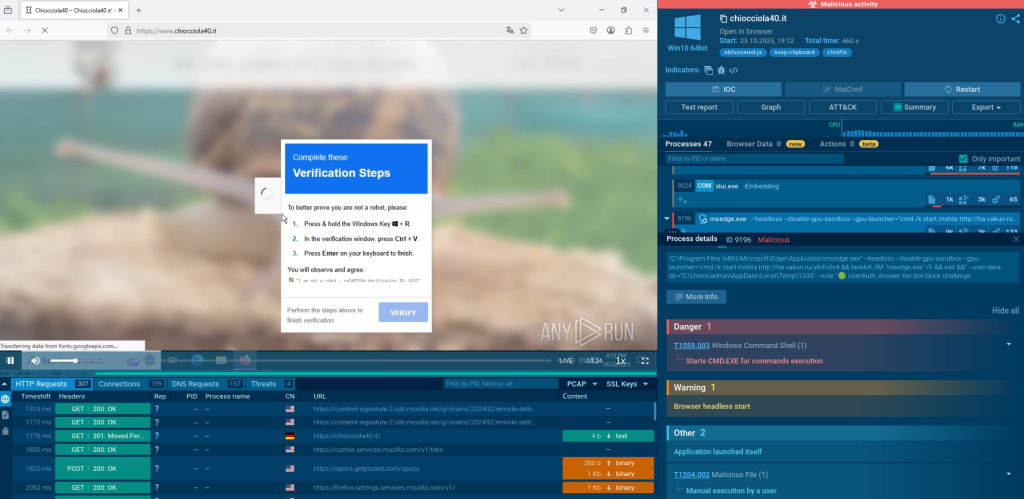
A typical ClickFix “CAPTCHA” making user run a malicious command
A malware technique that literally turns its victim into unwitting accomplices: that’s ClickFix. In 2025, it boosted its activity as a simple but highly effective social engineering method. ClickFix tricks users into running commands that instal malware on their devices using fake CAPTCHA pages.
Read more for ClickFix overview on how it evolved into scam traps and became the second most prevalent attack vector globally.
Explore How It Works

The basic steps of ClickFix attack chain are:
- Threat actors presenent a convincing CAPTCHA, verification, or “fix this” element. It instructs the user to copy and paste malicious code into system dialog or terminal.
- When user does so, they unknowingly execute the command installing and launching malware.
- The payload is complete.
Note: ClickFix campaigns affect not only Windows, but also macOS and Linux operating systems. They often abuse legitimate distribution and installation flows (e.g., Homebrew install pages spoofing or shell commands). That’s what makes it even harder to detect on non-Windows OSs.
Case 1: Fake Updates

View the first example analyzed in ANY.RUN’s Interactive Sandbox.
In this case, we are dealing with a“fix-this” swindle. It persuades the user to run a command to complete a fake Windows update. Here’s what happens if these instructions are followed:
- mshta.exe process is initiated. It utilizes an unusual IP with a “0x” in it.

- PowerShell command is triggered. It drops an .exe file.

- Malware then applies TTPs labeled as T1497.001 System Checks: it reads a speicifc registry key and the BIOS version to learn about the user’s environment.
The process OOBE-Maintenance.exe is noteworthy, too: it’s a legitimate file abused to load DLLs.

- Malicious extension is dropped despite Google Chrome defenses, as it’s able to work around them.

This malicious sample reveals infostealer activity along amplified by anti-analysis techniques and methods.
Detect threats faster with ANY.RUN’s Sandbox
See full attack chain in seconds
Case 2: Stealthy Classic

This example is a typical ClickFix pseudo-CAPTCHA: see its analysis here.
The attack in a nutshell:
- Running the malicious command hidden in CAPTCHA does mshta for a domain the drops a massive payload.
- The system works like everything’s fine, and the CAPTCHA worked.
- In reality, the computer is completely pwned.

Case 3: Forged CloudFlare, Actual RAT
In this exampl, we see a “verification” website abusing CloudFlare services: view sandbox analysis.
Notably, this sample involves two CAPTCHAs, the first being a genuine one from CloudFlare CAPTCHA:

But the second CAPTCHA is malicious:

This sample is not as stealthy as the previous. We can see that a PowerShell window opens up and hints that something is possibly wrong.
The next step is PowerShell spawning a GUI urging the user to click “Continue”. Doing so leads us to the actual Booking website, creating the impression that everything’s OK.

But this redirection is just a fascade. At same time, the file travelsecurity.exe is dropped. It creates persistence and launches what seems to be a phishing attack.

Example 4: FileFix and Explorer Commands
A relatively new version of ClickFix is a Docusign scam: view sandbox analysis
At first sight, it looks like a legit document your need to sign. It’s spready via email. But there’s a red flag you can notice: the domain eu2-docusign[.]net is not a subdomain of Docusign. It only masks like one using a hyphen.

There’s no CAPTCHA in this example, hence the name FileFlix. There’s just a path to copy into Windows Explorer and open the document for signing.
Note: There is also a DocFix variant that masquerade as document viewer errors, particularly targeting Microsoft Office and PDF workflows. MeetFix exploits fake Google Meet errors.
Once the path is copied into the Exporer address bar, a command is run. It’s separated from the path by a string of spaces. This makes it unvisible, unless you scroll the address bar.
Here’s how it looks originally:

And if you scroll:

This PowerShell command is executed as a result:

And a couple of processes later, an info stealer is fully delivered to the system:

How to Prepare for New ClickFix Attacks
- Monitor new ClickFix attacks in Threat Intelligence Lookup
You can discover ClickFix samples, analyses, and indicators in Threat Intelligence Lookup by ANY.RUN, a solution for threat hunting and enrichment of IOCs. Indicators and contextual data is gained from threat investigations done by over 15,000 SOC teams worlwide, allowing you to monitor emerging and evolving threats.
Follow this link to browse ClickFix in TI Lookup:

Power your threat hunting with fresh intel
from 15K SOCs and 500K analysts
- Verify domains in TI Lookup to check IOCs for associations with ClickFix attacks.
E.g., to check a domain, search with a query like this:
domainName:”googleserviceteg.com”

- Keep blocklists relevant to reduce exposure to malware and use TI to create detection rules in SIEM or EDR.
- Implement targeted preventative controls, such as clipboard-protection extensions or OS-level safeguards and enterprise browser policies that block risky address-bar patterns.
- Automate response workflows to reduce dwell time and improve resilience.
Conclusion
ClickFix is a human-centric, high-ROI social-engineering technique that emerged as a major attack vector in 2025. It’s cross-platform, rapidly evolving (with variants like FileFix and other address-bar or clipboard-based tricks), and powered by automation and AI that ensure its scalability.
This malicious technique is expected to continue evolving. Only comprehensive, intelligence-driven security teams will be able to stay ahead of ClickFix, the defining threat of 2025.
Sign up in ANY.RUN’s Interactive Sandbox for hands-on malware analysis.