 Do Son
Cloudflare is widely known for masking the real IP addresses of websites it protects—safeguarding them from DDoS attacks, scanning, and direct targeting. However, in the hands of ethical security researchers and red teamers, tools like CF-Hero offer a way to identify misconfigurations or expose real IP addresses that may still be publicly reachable due to overlooked DNS entries or shared infrastructure.
Disclaimer: This article is for educational and authorized security testing only. Do not use these techniques against networks or systems without explicit permission.
What is CF-Hero?
CF-Hero is a reconnaissance tool designed to uncover the real IP addresses of web applications protected by Cloudflare. It performs multi-source intelligence gathering and correlates DNS and historical infrastructure data to find possible origin IPs.
It leverages:
- DNS analysis (A, TXT records)
- Historical DNS data
- Shodan, Censys, and SecurityTrails
- JA3 fingerprinting, custom headers, and response validation
Installation
You’ll need Go (version 1.18 or higher) installed. Then run:
go install -v github.com/musana/cf-hero/cmd/cf-hero@latest
Basic Usage
Read from a list of domains:
cat domains.txt | cf-hero
Or use the -f flag:
cf-hero -f domains.txt
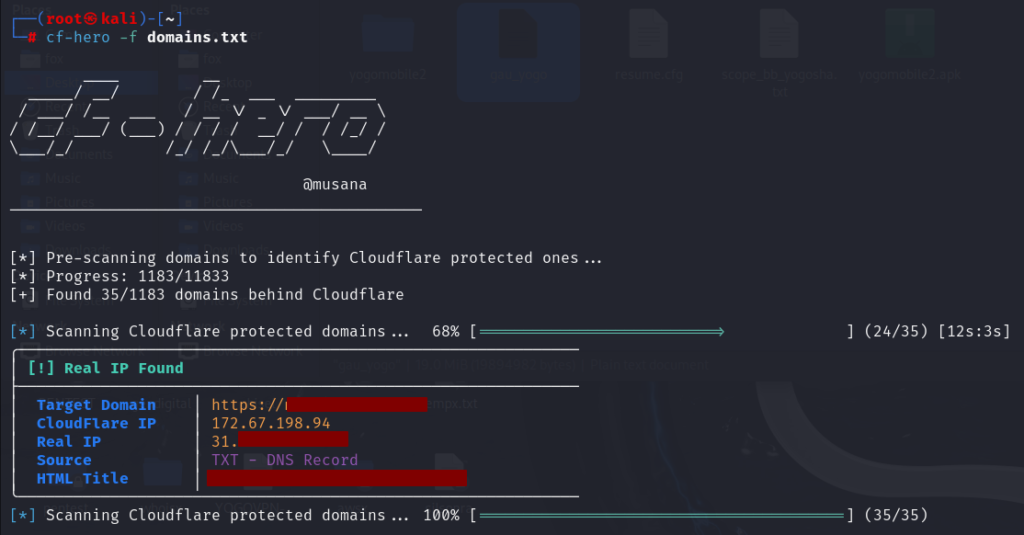
This will extract DNS records for each domain and attempt to identify which are behind Cloudflare.
Getting More Specific
Find domains behind Cloudflare:
cf-hero -f domains.txt -cf
Find domains not behind Cloudflare:
cf-hero -f domains.txt -non-cf
Use Intelligence Sources
CF-Hero supports integration with Shodan, Censys, and SecurityTrails. To enable them, just include their flags:
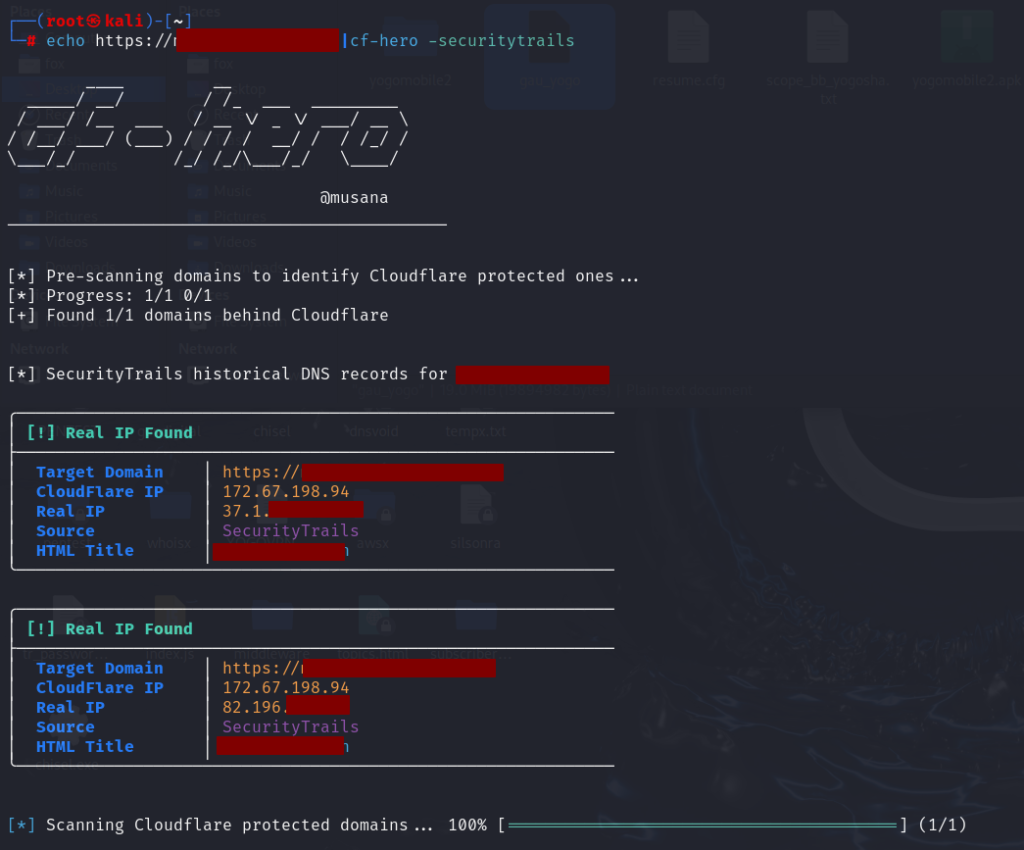
For this, you’ll need API keys in a config file:
Advanced IP Discovery via Subdomain Relationships
One of CF-Hero’s more advanced features involves using a list of known subdomains that may not be protected by Cloudflare.
Example:
cf-hero -td https://target.com -dl subdomain_list.txt
Here:
-td= the target domain-dl= a file containing a list of subdomains (e.g., dev.target.com, api.target.com)
CF-Hero will attempt to correlate infrastructure and identify origin IPs based on response similarity and DNS misconfigurations.
Advanced Options
Customize your fingerprint and connection details:
Options include:
-ua— Custom User-Agent-ja3— JA3 TLS fingerprint-w— Number of concurrent workers-px— Proxy support (e.g., Burp, SOCKS, HTTP)
Summary
| Feature | Command Example |
|---|---|
| Basic scan | cf-hero -f domains.txt |
| Show only CF domains | cf-hero -f domains.txt -cf |
| Show only non-CF domains | cf-hero -f domains.txt -non-cf |
| Use Shodan | cf-hero -f domains.txt -shodan |
| Use Censys | cf-hero -f domains.txt -censys |
| Subdomain correlation | cf-hero -td https://site.com -dl subdomains.txt |
| Use proxy and custom headers | cf-hero -ua "Mozilla" -px "http://127.0.0.1:8080" |
Final Thoughts
Cloudflare provides excellent protection, but human error—such as forgotten DNS entries or misconfigured services—can still expose origin IPs. CF-Hero is a potent recon tool that helps you uncover these gaps through DNS mining, passive intelligence, and behavioral fingerprinting.
Always ensure you’re using CF-Hero for authorized security assessments. It’s not just about uncovering weaknesses—it’s about helping organizations fix them.
Support Our Threat Intelligence
Find our zero-day alerts and CVE reports helpful? Support our work today and unlock a 100% ad-free reading experience!
 Buy Me a Coffee