Microsoft Project Zenith: A Ready-to-Code Windows 11 Experience for Developer PCs
 Do Son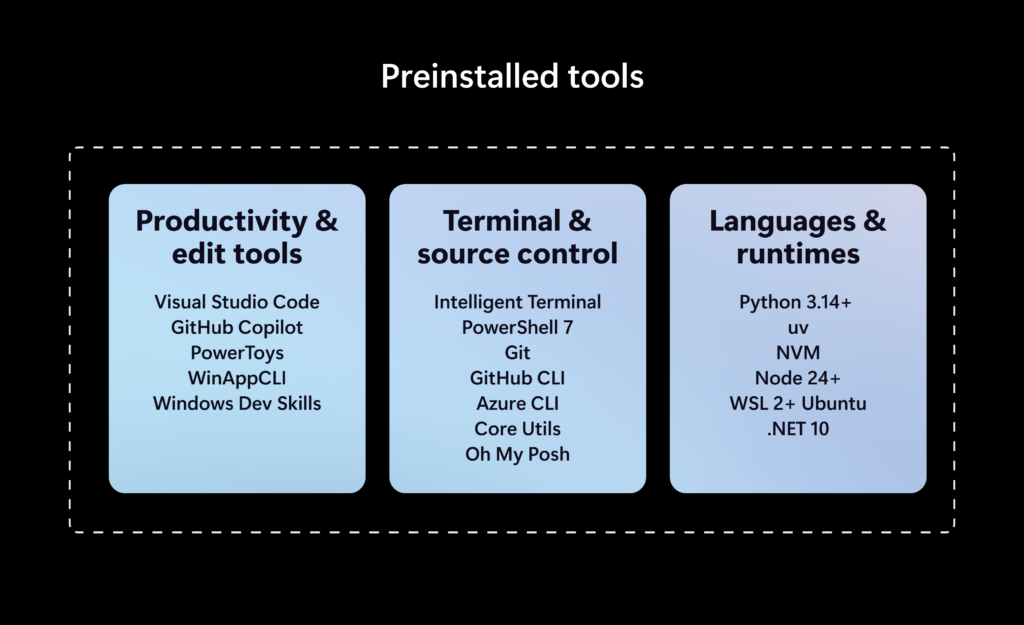
Microsoft has recently unveiled a new system named Project Zenith, offering developers a ready-to-code Windows 11 PC experience straight out of the box. To call it a new system is, admittedly, a slight overstatement; it is in essence an optimized refinement built atop Windows 11, preinstalling commonly used development tools and disabling certain extraneous features that might otherwise disturb a developer’s daily work.
Possible, Yet Hardly Necessary
Project Zenith is a project Microsoft has forged in partnership with hardware manufacturers. Rather than a system, it is better described as a kind of standard: only hardware and software meeting the project’s requirements may be dubbed a Project Zenith device. To satisfy the hardware criteria, a device must be furnished with at least 64 GB of memory, a memory bandwidth reaching 250 GB per second, and an AI processor or an accompanying NPU unit.
In practice, however, the Project Zenith experience can also be attained through the open-source Windows Developer Config that Microsoft maintains, which enables the developer features Windows 11 leaves dormant by default. Once configured, it differs little from Project Zenith. Interested enthusiasts may therefore simply try Microsoft’s open-source script, with no need to seek out a Project Zenith system.
How Project Zenith Differs from the Ordinary Edition
Project Zenith preinstalls development tools by default. Windows Terminal and Visual Studio Code are pinned to the taskbar, while File Explorer displays file extensions, hidden files, and full paths, with long-path support enabled.
Extraneous features that may distract a developer, such as recently used files, sync-service prompts, Start-menu suggestions, and account notifications, are switched off. The Windows Subsystem for Linux, moreover, is enabled by default for Linux and container development.
In other words, the principal distinction of a Project Zenith device is that it must carry 64 GB of memory or more, so as to run AI models locally. For most ordinary users, at least, this is unnecessary. Developers, too, can obtain a comparable experience directly through Microsoft’s script, forgoing nothing but the ability to run models locally.
Support Our Threat Intelligence
Find our tech and OS security coverage helpful? Support our work today and unlock a 100% ad-free reading experience!
 Buy Me a Coffee
