The Hidden Toggle: Why Windows 11’s New One-Click Dark Mode is Hiding in Your Battery Settings
 Do Son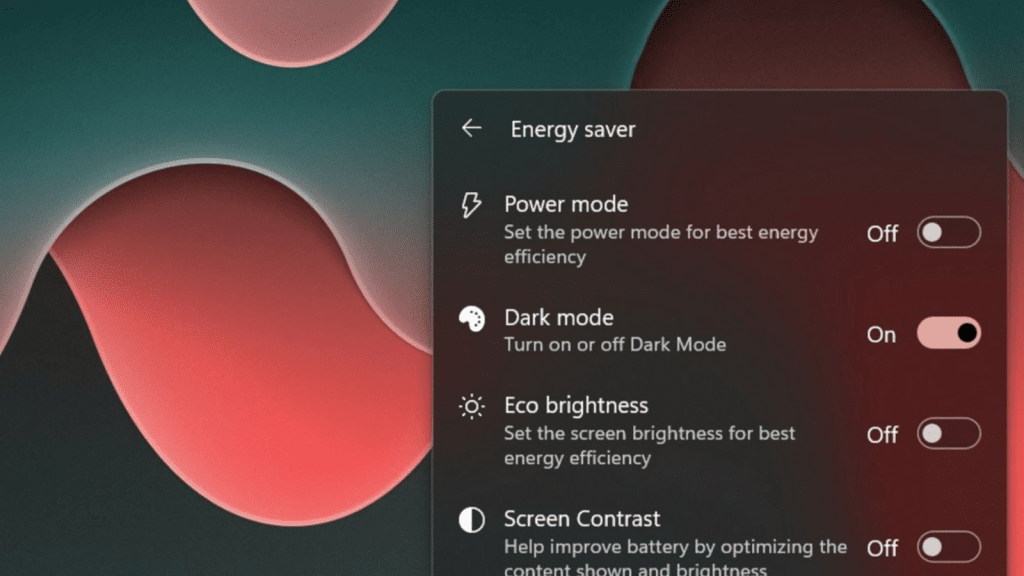
For an extended epoch, Microsoft has furnished Windows 11 with a dark mode, yet has conspicuously neglected to engineer an autonomous toggling mechanism. Whereas the iOS and Android architectures seamlessly pivot in harmony with the user’s localized sunset or predefined chronometers, Windows 11 remains glaringly bereft of such sophistication, tethering patrons to the machinations of third-party software to achieve this seamless transition.
An equally confounding grievance lies in the sheer friction of traversing between the luminous and obsidian paradigms; such an endeavor demands a tedious pilgrimage deep into the Windows 11 Personalization settings, rendering a fundamentally simple act needlessly labyrinthine and burdensome.
At long last, Microsoft is poised to remediate this friction by embedding the illumination toggle within the taskbar’s Quick Actions interface. Users will simply click the network icon upon the Windows 11 taskbar to summon the Quick Actions pane, subsequently dictating the dark mode parameters from within the energy conservation configurations. One must, however, scrutinize the profoundly peculiar logic underpinning this architectural choice.
Stripped to its essence, the impending methodology for traversing these visual modes will prove markedly more expeditious: a solitary click upon the taskbar’s network icon invokes the Quick Actions panel, whence one navigates to the energy conservation settings to decree the activation or suppression of dark mode.
What renders this stratagem so peculiar? The bewilderment stems from Microsoft’s baffling decision to sequester this aesthetic toggle within the energy conservation matrix. The corporation’s paramount preoccupation seemingly lies not in mitigating the ocular strain of its nocturnal patrons, but rather in the marginal preservation of electrical vitality achieved by plunging the interface into darkness.
How, then, does this paradigm propose to accommodate the desktop aficionado? At the bare minimum, Microsoft ought to have consecrated this visual toggle as a premier, top-tier menu within the Quick Actions pavilion; exiling it to the energy conservation catacombs inevitably invites profound skepticism regarding the architects’ underlying rationale.
Nevertheless, the forthcoming mechanism will undeniably grant users a far swifter conduit to dark mode. It represents a vast improvement over the archaic ritual of invoking the Start menu, tunneling into Settings, unearthing Personalization, and finally effectuating the switch.
Support Our Threat Intelligence
Find our tech and OS security coverage helpful? Support our work today and unlock a 100% ad-free reading experience!
 Buy Me a Coffee
