 Do Son
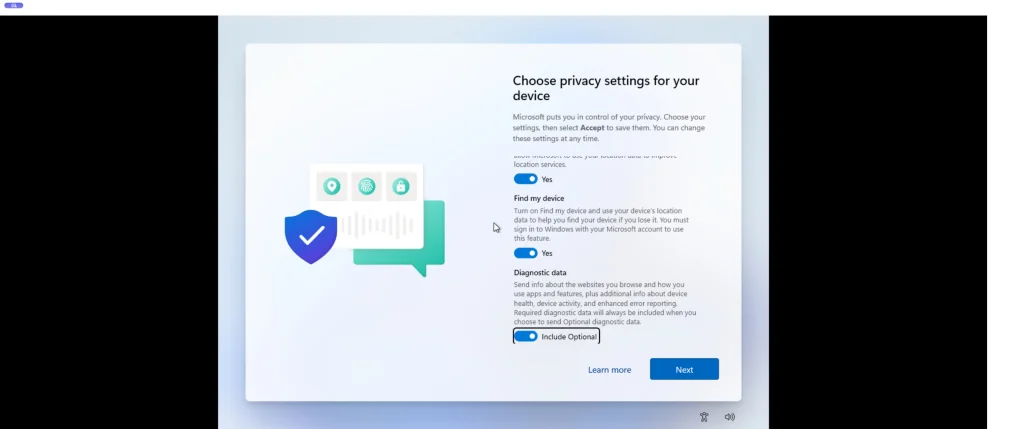
Reverse engineering researcher Xusheng Li recently uncovered a subtle data collection mechanism inside Windows 11. Specifically, his November 16 blog post reveals that Microsoft monitors usage of popular AI coding assistants and development tools. Effectively, this Windows 11 AI telemetry runs by default on most consumer machines. Because the system collects these records whenever Optional Diagnostic Data stays active, most installations report developer activity automatically. Notably, Windows enables Optional Diagnostic Data out of the box during initial system setup.
Tracked AI Coding Assistants and Developer Utilities
According to Xusheng Li’s technical analysis of Windows coding agent telemetry, the collector targets two distinct software groups. First, the AI programming category covers Codex, Claude Code, Cursor, Antigravity, and Copilot. Second, the standard development category monitors Python, Node.js, GCC, and .NET runtimes. Whenever Optional Diagnostic Data remains enabled, Windows logs activity across these environments and transmits reports to Microsoft servers.
Presence Detection Without Capturing Prompts or Source Code
Crucially, Microsoft does not harvest sensitive intellectual property through this telemetry pipeline. Instead, the system merely records whether it detects a specific software category within a given collection window. Therefore, the telemetry payload excludes user prompts, source code, exact execution durations, and interaction counts. Nevertheless, analysts at Microsoft can easily deduce user personas from these high-level signals. For example, the data reveals whether an individual is a developer, a casual AI adopter, or a power user.
Furthermore, this tracking practice aligns with Microsoft’s existing privacy disclosures. Specifically, the company’s privacy statement notes that Optional Diagnostic Data may include application activity history. Because tracking coding utilities falls under general application usage, this mechanism complies with Microsoft’s stated policies.
How to Disable Windows 11 Developer Telemetry
Fortunately, privacy-conscious developers can stop this telemetry collection effortlessly. Users simply need to disable Optional Diagnostic Data inside Windows 11 privacy settings. During the Out-of-Box Experience setup wizard, Windows checks this option by default unless users actively opt out. If you uncheck the setting during initial setup, retail Windows 11 builds leave this collector disabled. However, Windows Insider Preview participants face a strict constraint. Specifically, Insider builds require Optional Diagnostic Data to remain active for receiving ongoing preview updates. Ultimately, users must choose between preview access and stricter local telemetry privacy.
Support Our Threat Intelligence
Find our tech and OS security coverage helpful? Support our work today and unlock a 100% ad-free reading experience!
 Buy Me a Coffee
