 Do Son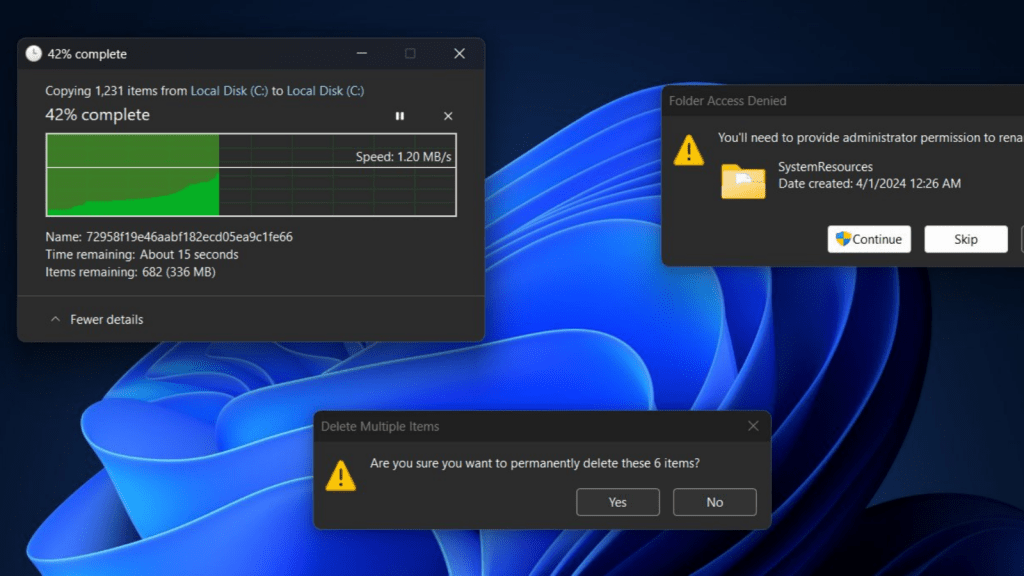
For a long time, Microsoft has left unaddressed various shortcomings of Windows 11’s dark mode. For instance, certain menus in the Control Panel still retain a light (white) theme, while multiple windows within File Explorer continue to appear in light mode.
When a user copies a file through File Explorer, the progress bar window that appears is displayed in light mode. Similarly, confirmation dialogs for file deletions, prompts for renaming conflicts, and other related windows are all presented in light mode.
To users, these inconsistencies are both glaring and frustrating, as the sudden appearance of bright white windows in dark mode is jarring to the eyes. At last, however, Microsoft has begun addressing this issue: in the latest test builds of Windows 11, File Explorer’s dialog windows are being restyled.
According to information shared by @Phantomofearth, the Windows 11 Build 26100.5061 preview update now brings dark mode support to the file copy progress window, file deletion confirmation dialogs, and other related prompts.
This development marks a significant update for Windows 11, particularly for users who regularly rely on dark mode. At the very least, it spares them from being blinded by an unexpected white dialog box when working at night.
At present, these improvements are being tested in the Windows Insider Release Preview channel. If all goes smoothly, they are expected to roll out with the cumulative update scheduled for September, meaning users of the stable release will need to wait a little longer.
Related Posts:
- Microsoft Integrates AI Directly into Windows 11 File Explorer
- Deceptive CAPTCHA: ClickFix Campaign Uses Clipboard Injection to Deliver Malware
- PoC Released: Windows Explorer CVE-2025-24071 Vulnerability Exposes NTLM Hashes
Support Our Threat Intelligence
Find our tech and OS security coverage helpful? Support our work today and unlock a 100% ad-free reading experience!
 Buy Me a Coffee
