 Do Son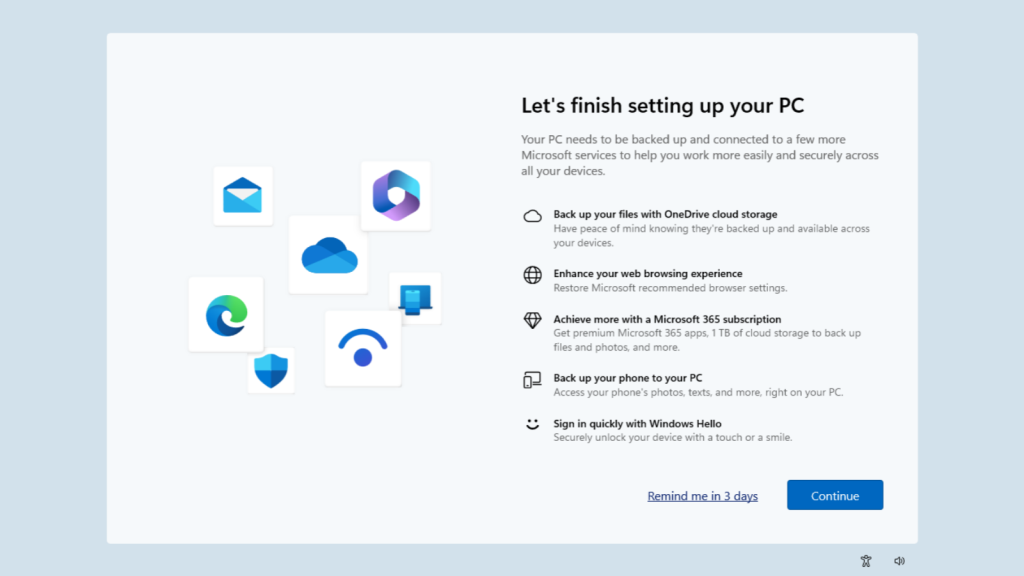
Windows 11 users frequently encounter incredibly frustrating full-screen pop-ups. These intrusive screens typically appear immediately following a system reboot or standard startup. They aggressively urge users to initiate Microsoft OneDrive file backups. Simultaneously, they persistently badger users to establish Microsoft Edge as their default web browser.
The Frustration of Temporary Dismissals
Historically, users could technically bypass these full-screen advertisements. However, Microsoft deliberately designed a flawed system. They only permitted users to click a deceptive “Remind me in 3 days” button. Consequently, if a user firmly declined these settings, the annoyance remained temporary. A few days later, upon rebooting, the exact same full-screen pop-up would inevitably resurrect itself. Naturally, a massive multitude of users harbored deep-seated resentment regarding this persistent harassment.
A Permanent Opt-Out Arrives
Now, relief finally arrives. According to a report from Windows Latest, Microsoft implemented a crucial adjustment within the Windows 11 25H2 build. The company permanently altered the exit options available on these full-screen pop-ups. Previously, the interface solely offered the infuriating “Remind me in 3 days” option. Now, developers replaced it with a definitive “Opt-out of backup” button. Theoretically, once a user selects this new option, the system should permanently suppress future full-screen nagging. Replacing the temporary dismissal with a permanent opt-out elegantly resolves a widespread user complaint.
Rollout Status and Current Availability
Currently, the precise scope of Microsoft’s deployment remains somewhat unclear. The software giant controls the distribution of these updated pop-ups remotely via cloud configuration. Therefore, numerous current users might unfortunately still encounter the outdated interface. They might only see the restrictive three-day reminder option. However, once Microsoft concludes its internal testing phases, a comprehensive global rollout should swiftly follow.
Addressing Default OneDrive Behaviors
Users must understand one additional, critical caveat. Whenever a user logs into Windows 11 utilizing a registered Microsoft account, the integrated OneDrive application automatically authenticates. Furthermore, it proactively initiates the synchronization of vital folders, including Documents, directly to the cloud. This recent interface adjustment specifically addresses the full-screen notifications. It does absolutely nothing to uninstall or disable this aggressive, automated background backup functionality.
Consequently, many users will likely still encounter frustrating notifications regarding exhausted OneDrive storage capacity. Users who do not subscribe to premium Microsoft 365 services receive a meager 5GB storage allocation. Naturally, the automated backup function effortlessly consumes this limited space. If a user genuinely wishes to avoid this entire ecosystem, they must manually intervene. They must access the OneDrive settings, definitively disable the backup functionality, and manually delete any files already synchronized to the cloud. Finally, completely uninstalling the OneDrive application provides the ultimate resolution.
Support Our Threat Intelligence
Find our tech and OS security coverage helpful? Support our work today and unlock a 100% ad-free reading experience!
 Buy Me a Coffee
