Microsoft Fixes the Insider Mess: The End of “Clean Installs” and Staggered Features
 Do Son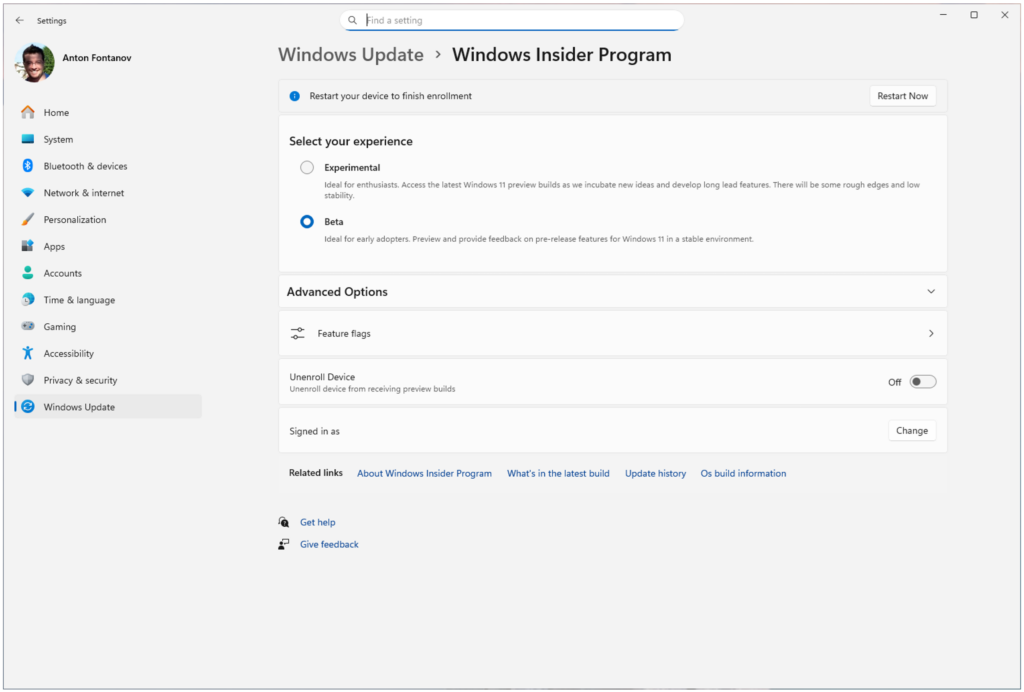
For enthusiasts who relish the vanguard of Windows features, Microsoft’s Windows Insider Program (WIP) has long been a source of both exhilaration and exasperation. The labyrinthine channel nomenclature, the agonizing necessity of a “clean install” to exit or transition between branches, and the elusive nature of heralded features have frequently left users disillusioned. In a significant redress, Microsoft has unveiled a comprehensive structural simplification of the program. The most pivotal modifications include the amalgamation of the Canary and Dev channels into a unified “Experimental” tier, the introduction of an integrated “Feature Flag” dashboard, and a streamlined transition process that finally permits “in-place upgrades” across various testing branches.
Through extensive dialogue with the Insider community, Microsoft identified two primary grievances: a profound confusion regarding channel selection and the frustration of “unavailable” features despite successful updates. To rectify this ambiguity, the organization has consolidated the pre-Beta Canary and Dev channels into the singularly named “Experimental” channel. This transparent designation serves as an explicit caveat: features within this domain are purely speculative and subject to instantaneous alteration, delay, or total cancellation. Meanwhile, the more stable Beta and Release Preview channels retain their original titles.
For the most intrepid developers and early adopters, the Experimental channel will offer an advanced “Future Platforms” toggle, providing access to nascent, low-level builds. However, Microsoft cautions that because this core diverges from future retail iterations, reverting to standard channels will remain a laborious endeavor; as such, it is discouraged for casual enthusiasts. Historically, Microsoft’s reliance on “Controlled Feature Rollouts” (CFR) meant that many users remained unable to locate publicized features, forcing them to resort to third-party open-source utilities like “Vive Tool” to bypass A/B testing restrictions.
Microsoft is now ceding control back to the user through two landmark initiatives:
- The “What You See Is What You Get” Beta: Henceforth, any feature announced for the Beta phase will be immediately accessible to all users in that channel, effectively terminating the era of staggered deployments for that tier.
- Integrated Feature Management: Within the settings of the Experimental builds, Microsoft will debut a native “Feature Flag” page. This allows aficionados to manually toggle specific experimental functionalities directly through the system interface, obviating the need for third-party command-line tools.
Perhaps the most resonant improvement is the simplification of channel transitions. Previously, those entrenched in a forward-leaning channel like Dev were faced with a grim ultimatum if they wished to retreat to Beta or exit the program: a full system wipe and a clean reinstallation. This deterrent has been dismantled through a fundamental revision of the system’s architecture. As long as the builds share a common Windows core, users may now utilize an “in-place upgrade” (IPU) tool to migrate seamlessly between Experimental, Beta, and Release Preview branches without sacrificing their data. While Microsoft notes that this process is slightly more protracted than a standard update, it represents a monumental reduction in friction compared to the traditional reinstallation cycle.
Support Our Threat Intelligence
Find our tech and OS security coverage helpful? Support our work today and unlock a 100% ad-free reading experience!
 Buy Me a Coffee
