 Do Son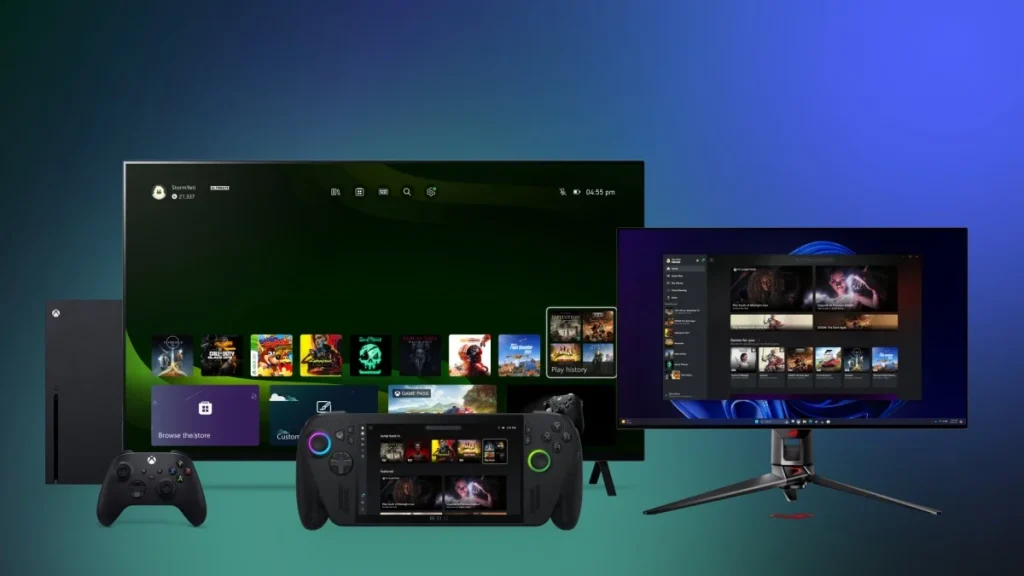
Microsoft continues to enhance the Xbox Cloud Gaming experience. Following earlier trials under the updated Xbox Insiders program, the company has now introduced a new cross-device “Play History Sync” feature, which is being rolled out universally to all players.
This update ensures that gamers can seamlessly carry their progress across Xbox consoles, PCs, and even Windows handhelds, eliminating concerns about losing momentum when switching devices. For instance, a player might begin a game on an Xbox Series X, then continue on a PC or handheld, with the system automatically retrieving cloud saves and play history to resume exactly where they left off.
At the core of this update is the addition of a “Play History” section within both the Xbox PC app and the console UI. This feature not only displays the most recently played cloud games but also synchronizes activity across devices, allowing players to instantly recognize their last save point and effortlessly continue gameplay.
In parallel, cloud save integration has been expanded. This means that even if a title lacks a native PC version, as long as it supports Xbox Cloud Gaming streaming, progress can still be carried forward across platforms without restriction to a single device.
The Xbox app has also been redesigned, adding a cloud game search filter and a Quick Resume list. These refinements make it easier for players to locate their active titles or instantly return to a previously suspended session.
According to Microsoft’s official blog, the existing “Large Icon” continues to display games currently being played on the active device, while “Play History” consolidates recent activity across all Xbox platforms. Together, these features make device switching smoother and more intuitive.
This update marks a pivotal step for the Xbox ecosystem. With the rise of Windows handhelds, Microsoft is leveraging cloud gaming and synchronized progress to grant players the freedom to choose their preferred play environment — whether in the living room, at a desk, or on the go.
In the long run, this move reflects Microsoft’s broader “Play Anywhere” strategy, extending the reach of Xbox Game Pass, cloud streaming, and cross-device integration, while sharpening its competitive edge against Sony and Nintendo by offering a uniquely flexible gaming experience.
With the new feature now fully available, players only need to update their Xbox console or PC app to see the “Play History” option appear on the home screen or sidebar — unlocking a more fluid, cross-device gaming journey.
Related Posts:
- Cloud Gaming for Everyone: Xbox Opens Its Streaming Service to Game Pass Core and Standard
- Xbox AI Boost: Copilot for Gaming, Play Anywhere Hits 1,000 Game
- VPN No More: Xbox Targets Gamers Buying Games from Cheaper Regions
- Xbox AI Gaffe: Layoffs, Ill-Timed Recruitment, and a Questionable Image
- Google Chrome Tests AI-Driven Auto Password Change for Breached Accounts
Support Our Threat Intelligence
Find our tech and OS security coverage helpful? Support our work today and unlock a 100% ad-free reading experience!
 Buy Me a Coffee
