Help Desk Impersonation on Teams Leads to AD CS Abuse and Domain Takeover Attempts
 Do Son
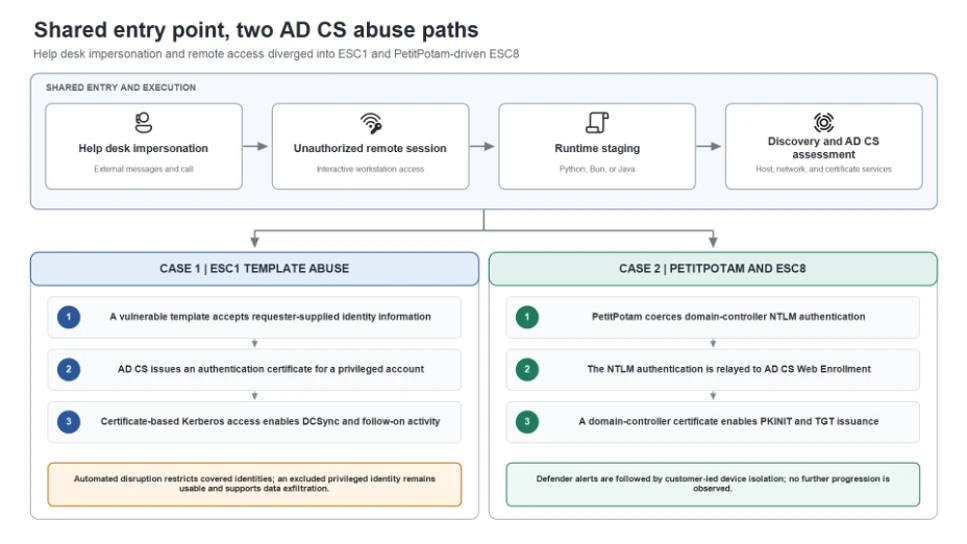
Both incidents followed a shared entry and execution pattern before diverging into two AD CS abuse paths
| At a glance | |
| Actor | Unattributed human operators |
| Activity | Teams help desk impersonation, Quick Assist remote access, and AD CS certificate abuse |
| Targets | Users and Active Directory environments at two organizations |
| Scale | In one case, 19 users targeted and certificates issued for 11 privileged accounts |
| Status | No law-enforcement action reported |
TL;DR
Microsoft Threat Intelligence investigated two intrusions that began with fake IT staff calling users on Microsoft Teams. Once users granted remote access through Quick Assist, the attackers turned to AD CS abuse to obtain certificates for privileged accounts. In one case, the attackers stole data. In the other, the customer cut them off.
What happened
Both attacks started with help desk impersonation. The attackers used Teams messages and calls with support-style display names. They then talked users into opening Quick Assist and sharing the connection code.
That remote session was “the decisive transition in the attack,” Microsoft says. Next, the attackers dropped an archive in the Downloads folder and unpacked it into a new folder named like a Windows update. They then launched code using portable Python, Bun, or Java runtimes. After that, the tools mapped the host and network and started probing Active Directory Certificate Services (AD CS).
Microsoft stresses that no Teams vulnerability was involved. Instead, the attacks relied on “social engineering and insecure or overly permissive AD CS configurations.”
Case 1: A flawed certificate template
In the first case, the attackers found a template vulnerable to ESC1. This misconfiguration lets a low-privileged user request a certificate for any identity, including an admin.
The first Teams wave targeted three users and compromised one workstation. The attackers then obtained certificates for three highly privileged accounts. About 90 minutes later, a second wave targeted 16 more users. That round yielded certificates for eight more privileged accounts.
Within seconds of getting one certificate, the attackers ran DCSync against a domain controller to pull credential data. Microsoft Defender’s automatic disruption blocked more than 1,000 later file-access attempts.
However, one privileged account was excluded from automated response. The attackers used it to reach a file server. They then ran a renamed copy of Rclone to copy data to an outside SFTP server.
Case 2: PetitPotam and ESC8
The second organization had no ESC1 weakness. So the attackers used PetitPotam to force a domain controller to authenticate to a system they controlled. They then relayed that login to the AD CS web enrollment service, a technique called ESC8.
As a result, the attackers obtained a certificate as the domain controller itself. They used it to request a Kerberos ticket for that identity. Microsoft details this path in its analysis of how PetitPotam and ESC8 turned a workstation into a domain controller identity.
Defender raised ESC8 alerts, and the customer isolated the workstation. Microsoft observed no further activity after that.
Who is behind it
Microsoft says the activity “is not attributed to a specific threat actor.” The attackers used tenant names on onmicrosoft.com that mimicked the target organizations. No suspects have been named.
Impact and scale
The real danger of AD CS abuse lies in how long certificate access lasts. Microsoft warns that resetting a password or reimaging a device “does not revoke an issued certificate.” It also does not cancel Kerberos tickets already issued.
The two cases also show why full containment matters. In the first case, a single excluded account was enough to enable data theft. In contrast, quick device isolation in the second case stopped the attack.
How to stay protected
Based on Microsoft’s findings, defenders can take several steps to block this AD CS abuse path:
- Train users to treat unexpected Teams calls from “IT support” with caution, and watch for External and Scam labels.
- Restrict or disable Quick Assist where it is not needed.
- Audit certificate templates and remove settings that let requesters supply their own identity.
- Enable relay protections on AD CS web enrollment, or disable it if unused.
- Revoke suspicious certificates and review Kerberos tickets after any incident.
- Avoid excluding privileged accounts from automated containment.
- Flag portable runtimes launched from user folders after a remote session.
In short, help desk impersonation can open the door, but weak AD CS settings let attackers walk straight to domain control.
Support Our Threat Intelligence
Find our threat intelligence and malware analysis helpful? Support our work today and unlock a 100% ad-free reading experience!
 Buy Me a Coffee
