 Do Son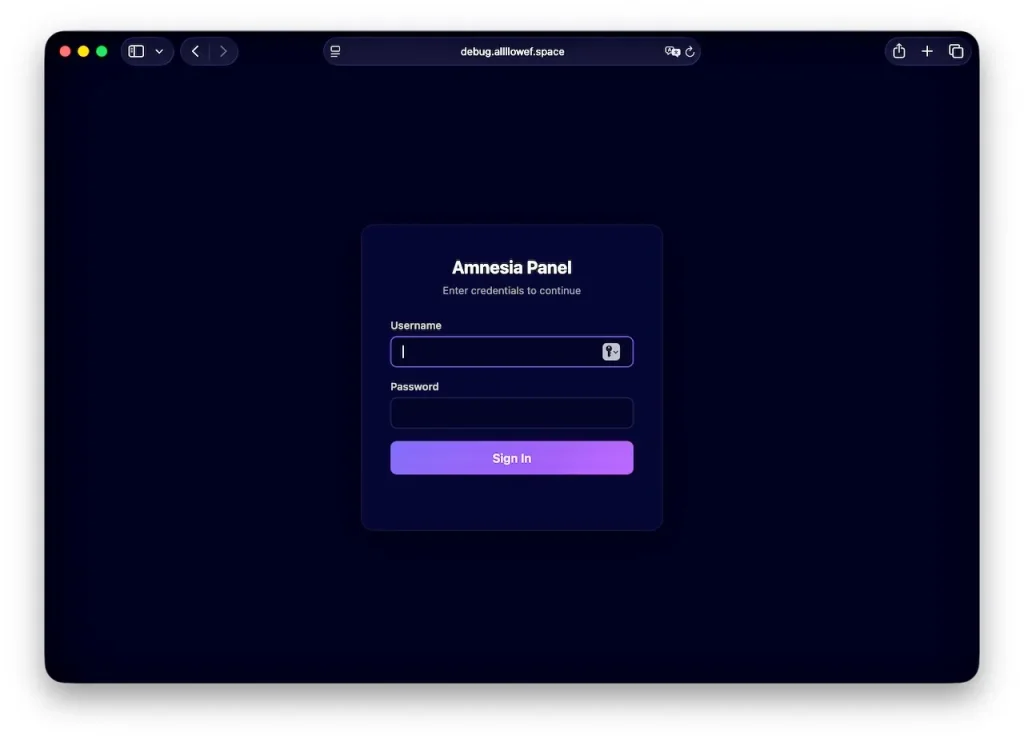
Jamf Threat Labs researchers recently identified a fresh, multi-stage AmnesiaStealer macOS infostealer circulating online. Specifically, this malware exploits social engineering rather than software vulnerabilities to compromise Apple computers. Victims first land on a fake GitHub download page. Next, this page prompts them to run a malicious Terminal command. Consequently, that action triggers the infection. The new AmnesiaStealer macOS infostealer malware then steals sensitive data. Furthermore, it allows attackers to interactively control Chromium browsers in the background.
At a Glance
- Malware Family: AmnesiaStealer
- Threat Actor: Suspected Russian-speaking
- Targets: macOS users, Chromium, and Safari browsers
- Delivery Vector: ClickFix social engineering attack
- Key Capabilities: Credential harvesting, destructive Safari cookie theft, live hidden browser hijacking
- Source: Jamf Threat Labs
TL;DR
A newly discovered Rust-based malware targets Apple computers through deceptive GitHub pages. Consequently, this AmnesiaStealer macOS infostealer harvests passwords, crypto wallets, and browser cookies. Ultimately, it deploys a remote-control module that grants attackers hidden access to active browser sessions.
Delivery via Fake GitHub Pages
The attack begins with a counterfeit GitHub landing page. Specifically, this site replicates GitHub’s dark theme and verified badge. However, it does not offer a standard application download. Instead, it presents a Terminal installation box. Security experts call this a ClickFix attack. The page instructs victims to copy a specific command. Then, users paste this command into their macOS Terminal. Running this command initiates the compromise. In this ClickFix scenario, the attackers trick the user into executing a payload directly. The malicious page includes a convenient copy button. This button copies a base64-encoded command to the clipboard. Consequently, victims unknowingly paste this command into the command-line interface. By doing so, they bypass standard macOS gatekeeper protections. The system assumes the user intended to run the command. Exact victim numbers remain undisclosed. Nevertheless, researchers confirmed this threat actively operates in the wild.
A Multi-Stage Infection Chain
Initially, the Terminal command fetches a short, self-deleting shell script. Next, this script downloads a password-protected ZIP archive containing the primary payload. Then, the script extracts a Rust-based universal Mach-O binary. This binary executes the first stage of the AmnesiaStealer macOS infostealer.
First, the malware profiles the host system. It records hardware identifiers and public IP geolocation data. Next, it displays a fake system password prompt. This native dialog tricks users into providing administrative credentials. The malware then validates this password locally.
With the password secured, the stealer targets the macOS keychain. It copies Apple Notes, Telegram session data, and multiple cryptocurrency wallets. Furthermore, the malware uses the native Finder application to duplicate specific files quietly. According to researchers, “Because duplicate makes Finder the process that reads each file, these steps access data the malware cannot directly reach without prompting the user.”
Operating System Specific Bypasses
The malware includes specific code paths for different macOS versions. On macOS 26, the stealer attempts to overwrite the Chrome Safe Storage key. This destructive action permanently locks out the victim’s saved passwords. Consequently, attackers use a hardcoded key to decrypt the exfiltrated data.
Additionally, the malware tries to bypass Apple’s Transparency, Consent, and Control protections. It attempts to mount an APFS local snapshot to steal Safari cookies. It relies on an old vulnerability. Fortunately, Apple patched this flaw years ago. Thus, the technique now fails unless the user already granted Full Disk Access to the Terminal application.
Command-and-Control and Data Exfiltration
The malware stages stolen files in a hidden temporary directory. Next, it archives this data and encrypts it. Then, it sends the archive to a remote command-and-control server. The threat actors utilize a specific API endpoint for file uploads. Also, the panel interface displays Russian language errors. Therefore, researchers suspect the operators are Russian-speaking.
Stage 2: Live Browser Hijacking
If the command-and-control server issues a specific command, the malware downloads a second Rust module. Next, this component connects back to an operator relay via WebSockets. It clones the victim’s Chromium browser profile. Then, it launches this cloned browser in headless mode.
This stage grants the attacker interactive control over the victim’s authenticated sessions. The report emphasizes, “The operator receives a live screencast of the session at around 3fps and can drive it with a full input set: keyboard, mouse, scroll, navigation and tab management.” Moreover, the module injects a custom stealth script into the browser. This script patches various browser fingerprinting programming interfaces. Consequently, it prevents websites from flagging the headless session as automated traffic. The entire process occurs invisibly to the victim. Meanwhile, the attacker freely browses internal applications or banking websites using the victim’s active session cookies.
Defense or Detection Guidance
Security teams must monitor for unusual Terminal activity. Specifically, organizations should flag encoded commands originating from web browsers. Defenders should also watch for unauthorized modifications to the macOS TCC database.
Furthermore, you should monitor for the unexpected deletion of the Chrome Safe Storage password. Applications normally use the Security framework for these actions, not the command-line tool. Additionally, restrict execution permissions on temporary directories where possible. End-point detection solutions should actively monitor for the execution of curl commands combined with nohup bash execution. These patterns strongly indicate an active infection attempt. Finally, educate users about the dangers of pasting unknown commands. Always download software from trusted, official sources.
Support Our Threat Intelligence
Find our threat intelligence and malware analysis helpful? Support our work today and unlock a 100% ad-free reading experience!
 Buy Me a Coffee
