 Do Son
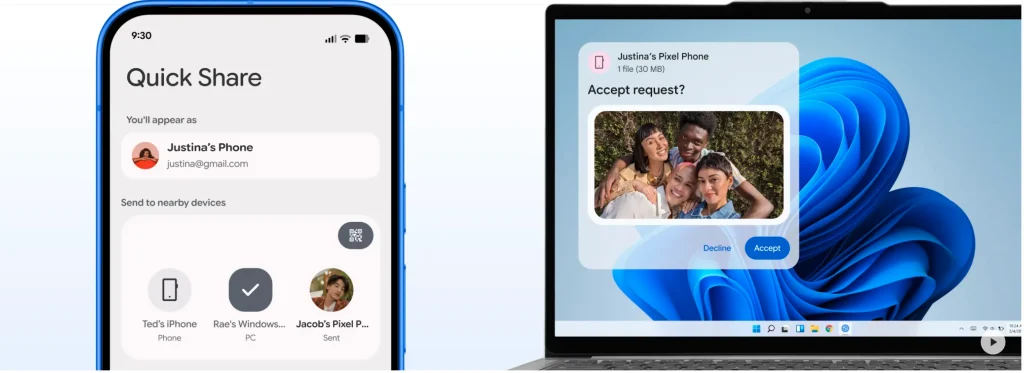
Google is introducing an automated media synchronization capability across the Android ecosystem. Specifically, the latest Google Play services update enables seamless Android Quick Share backup to personal computers. This feature transmits gallery items directly to a desktop computer without requiring manual file selection. Once configured, the background service syncs newly captured photographs and video recordings automatically. Consequently, mobile users can preserve valuable device storage while safeguarding personal memories.
Transitioning from Manual Transfers to Automated Sync
Previously, Quick Share operated purely as an on-demand proximity transfer utility. Users had to open their mobile galleries, select specific items, and initiate transfers manually. However, the refreshed architecture eliminates repetitive interactions by shifting synchronization into background tasks. Furthermore, release notes confirm that Quick Share handles these automated local transfers natively. In addition, users can designate specific folders or trigger manual synchronization passes at their convenience.
Desktop Prerequisites and Hardware Compatibility
Operating this wireless synchronization bridge requires dedicated software on the host workstation. Specifically, users must install the official companion utility from Google. Desktop users can download Quick Share for Windows directly from the official website. Notably, the companion application supports sixty-four-bit releases of Windows 10 and Windows 11. However, thirty-two-bit operating systems cannot run the client software. Additionally, the desktop utility currently excludes Samsung branded phones and computers from this workflow.
Network Architecture and Service Deployment
Successful synchronization depends upon shared local connectivity between paired endpoints. Both devices must connect to the same Wi-Fi router with Bluetooth radios enabled. Meanwhile, Google is distributing this capability via Google Play services version 26.43. Because rollouts occur in phases, regional feature availability may vary across individual device models. Ultimately, this native integration establishes a reliable local backup pipeline without relying on external cloud storage.
Support Our Threat Intelligence
Find our tech and OS security coverage helpful? Support our work today and unlock a 100% ad-free reading experience!
 Buy Me a Coffee
