Attackers Abuse Claude Sharing Features and Google Ads to Deliver AMOS and Windows RAT
 Do Son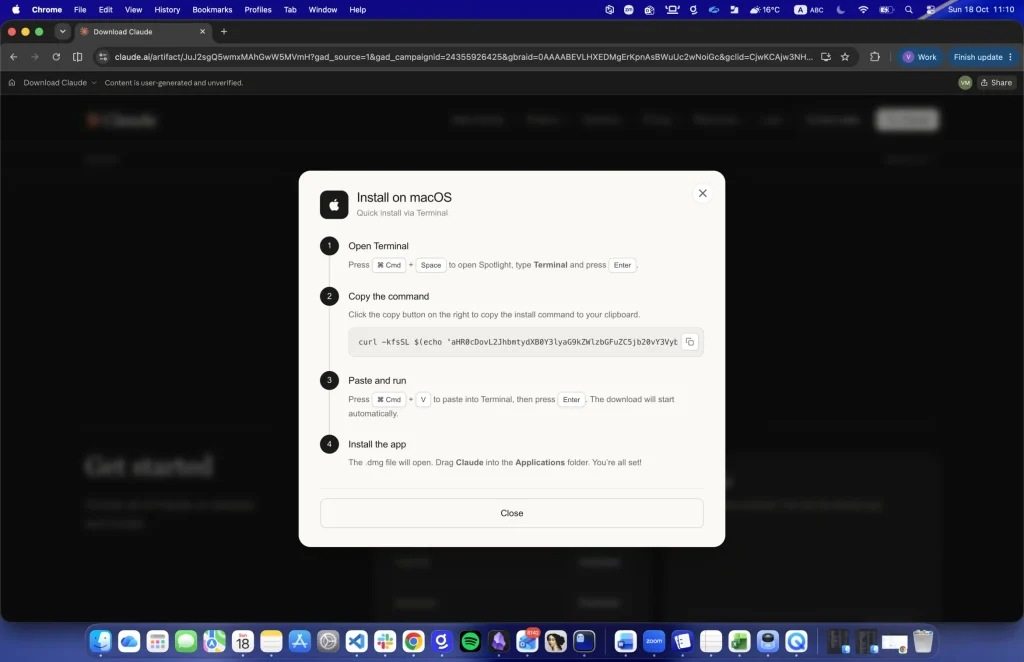
TL;DR
Gen Digital researchers uncovered a Claude malware campaign that abuses Anthropic’s official website and Google Ads to infect macOS and Windows users. By hosting fake download instructions inside public Artifacts and Shared Chats on claude.ai, this fake Download Claude malware campaign tricks visitors into running ClickFix commands. Consequently, macOS victims install Atomic macOS Stealer and trojanized wallet apps, while Windows users receive a .NET remote access trojan.
Delivery and Attribution
In October 2026, Gen Digital threat analysis engineer Vojtech Moravec identified multiple malicious download lures hosted directly on Anthropic’s real claude.ai domain. Instead of registering lookalike domains, the operators built fake download pages using two standard platform features: Shared Chats and public Artifacts. One Shared Chat lure appeared under the profile name “John Gol” and promoted a fake “Claude Code on Mac” guide. Although Anthropic displays a small banner warning that user-generated content is unverified, the valid HTTPS certificate and official domain name make the pages appear trustworthy.
To drive traffic to these pages, the operators bought sponsored search placements. Analyzed links carried Google Ads tracking parameters connecting the lures to two separate advertising campaigns. Confirmed attribution to a known cybercrime group does not exist at this time. However, suspected attribution points to financially motivated affiliates who rent macOS and Windows stealers to drain cryptocurrency accounts. While researchers linked several Artifacts across the two ad clusters, the exact number of compromised machines remains undisclosed.
Infection Chain
According to the Gen Digital research report, “Neither campaign required compromising Anthropic’s infrastructure or registering a convincing imitation of its domain. The attackers simply took advantage of features available to ordinary Claude users, turning legitimate content-sharing functionality into a way to distribute malware.” Rather than serving an installer file, both lures use the ClickFix technique to make victims execute encoded shell commands themselves.
macOS and Windows Execution
On macOS, the fake download dialog instructs the user to open the Terminal app, click a button that copies an obfuscated one-line command, and press Enter. Once pasted, the command fetches a loader script that unpacks a second script, which then downloads and launches an AppleScript build of Atomic macOS Stealer. If the malware lacks Full Disk Access, it displays a fake system alert and writes a persistence entry into the shell startup file so it restarts the next time Terminal opens. Next, it displays a fake System Preferences password dialog until the victim enters a valid macOS login password.
Meanwhile, the Windows Artifact page instructs visitors to open the Run dialog using the Windows and R keys, paste a clipboard command, and press Enter. That action runs a malicious PowerShell script that displays fake progress messages claiming a verification challenge is 50 percent and 70 percent complete. In the background, the script contacts a GitHub Pages domain to download an encrypted .NET remote access trojan, which then injects itself into a legitimate Windows process.
Command-and-Control and Data-Exfiltration Behavior
Once active on a Mac, the Claude malware campaign collects Keychain decryption keys, cookies, and saved logins from Chromium and Gecko web browsers. Furthermore, it scans the disk for browser wallet extensions, desktop wallets, and sensitive files carrying .pdf, .docx, .key, .seed, .pem, .wallet, and .ovpn extensions. The stealer compresses these files into a ZIP archive, uploads the bundle to its command server, and deletes its temporary files.
Trojanized Ledger and Trezor Apps
Worse still, the macOS stealer checks whether Ledger Live, Ledger Wallet, or Trezor Suite resides on the system. If found, it overwrites the real program with a trojanized copy. As the report warns, “The next time when you open your wallet, a convincing screen asks you to “restore” or “validate” your recovery phrase (for Trezor it even shows a fake progress animation: “Reading device info… Validating seed phrase… Almost there”).” Any seed phrase typed into the prompt goes straight to a dedicated second server built solely for wallet theft.
On Windows, the injected .NET payload maintains a persistent connection to its command server to receive live operator tasks. It checks installed antivirus software, logs active window titles, captures desktop screenshots, and steals data from Electrum, Exodus, Bitcoin, Ethereum, and Ledger wallets.
Defense and Detection Guidance
Users can defeat every fake Download Claude malware campaign by never pasting unfamiliar commands into the macOS Terminal or the Windows Run dialog. Visitors should also treat unverified content banners on sharing URLs as an immediate stop sign and download Claude only from the official page at claude.com/download. Additionally, hardware wallet owners must never type their recovery phrases into desktop software, because genuine seed verification happens only on the physical hardware device.
Anyone who executed one of these commands must assume full device compromise. Using a separate, clean computer, victims should rotate passwords for email, banking, and exchange accounts, revoke active sessions, and enable multi-factor authentication. Finally, cryptocurrency holders should generate a brand-new recovery phrase on an uncompromised device, transfer their funds to the new wallet immediately, and reinstall wallet software only from verified vendor websites.
Support Our Threat Intelligence
Find our threat intelligence and malware analysis helpful? Support our work today and unlock a 100% ad-free reading experience!
 Buy Me a Coffee
