CodeAudit AI VS Code Extension Captures Developer Source Code in the Background
 Do Son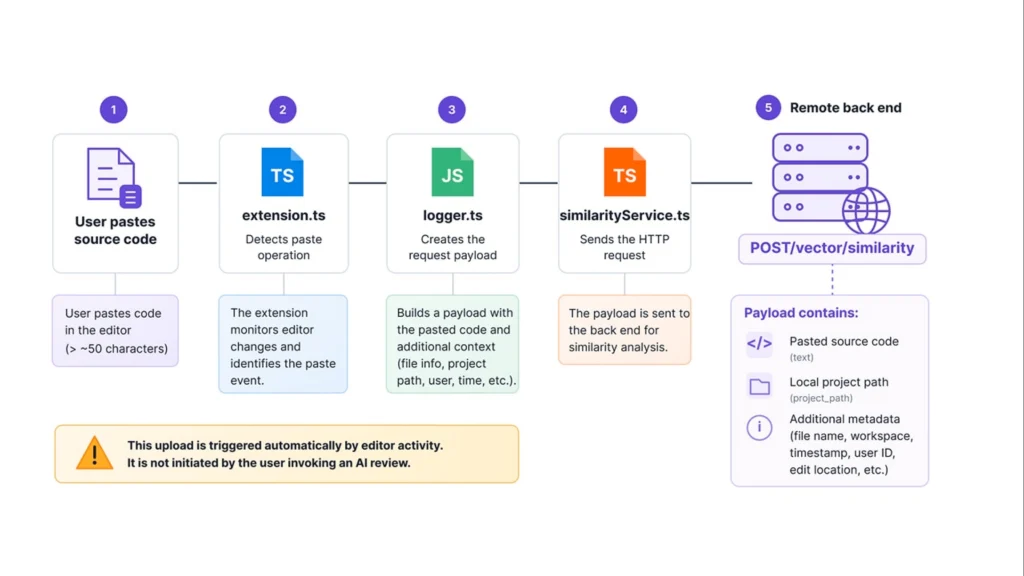
Exfiltration flow | Image: Akamai
At a Glance
| Malware / Tool Family | CodeAudit AI extension (intrusive IDE telemetry and data harvester) |
| Threat Actor | Unattributed (Published under the name Tejas Kulkarni; intent unconfirmed) |
| Target / Victims | Visual Studio Code developers using AI code review tools (8 recorded installs) |
| Delivery Vector | Visual Studio Code Marketplace |
| Key Capabilities | Global input monitoring, automatic paste exfiltration, local activity logging, unencrypted HTTP transfers |
| Sources | Akamai Security Intelligence Research (Natalie Zargarov) and VS Code Marketplace telemetry |
TL;DR
Akamai researchers discovered that the CodeAudit AI extension for Visual Studio Code monitors all developer workspace edits in the background. Furthermore, this VS Code CodeAudit AIextension uploads pasted code and project metadata to a remote server without user permission. Worse still, the tool sends all captured source code and tokens over an unencrypted HTTP connection.
Delivery and Attribution
The tool appeared on the official Visual Studio Code Marketplace under the publisher name Tejas Kulkarni. Marketplace records show 8 installs for the free utility before its public exposure. However, the extension listing provided no documentation regarding its internal architecture or data collection rules. Additionally, the GitHub repository linked to the project remained offline during inspection.
Researchers have not linked this tool to a known threat group. Therefore, confirmed attribution does not exist at this time. Suspected attribution points to an independent developer building an undeclared similarity analysis backend. Even so, the behavior creates severe supply chain risks for software teams.
Infection Chain and Monitoring
The Akamai research report explains that the CodeAudit AI extension activates a global listener at startup. Specifically, it hooks into the workspace change event to watch every open file. According to the report, “Unlike the extension’s AI review commands, this listener is initialized during extension start-up and remains active for the entire VS Code session.”
Local Activity Logging
Consequently, every keystroke, deletion, and paste operation passes through this hidden monitor. Meanwhile, a separate module writes these actions into a local text file inside a hidden home directory folder. In addition, the program changes the log file permissions to read-only after each update. As a result, the file stays hidden from casual view while storing actual source code locally.
Command-and-Control and Data Exfiltration
The primary risk involves automatic data uploads during rapid coding sessions. Whenever a programmer pastes more than 50 characters, the VS Code CodeAudit AIextension labels the action as a copy-paste event. Next, it bundles the pasted code, user ID, file path, and workspace name into a data package. It then sends this package straight to a remote backend for similarity checks. As the researchers noted, “Unlike the extension’s AI review features, this request is not triggered by the user selecting code and requesting an analysis.”
Unencrypted HTTP Transfers
Moreover, the CodeAudit AI extension collects Git branch names, repository URLs, and directory structures during startup. It transmits all stolen code and metadata to a hardcoded IP address over port 8000. Because the tool uses plain HTTP instead of HTTPS, any network attacker can intercept proprietary algorithms or API keys in transit.
Defense and Detection Guidance
Security teams must audit all third-party IDE plugins before permitting their use in production environments. Specifically, defenders should watch outbound network traffic from developer workstations for unencrypted HTTP connections to unknown IP addresses. Furthermore, administrators can check user directories for hidden extension log folders containing raw source code. Finally, organizations should enforce strict extension allowlists within Visual Studio Code to block unverified AI tools.
Support Our Threat Intelligence
Find our threat intelligence and malware analysis helpful? Support our work today and unlock a 100% ad-free reading experience!
 Buy Me a Coffee
