 Do Son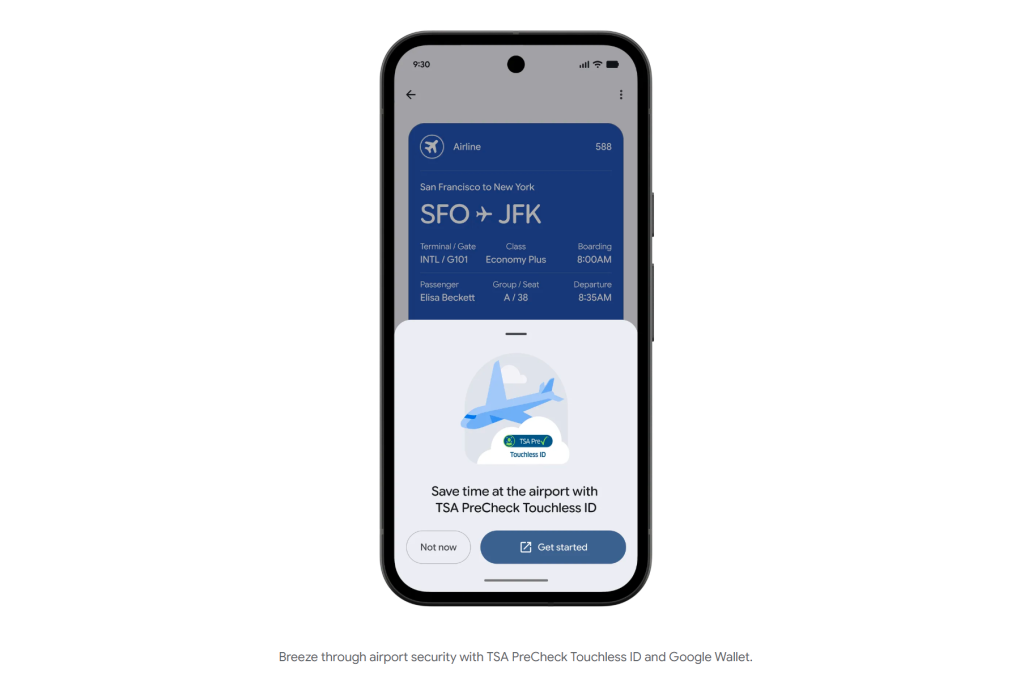
For business travelers and frequent flyers across the United States, the long airport security line is often the worst part of the trip. The TSA already offers TSA PreCheck Touchless ID for contactless identity checks. In the past, however, travelers had to enter passport details by hand for each airline. The process was tedious. Now Google has announced a much simpler flow. Google Wallet becomes the TSA program’s first digital wallet partner. In the future, a single opt-in supports contactless fast-track screening with up to 100 partner airlines.
Escaping Manual Entry: 100 Airlines, 65 Airports
In practice today, TSA PreCheck Touchless ID is already live at 65 airports nationwide. Yet only a few airlines support it. The biggest pain point is switching carriers. Each time, travelers had to re-upload passport details and settings in that airline’s own app. The experience was far from friendly.
To fix this, Google product manager Atri Chandramouli announced an update for the coming weeks. Google Wallet will expand support for the contactless service to 100 airlines that take part in TSA PreCheck Touchless ID.
The New Setup Flow
The setup becomes very intuitive:
- Create a digital ID: if you have not already, first build a digital ID pass in Google Wallet using your passport details.
- Add a boarding pass: check in as usual, then save the digital boarding pass to Google Wallet.
- Opt in with one tap: if you are eligible, a “Get started” button appears on the boarding pass screen. Tapping it leads to the TSA PreCheck Touchless ID sign-up page. There you simply agree to share your digital ID and flight details with the TSA.
- Get the badge: once the TSA confirms the authorization, a dedicated TSA PreCheck Touchless ID icon appears on the boarding pass.
When you reach the security checkpoint at one of those 65 airports, the rest is easy. You walk into the dedicated express lane and look at the TSA’s facial comparison camera. You do not need to pull out a physical ID, passport, or even the boarding pass on your phone. The identity check finishes smoothly, and you pass through.
Privacy First: Encrypted On-Device, Unlocked by Biometrics
Passport data and facial recognition involve highly sensitive identity information. So privacy is naturally a key concern. On this point, Google stresses the Google Wallet security model. The company says all digital ID data is encrypted. It is stored only on the user’s phone, not uploaded to the cloud.
Google Wallet also never quietly uploads data in the background. The system shares information with the TSA only after you tap to consent. First, you must pass device verification through a biometric (fingerprint or face), a PIN, or a pattern. Only then does Wallet send the needed details for that one flight. As a result, you keep full control over your digital identity.
Analysis: The Wallet as an Invisible Key to Physical Life
For a long time, Apple Wallet has drawn more headlines in the U.S. market. That covered linked credit cards, digital car keys, and state driver’s licenses. This time, Google entered through air travel, a high-frequency, high-need scenario. It wired data links directly to the TSA and a hundred airlines at the system level.
The most striking part of this update is consolidation. It pulls a fragmented experience into one entry point. Before, every airline meant a separate app and repeated data entry on every flight. Google Wallet now gathers that into a single place. For frequent flyers who switch between carriers like Delta, United, or Southwest, this removes a huge hassle.
It also points to the ultimate form of the digital wallet. It is no longer just a tool for tap-to-pay. Instead, it becomes an invisible key that links identity in the physical world. When you walk into the airport, the system already knows who you are and where you are going. The only thing left to do is walk through.
Support Our Threat Intelligence
Find our tech and OS security coverage helpful? Support our work today and unlock a 100% ad-free reading experience!
 Buy Me a Coffee
