The Copilot Retreat: Why Microsoft is Scrubbing Its AI Brand from Windows 11 Apps
 Do Son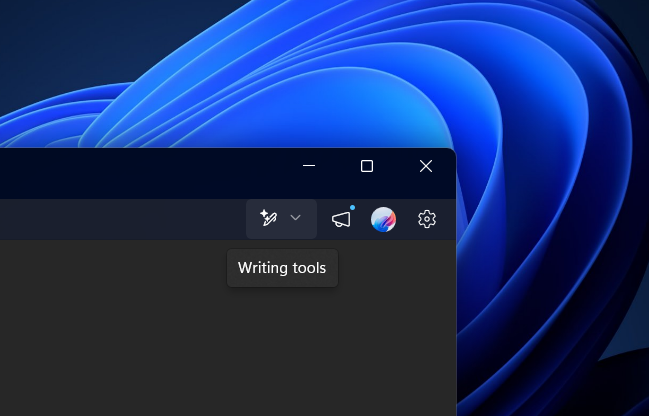
Earlier, when Microsoft disseminated a blog post outlining its intentions to refine the performance and user experience of Windows 11, numerous users implored the corporation to exercise greater discretion regarding the integration of artificial intelligence and Microsoft Copilot services.
At present, Microsoft installs Copilot by default within the Windows 11 environment, with various integrated services invoking its capabilities; for instance, within Notepad, users may utilize Copilot to refine prose, generate summaries, or modulate the linguistic tone.
However, the reality is that a significant portion of the user base harbors a distaste for Copilot. This widespread aversion has compelled Microsoft to incrementally excise the Copilot branding from both the operating system and its constituent applications. The most recent manifestation of this trend is observed in Notepad, where the AI-driven utilities have been stripped of the Copilot moniker.
In the latest iteration of Notepad, Microsoft has rechristened these AI capabilities as “Advanced Features.” The erstwhile Copilot iconography has been superseded by a dedicated writing implement icon, a design choice intended to facilitate a more intuitive understanding of the tool’s utility.
Upon engagement, these “Advanced Features” offer functionalities such as text rewriting, content summarization, and tone adjustment. In terms of technical execution, these remain indistinguishable from the previous Copilot-branded iteration, as they likely continue to leverage the underlying Copilot AI infrastructure.
While the Copilot brand persists across many pre-installed and first-party Microsoft applications, it is anticipated that these references will be progressively purged and replaced with functional descriptions specific to each application, eventually distancing the user experience from the Copilot identity.
Support Our Threat Intelligence
Find our tech and OS security coverage helpful? Support our work today and unlock a 100% ad-free reading experience!
 Buy Me a Coffee
