 Do Son
At a Glance Summary
| Attribute | Details |
|---|---|
| Actor or Group | Unattributed cybercrime operators |
| Activity Type | Phishing, dual RMM deployment, living-off-the-land access |
| Targets or Victims | Enterprise networks across multiple global industry sectors |
| Scale | Multi-industry distribution utilizing five major cloud hosting providers |
| Jurisdiction / Status | Unidentified threat actors; uncharged |
| Source | Microsoft Defender Experts |
Executive Summary
Threat actors use deceptive email lures to distribute legitimate MSP360 remote monitoring and management installers. Once installed, the management agent downloads a secondary ConnectWise ScreenConnect client to establish redundant remote access. This multi-stage technique enables attackers to harvest corporate credentials while blending into daily administrative traffic.
What Happened During the RMM Phishing Attacks
The intrusion begins when targets receive deceptive emails containing malicious download links. These lures impersonate calendar invitations, PDF reader updates, and video conference installers. Furthermore, the attackers abuse reputable cloud storage services to host the payloads. These platforms include Amazon S3, Cloudflare R2, Dropbox, GitLab, and Supabase.
When a recipient opens the file, the system runs a digitally signed MSP360 installer. The program immediately prompts the user for User Account Control elevation. If the user grants administrative rights, the software installs background services. Specifically, it creates two system services named RMM.Agent.exe and RMM.Agent.Launcher.exe. The installer also configures the Windows Firewall to permit incoming traffic on UDP port 48678.
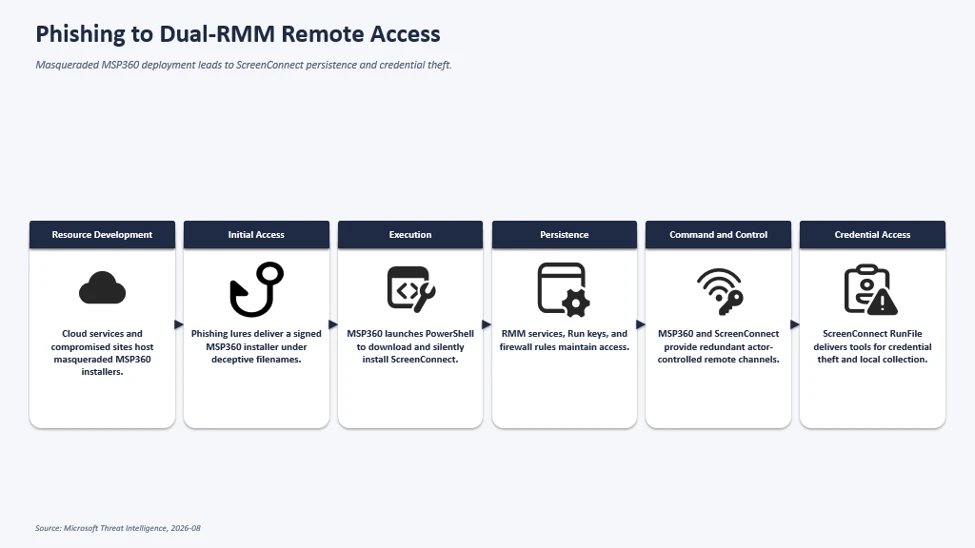
Next, the newly established agent initiates remote command execution. The background service invokes PowerShell to download an MSI installer from attacker infrastructure. Then, the script installs ConnectWise ScreenConnect in quiet mode without showing visual alerts. As Microsoft reported, “Microsoft observed the MSP360 deployment being used to download and install a ConnectWise ScreenConnect client, creating a secondary remote-access channel that provided redundant access to compromised systems.”
After configuring ScreenConnect, the operators deploy post-compromise utilities directly through the platform. Attackers place custom executables inside local document directories. In addition, the intruders use utilities like WebBrowserPassView to steal stored passwords. Other dropped tools suppress mouse movement and hide application windows from the user.
Who Is Behind It
Microsoft tracks this malicious campaign as an unattributed cluster of activity. Security analysts have not linked the infrastructure to a known threat group. Therefore, the attribution remains unconfirmed across all observed incidents.
However, the operational tradecraft reveals clear financial and espionage motives. The operators show discipline by separating delivery hosts from command channels. In addition, researchers observed similar attacks that utilized Faronics DeployAgent instead of MSP360. This pattern indicates that multiple operators share access techniques across different campaigns.
Impact and Scale
The campaign impacted organizations across multiple commercial industries worldwide. Because phishing abuses RMM tools that carry valid digital signatures, endpoint protection systems often trust the binaries. As Microsoft explained, “This activity highlights how threat actors continue to abuse legitimate remote administration software to blend into normal IT operations while maintaining persistent access and reducing detection opportunities.”
Fortunately, installations fail whenever users deny the administrative elevation prompt. When users reject User Account Control prompts, the installer terminates before deploying any network services. Thus, strict endpoint privilege controls prevent the secondary infection chain from taking root.
What Comes Next and Defense Guidance
Security administrators must implement strict software application controls across managed endpoints. Organizations should block unapproved remote monitoring software through Group Policy or endpoint management tools. Furthermore, defenders should audit Windows service registrations for unexpected background agents.
Network defenders must also monitor outbound connections toward unauthorized remote access platforms. Administrators can review detection queries in the official Microsoft report on how phishing abuses RMM tools. Limiting administrative privileges on standard workstations remains the most reliable barrier against this threat. Finally, teams should configure email gateways to block executable archives delivered from third-party cloud sharing services.
Support Our Threat Intelligence
Find our threat intelligence and malware analysis helpful? Support our work today and unlock a 100% ad-free reading experience!
 Buy Me a Coffee
