 Do Son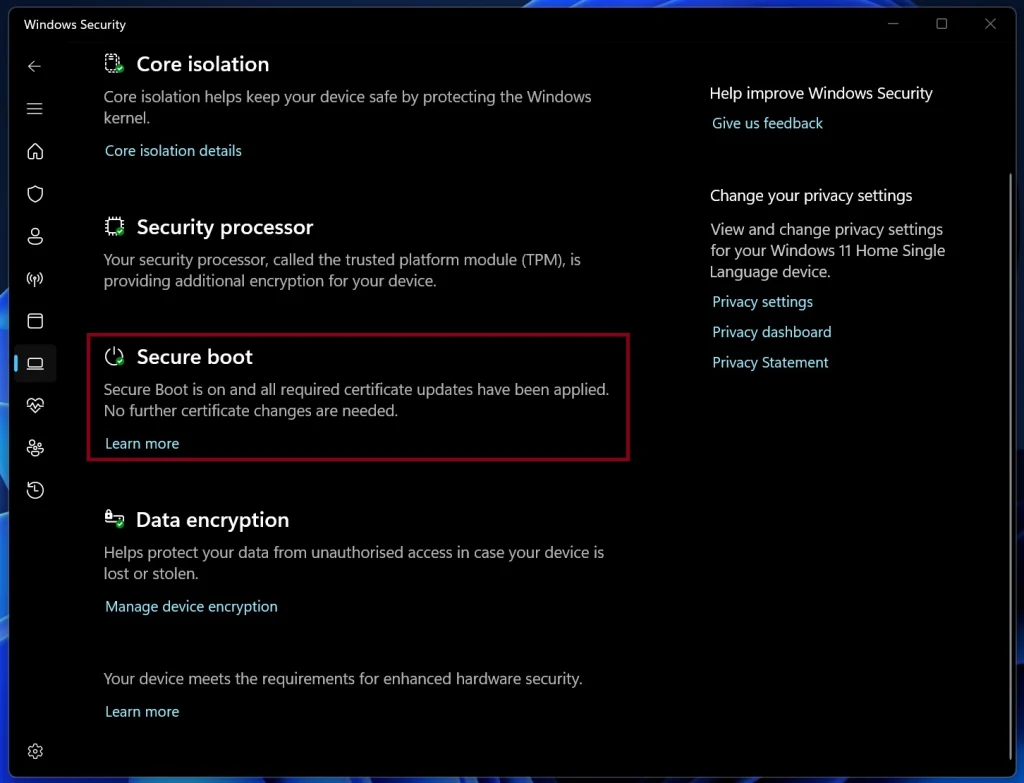
The Microsoft Windows Production PCA 2011 certificate officially reached its expiration date on October 19, 2026. This vital digital credential historically authenticated the integrity of the Windows Boot Manager during initial system initialization. According to Microsoft, personal computers relying on the legacy certificate will continue to boot normally. Furthermore, these machines will install routine cumulative security updates without interruption. However, older systems that fail to refresh their credentials cannot receive future bootloader mitigations.
The Sunset of Legacy Secure Boot Certificates
Secure Boot actively verifies cryptographic signatures across UEFI firmware, bootloaders, and kernel drivers before executing system code. Consequently, the mechanism prevents untrusted software and stealthy bootkits from compromising the operating environment. The PCA 2011 certificate resided within the native UEFI signature database to validate Microsoft boot components. To replace this retiring root, Microsoft introduced the updated Windows UEFI CA 2023 certificate.
Notably, this milestone represents the final phase of the comprehensive 2026 certificate transition. Previously, two companion 2011 certificates expired in June 2026. Those earlier credentials signed Secure Boot database updates, third-party bootloaders, and external EFI utilities.
Impact on Un-Updated Systems and Boot Security
Fortunately, un-updated devices will not experience boot failures or sudden system lockouts. As Microsoft clarified in guidance detailing when Secure Boot certificates expire on Windows devices, systems retain basic operational continuity. Nevertheless, outdated machines will miss upcoming enhancements to the Secure Boot revocation database. Therefore, unpatched endpoints will gradually fall behind as new boot-level vulnerabilities emerge.
Automated Updates and Firmware Upgrades
In most cases, Microsoft delivers the new UEFI CA 2023 certificate automatically through standard monthly updates. Users simply need to install regular cumulative patches to receive the new security payload. Meanwhile, certain hardware configurations require companion firmware updates from original equipment manufacturers. In those instances, device manufacturers must supply the appropriate UEFI BIOS patches directly.
Verifying Certificate Status and BitLocker Safety
Users can easily verify their configuration status within the Windows Security application. Specifically, navigate to Device Security and inspect the Secure Boot status panel. If the interface indicates that all necessary certificate updates have applied, the transition is complete.
Importantly, users facing required firmware updates must exercise caution before flashing their motherboards. System administrators strongly recommend backing up BitLocker recovery keys prior to initiating any BIOS installation. Afterward, users can safely apply the manufacturer updates according to official OEM instructions.
Support Our Threat Intelligence
Find our tech and OS security coverage helpful? Support our work today and unlock a 100% ad-free reading experience!
 Buy Me a Coffee
