Smile for the Settings: Windows 11 Update Adds Native Camera Controls and Tired New Emojis
 Do Son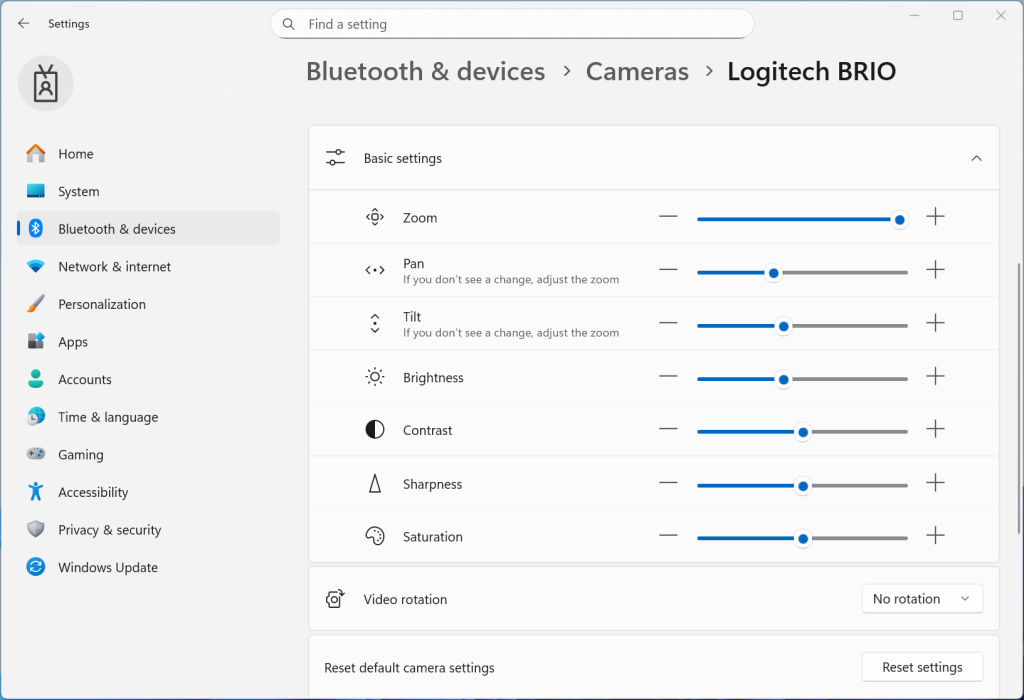
Microsoft has recently inaugurated a nascent update for participants within the Windows 11 Dev and Beta Channels, delivering a synchronized suite of enhancements that includes sophisticated, high-level camera configuration options.
Following the installation, the Dev Channel iteration ascends to Build 26300.7760 (KB5077202), while the Beta Channel progresses to Build 26200.7755 (KB5077201). Users enrolled in these specific trajectories are encouraged to navigate to the system update interface to initiate the retrieval. It should be noted that the Canary Channel has yet to receive this particular deployment; consequently, patrons of that flight are requested to remain patient.
This release formally reintroduces support for Emoji 16.0. Although previously integrated, the feature was retracted due to technical inconsistencies; having been rigorously remediated, it is now being redistributed. The Emoji 16.0 lexicon introduces a variety of evocative symbols, including the “face with bags under eyes,” a fingerprint, root vegetables, a leafless tree, a harp, a shovel, and a splatter.
Furthermore, Microsoft has enriched the Settings application by integrating direct pan and tilt controls for compatible hardware. This empowers users to execute precise, advanced manipulations of their camera’s orientation directly from the system interface. To access these refinements, navigate to Settings > Bluetooth & devices > Cameras, where the new options are housed within the basic configuration menu. Please be advised that this feature is being disseminated via a phased rollout.
Beyond these functional additions, the update addresses several aesthetic and performance anomalies. It rectifies a visual glitch involving the screen’s lower periphery when the taskbar is configured to auto-hide, and resolves a persistent issue causing desktop icons to flicker. Crucially, the patch also remediates a defect within the Windows Security dialogue that erroneously solicited credentials. Users on the Dev and Beta flights are strongly urged to proceed with this update to ensure an optimized computing environment.
Related Posts:
Support Our Threat Intelligence
Find our tech and OS security coverage helpful? Support our work today and unlock a 100% ad-free reading experience!
 Buy Me a Coffee
