 Do Son
At a glance
| Category | Details |
|---|---|
| Campaign / Family | TerminalFix (ClickFix variant) |
| Threat Actor | Unattributed (Tracked across ongoing intrusion clusters) |
| Targets | Enterprise networks across multiple global industries |
| Delivery Vector | Compromised websites displaying fake Cloudflare Turnstile CAPTCHA lures |
| Key Capabilities | DLL sideloading, steganography, Active Directory discovery, Python reverse WebSocket tunneling |
| Source | Microsoft Threat Intelligence |
TL;DR
Microsoft Threat Intelligence recently identified an active TerminalFix campaign targeting organizations across multiple industries. This threat variant abuses fake Cloudflare CAPTCHA prompts to trick users into pasting malicious commands into Windows Terminal. Consequently, the multi-stage attack deploys an encrypted reverse tunnel that gives threat actors direct access to enterprise networks.
Delivery
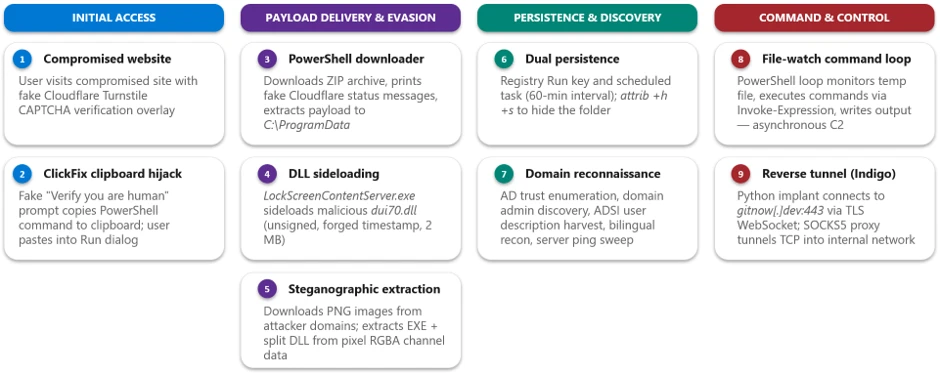
The intrusion begins when an unsuspecting user visits a compromised website. The site rapidly displays a fake Cloudflare Turnstile verification overlay. This overlay mimics genuine verification prompts with animated spinners and branded checkboxes. When the visitor clicks the verification box, the site silently copies a malicious PowerShell command to their clipboard.
Earlier ClickFix attacks instructed victims to paste commands into the Windows Run dialog. In contrast, this TerminalFix campaign directs targets to open Windows Terminal or PowerShell instead. As Microsoft notes, “While traditional ClickFix campaigns direct victims to the Windows Run dialog, TerminalFix campaigns apply the same technique but direct users to Windows Terminal or PowerShell instead, increasing the likelihood that complex, multi-line scripts execute successfully.” The pasted script displays fake cyan and green status messages to reassure the victim while downloading malicious payloads in the background.
The Infection Chain
The initial PowerShell command downloads a ZIP archive directly into the local program directory. This archive contains a legitimate, signed executable named LockScreenContentServer.exe alongside a malicious file named dui70.dll.
DLL Sideloading and Steganography
The malware executes the signed binary to initiate DLL sideloading. Because Windows checks the local directory before checking system folders, the application loads the malicious DLL. This technique allows the threat actors to run unauthorized code inside a trusted Windows process.
Next, the sideloaded DLL launches a script that downloads three PNG images from remote servers. The attackers embed binary components directly within the image pixel data. The script extracts these hidden bytes and reassembles them into executable files on disk. Furthermore, the operators split the core DLL across two separate images to evade standard network detection rules.
Persistence and Local Reconnaissance
The malware establishes persistent access across system restarts using two independent mechanisms. First, it registers a new Run key in the Windows Registry. Second, it configures a scheduled task that executes every 60 minutes under a deceptive system name.
After establishing persistence, the malware performs extensive network reconnaissance. It gathers system metadata across English, Spanish, and German locales. Additionally, the script enumerates Active Directory domain trusts, domain admin accounts, and user descriptions. It also performs automated ping sweeps against internal domain controllers, SQL servers, and backup systems.
To manage local operations, the malware creates an asynchronous command loop. A persistent PowerShell script monitors a local text file for incoming instructions. It executes queued commands and writes output to a separate response file. This decoupled architecture allows operators to run local tasks on demand.
Command-and-Control and Network Pivoting
The final stage of the TerminalFix attack chain involves deploying a network tunnel. The attackers bring an official, unmodified Python runtime environment directly to the host. They execute a custom script named client.py using pythonw.exe to suppress all visible console windows.
The tunneling implant establishes an outbound TLS connection over port 443. It then upgrades the connection to an encrypted WebSocket channel. This tunnel supports SOCKS5 proxy routing, allowing the remote operator to route arbitrary TCP traffic through the compromised host.
According to Microsoft researchers, “This type of intrusion is particularly dangerous because it provides attackers with direct access to an organization’s internal network through the reverse tunnel.” Combined with the Active Directory reconnaissance gathered earlier, the compromised machine becomes an internal pivot point. Threat actors can use this pivot to reach internal servers, escalate privileges, and stage secondary malware.
Defense and Detection Guidance
Organizations must adopt layered defenses to stop the TerminalFix campaign before it establishes network access. Security teams should implement endpoint detection rules that flag unauthorized PowerShell executions originating from browser interactions. Additionally, administrators should restrict standard user permissions from executing scripts in temporary directories.
Defenders should monitor process trees for legitimate Windows binaries loading unsigned DLLs from atypical paths. Security systems must also inspect network telemetry for long-lived outbound WebSocket connections to unfamiliar hosts. Finally, organizations should train employees to recognize social engineering prompts that ask users to paste commands into terminal windows.
Support Our Threat Intelligence
Find our threat intelligence and malware analysis helpful? Support our work today and unlock a 100% ad-free reading experience!
 Buy Me a Coffee
