The Exit Strategy: Microsoft Finally Grants Admins a Way to Uninstall Copilot
 Do Son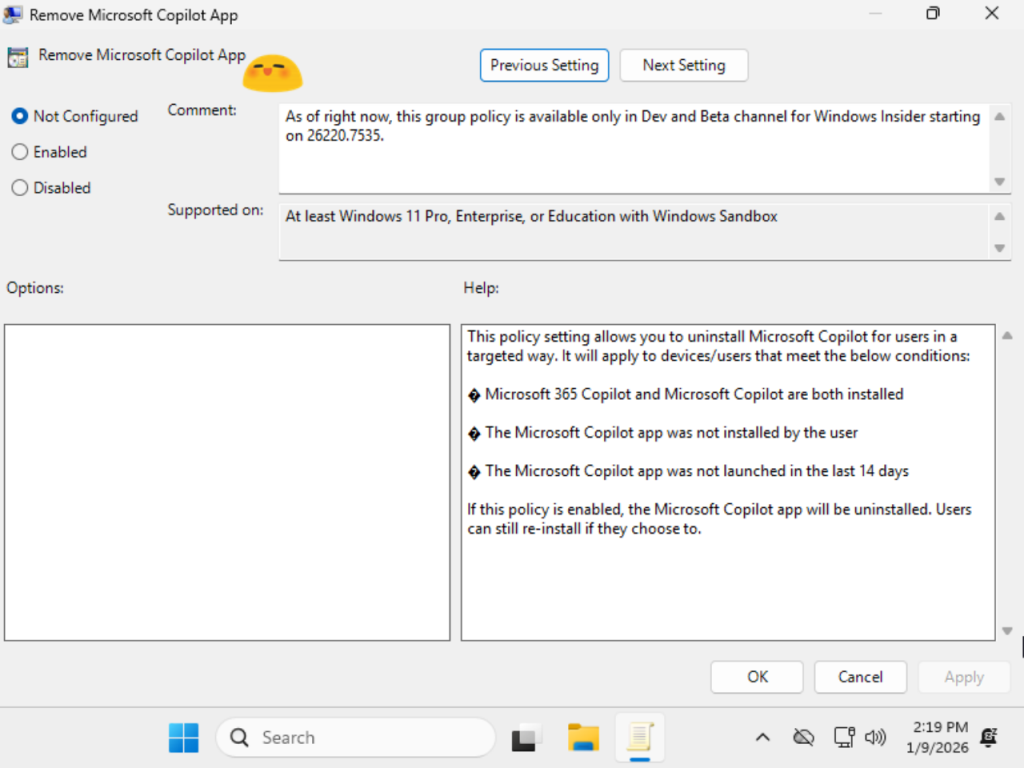
Microsoft has integrated its artificial intelligence utility, Microsoft Copilot, into the Windows 11 architecture; however, this inclusion has not been universally embraced by the user base. Despite this, Microsoft’s default configuration historically precluded the direct uninstallation of the application.
Evidently responding to a groundswell of corporate feedback, Microsoft has introduced a novel Group Policy within Windows 11 Beta/Dev Build 26200.7535. This policy empowers IT administrators to thoroughly expunge the Microsoft Copilot application, provided a specific set of criteria is met. The prerequisites established by Microsoft are as follows:
- The system must have both Microsoft Copilot and Microsoft 365 Copilot concurrently installed.
- The user must not have manually installed the Microsoft Copilot application (rendering it eligible only if pre-installed or deployed via enterprise volume licensing).
- The application must have remained dormant, with no user-initiated launches, for a minimum of 28 days.
Once these stipulations are satisfied, administrators may invoke the Group Policy to execute a complete removal. It is important to note that users retain the ability to manually reinstall Microsoft Copilot thereafter; thus, administrators currently lack the authority to impose a permanent prohibition on its installation or use.
This policy is exclusively tailored for enterprise environments, as Microsoft 365 Copilot is a service structured for corporate entities. Consequently, individual consumers are unable to utilize this specific administrative lever to remove the application.
The new Group Policy can be located at: User Configuration -> Administrative Templates -> Windows Components -> Windows AI -> Remove Microsoft Copilot App.
Related Posts:
Support Our Threat Intelligence
Find our tech and OS security coverage helpful? Support our work today and unlock a 100% ad-free reading experience!
 Buy Me a Coffee
