 Do Son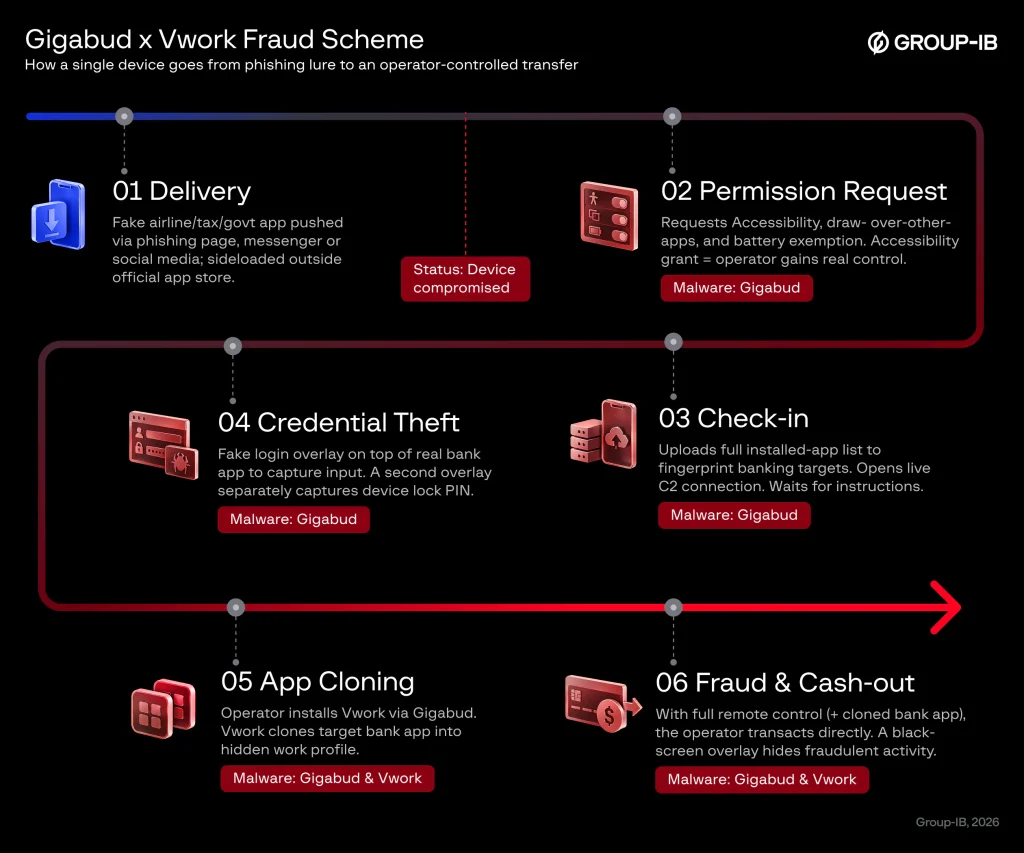
Gigabud and Vwork fraud scheme flowchart | Image: Group-IB
At a glance
- Malware family: Vwork and Gigabud
- Threat actor: GoldFactory (confirmed attribution)
- Targets or victims: Mobile banking users across 11 countries
- Delivery vector: Social engineering via phishing sites and malicious sideloaded apps
- Key capabilities: Android Work Profile abuse, app cloning, remote device control, credential harvesting
- Source: Group-IB Threat Intelligence
TL;DR
Researchers identified Vwork Android malware operating as a malicious companion to the Gigabud banking trojan. The GoldFactory cybercrime group uses this utility to clone targeted financial applications into isolated Android work profiles. Therefore, fraudulent transactions bypass traditional security controls and permit unauthorized bank withdrawals.
Delivery
Attackers distribute the malware through multi-stage social engineering campaigns outside official app marketplaces. Specifically, threat actors lure victims using phishing websites, direct messaging applications, and social media promotions. These lures impersonate national airlines, revenue authorities, and official government portals.
When users download the malicious packages, they install the Gigabud trojan on their personal devices. Group-IB observed compatible samples targeting victims in eleven countries. These nations include Brazil, Colombia, Egypt, Indonesia, Laos, Mexico, Morocco, the Philippines, Thailand, Turkiye, and a GCC member state.
In Indonesia alone, the campaign caused severe damage between February and July 2026. Telemetry recorded 1,469 compromised devices and 1,281 compromised account credentials during this period. Furthermore, researchers calculated total financial losses of roughly 960,939 dollars in the country.
Infection Chain
The attack begins immediately after the victim installs the fake application on an Android device. Upon initial startup, the malware prompts the user to grant critical system permissions. These permissions include Accessibility service access, battery optimization exemptions, and permission to display overlays above other applications. The moment the victim grants Accessibility rights, the remote operator obtains functional control over the mobile device.
Next, Gigabud performs an initial inventory check by collecting a list of all installed packages. The trojan transmits this inventory back to the operator to identify installed banking applications. When the victim opens a supported banking app, Gigabud displays a fraudulent login screen over the genuine interface. This overlay steals customer credentials instantly. Simultaneously, a hidden overlay captures the personal screen unlock code of the device.
After harvesting user credentials, the operator instructs Gigabud to download and install Vwork. Vwork represents a weaponized fork of Shelter, an open-source tool that manages the Android Work Profile feature. The report notes that “Vwork is a fork of the open-source Android cloning application Shelter.” Unlike its benign predecessor, Vwork exposes internal controls as an API for third-party programs.
Gigabud then directs Vwork to clone the target banking application into a newly provisioned work profile. This Vwork Android malware acts as a tool to clone mobile banking applications into hidden profiles. The report explains, “Running the application inside the work profile hides Gigabud in the personal profile from signature detection in the application security SDK.” This architectural separation breaks the link between infection alerts in the personal profile and subsequent financial activity.
Finally, the operator performs unauthorized money transfers from within the cloned work profile. During the theft, the trojan displays a black screen to prevent the victim from noticing the ongoing fraud.
Command-and-Control and Data-Exfiltration Behaviour
The two applications divide their responsibilities across separate architectural layers to evade detection. The report states that “Vwork doesn’t have its own C2 communications function, so it requires an external application installed on the same device.” Gigabud provides the network bridge and coordinates all external communications. Consequently, the Vwork Android malware ecosystem enables attackers to bypass bank fraud systems.
Group-IB analysts discovered dedicated code routines inside newer Gigabud variants built to command Vwork. In particular, the developers implemented specific commands named initVwa, cloneApp, and uploadCloneApps. The trojan prefixes target package names with a custom tag during communication with the server. In addition, the cloneApp routine contacts an external authorization server to validate cloning tokens before duplicating the target app.
The malware transmits collected device data and credentials back to remote servers over encrypted channels. It sends detailed hardware parameters, running services, and active application lists to help attackers tailor their operations. Furthermore, the report notes that “Gigabud is an Android remote access banking trojan active since 2022.” The trojan grants operators live remote desktop capabilities to manipulate user interfaces directly.
Defense or Detection Guidance
Defenders must update mobile detection strategies to identify abuse of the Android Work Profile. Traditional security tools often monitor only the primary personal user profile. Therefore, organizations should monitor for unexpected work profiles provisioned by unfamiliar administrative applications.
Financial institutions must deploy behavioral monitoring to detect rapid app installations and screen overlay abuse. Security teams should also flag transactions initiated from newly initialized profiles that lack standard usage history.
Mobile users should never download applications from unofficial websites or untrusted messaging links. Users should review requested device permissions with extreme caution, particularly regarding Accessibility access. In addition, device owners should inspect their application lists for unfamiliar document providers or cloning utilities. If users detect unauthorized profiles, they should disconnect the device from the internet immediately. Afterwards, they should reset the phone to factory settings.
Support Our Threat Intelligence
Find our threat intelligence and malware analysis helpful? Support our work today and unlock a 100% ad-free reading experience!
 Buy Me a Coffee
