 Do Son
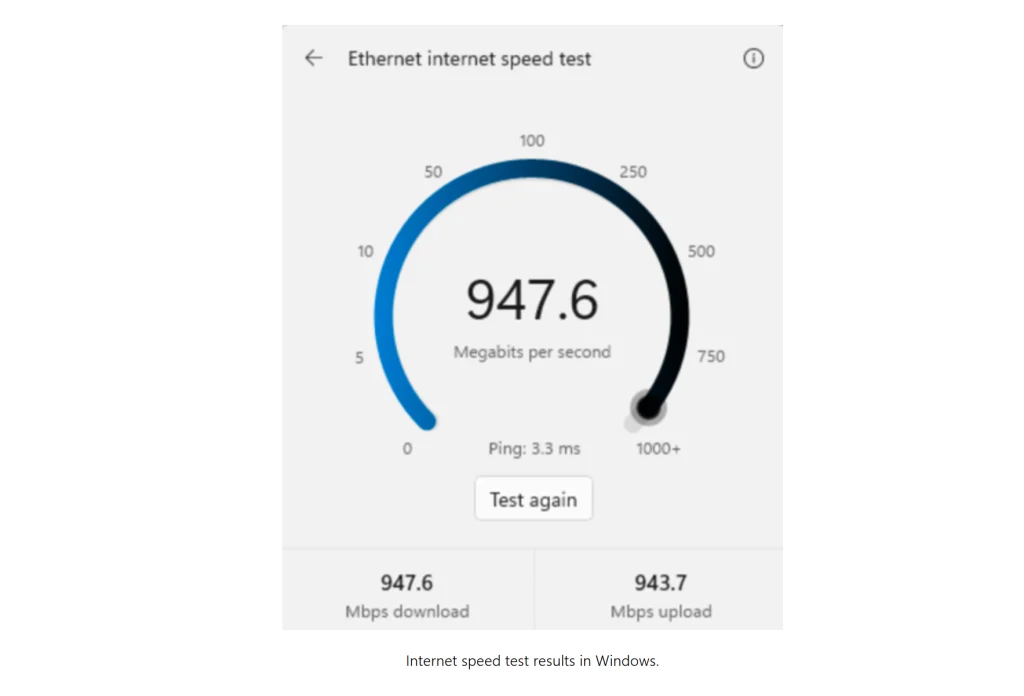
Microsoft is finally integrating a native internet diagnostic utility directly into Windows 11. Specifically, the new Windows 11 speed test feature enables users to evaluate network performance without leaving the desktop environment. Previously, testing broadband connectivity forced the operating system to open a browser window and load external search benchmarks. Now, a streamlined graphical interface conducts the diagnostic evaluation inside the operating system. Consequently, users can measure latency, download bandwidth, and upload throughput immediately.
In-System Telemetry and Persistent Performance Metrics
The integrated diagnostic tool measures three foundational network parameters with precision. First, the utility calculates real-time connection latency to identify routing delays. Next, the tool evaluates sustained download bandwidth and outbound upload throughput.
Furthermore, the system retains the previous evaluation results for quick comparative analysis. When a user reopens the diagnostic interface, the panel displays historical telemetry instantly. Users can review prior performance figures or launch a fresh network test with a single click. Therefore, diagnosing intermittent connection drops becomes far more convenient for everyday users.
AI-Assisted Prototyping and Rapid Architectural Integration
Microsoft revealed that artificial intelligence agents accelerated the feature development cycle significantly. Specifically, Windows and Devices design leader Marcus Ash explained that user feedback directly inspired the native implementation. Customers consistently requested a built-in diagnostic experience rather than disruptive web redirects.
Following this feedback, Windows executive Pavan Davuluri tasked design lead Diego Baca with examining the concept. Remarkably, Baca leveraged AI-assisted workflows to construct a functional prototype within a single day. As detailed in the report on AI development by Windows Latest, human engineers guided intelligent agents during spare hours. Furthermore, combining autonomous coding workflows with WinUI 3 allows teams to craft polished native system components rapidly.
Testing the Feature and Future Navigation Paths
Currently, Microsoft restricts the utility to experimental test flights. Specifically, testers can access the diagnostic tool within Windows 11 Experimental Build 26340.9767. Standard preview rings and production builds continue opening web-based speed tests for now.
Once Microsoft ships the utility to production channels, users can access the interface through multiple pathways:
- Right-click the network icon on the taskbar and select the speed test option.
- Open the Quick Settings flyout and select the speed test button inside Wi-Fi or cellular panels.
- Scroll to the secondary screen in Quick Settings to launch the diagnostic tool directly.
Ultimately, this native addition modernizes network troubleshooting while highlighting practical applications for generative software development.
Support Our Threat Intelligence
Find our tech and OS security coverage helpful? Support our work today and unlock a 100% ad-free reading experience!
 Buy Me a Coffee
