Microsoft Offers Windows 10 ESU Free for One Year, Mandating Microsoft Account and OneDrive Backup
 Do Son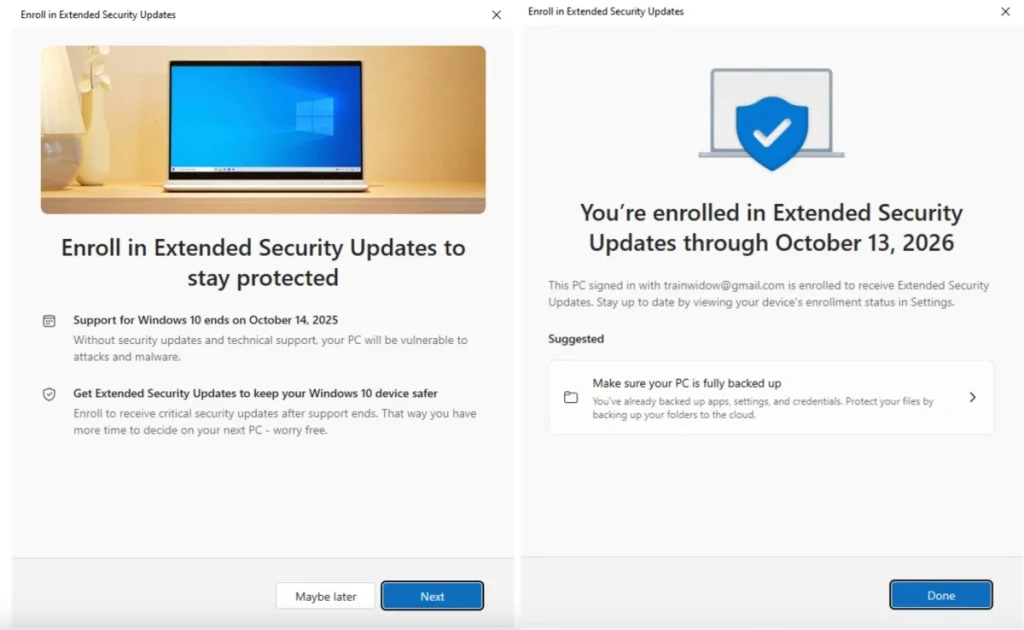
Several years ago, Microsoft announced that it would officially end technical support for Windows 10 on October 14, 2025, ceasing all subsequent security updates. As that date draws near, the company has now revealed a new offering called Extended Security Updates (ESU) — a program that grants users an additional year of protection, ensuring their devices continue to receive vital security maintenance. In certain regions, some users may even qualify to obtain this extended service free of charge.
According to Microsoft’s announcement, while Windows 10 will remain functional beyond October 14, it will no longer receive default security updates or vulnerability patches — leaving systems increasingly exposed to malicious attacks. To mitigate this risk, Microsoft’s ESU program will provide an extra year of updates, giving both enterprises and individual users more time to prepare for migration to Windows 11.
Originally, this extended update service required a $30 annual fee per device, but Microsoft has begun offering it free of charge in select markets, including the United States. Users can register through the “Update & Security” section in system settings by selecting “Enroll Now” under the Extended Security Updates program. Once enrolled, the device will continue receiving security updates until October 2026.
However, this complimentary extension is not entirely unconditional. To qualify for the ESU program, users must link their devices to a Microsoft account and enable OneDrive cloud backup. This means users who previously opted for offline logins or avoided cloud integration will now need to connect with Microsoft’s cloud ecosystem.
Additionally, OneDrive’s free storage is limited to 5 GB. If the backup exceeds this quota, users must purchase additional storage. To stay within the free limit, they may exclude certain folders — such as Documents, Pictures, or Videos — from synchronization.
For devices meeting hardware requirements, Microsoft continues to strongly recommend upgrading to Windows 11, which offers ongoing technical support and the latest AI-powered features. Yet, due to the stringent requirements for TPM 2.0 and CPU compatibility, many older systems are unable to upgrade, prompting users to remain on Windows 10 for the time being.
For these users, the Extended Security Updates program serves as a transitional safeguard, allowing them to maintain system security without an immediate hardware replacement. While it is only a temporary solution, it effectively grants hundreds of millions of active Windows 10 devices an additional year of life before the full shift to the AI PC era.
Having debuted in 2015, Windows 10 now enters its tenth year — still among the world’s most widely used operating systems. As it approaches its twilight, Microsoft’s decision to introduce Extended Security Updates not only fulfills its security obligations but also underscores the company’s strategic push toward the next generation, marking the true beginning of the end for the Windows 10 era.
Related Posts:
- How to Get Windows 10 Extended Security Updates for Free (or Cheap)
- Windows 10 ESU Program: A Lifeline for Holdouts, But at What Cost?
- OneDrive Users Targeted in Sophisticated Phishing and Downloader Campaign
- Windows 10 Users Get Free ESU: Microsoft Offers 1 Year of Security Updates via Backup or Rewards
- Still on Windows 10? Microsoft Is Rolling Out Your Last Chance for Security Updates
Support Our Threat Intelligence
Find our tech and OS security coverage helpful? Support our work today and unlock a 100% ad-free reading experience!
 Buy Me a Coffee
