 Do Son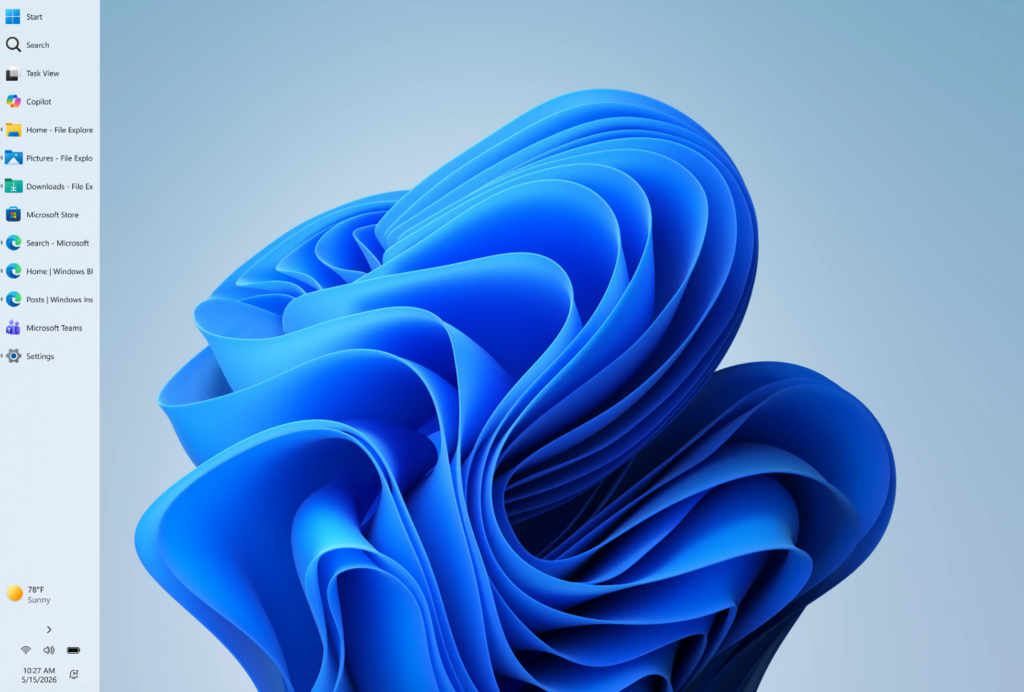
Microsoft plans to initiate a monumental recalibration of the Windows 11 user interface, seeking to address prolonged user grievances regarding the bloated architecture of the Start menu and the rigid, unyielding placement of the taskbar. The corporation announced that it will progressively distribute this nascent iteration to participants within the Experimental channel of the Windows Insider program over the forthcoming week.
This pivotal update not only empowers users to dynamically adjust the dimensions and structural segments of the Start menu but also heralds the comprehensive reinstatement of the highly anticipated feature allowing unrestricted taskbar relocation.
Following an update in November of the preceding year that conspicuously doubled the dimensions of the Windows 11 Start menu—arousing widespread consumer dissatisfaction—Microsoft has demonstrably heeded the counseling of its community, introducing a rich suite of personalization options within this Insider release:
- Bespoke Menu Dimensions: Users can now directly configure the Start menu to manifest in either a “Small” or “Large” profile, a stylistic preference that remains uniform across multi-monitor environments.
- Section-Level Toggles: The interface introduces independent switches for the “Pinned,” “Recommended,” and “All Apps” segments. Consequently, individuals desiring a streamlined aesthetic may deactivate the Recommended and All App matrices to secure an immaculate, distraction-free visual canvas.
- Granular File Recommendation Governance: Historically, suppressing menu suggestions globally impacted adjacent system sectors. Microsoft now offers discrete controls, enabling users to truncate file recommendations exclusively within the Start menu while preserving recent document repositories within File Explorer.
- Elevated Privacy Defenses: Tailored for professionals engaged in screen broadcasts, virtual presentations, or live streams, the updated system permits the obscuration of the user’s name and profile avatar within the Start menu to safeguard personal telemetry.
For veteran Windows patrons, the initial mandate anchoring the Windows 11 taskbar exclusively to the lower periphery of the display stripped advanced users of layout flexibility. With this deployment, that fundamental design liberty has finally returned:
- Omnidirectional Edge Docking: The taskbar can now be oriented along any display margin—top, bottom, left, or right. This represents a significant triumph for software engineers utilizing widescreen monitors who require maximized vertical visibility for code composition.
- Dynamic Icon Alignment: In alignment with the chosen docking perimeter, Microsoft has introduced corresponding icon orientation metrics. When anchored to the lateral margins, icons may be aligned to the upper edge or centered; when docked horizontally along the top or bottom, they retain options for left or centered configuration.
Users eager to pioneer these capabilities must authenticate their systems with a Microsoft account registered under the Windows Insider program and migrate to the Experimental channel. Through this phase, Microsoft intends to leverage consumer feedback to refine the fluid execution of these experimental features prior to a comprehensive public rollout.
This preview iteration signifies perhaps the most profound confluence of corporate concession and design progression observed in Microsoft’s recent user interface strategy.
Upon its inaugural debut, Windows 11 attempted to cultivate a sleek, contemporary consumer aesthetic reminiscent of tablet interfaces through a centered taskbar and a minimalist menu structure. However, the Windows user base is not a monolith. For accountants managing multi-display matrices, engineers requiring vertical screen real estate, or legacy users accustomed to classical paradigms, taskbar placement and menu architecture are never mere visual accoutrements; they are deeply ingrained attributes of muscle memory and information hierarchy.
By relinquishing control of the Start menu segments and restoring the four-directional taskbar freedom, Microsoft has tacitly acknowledged a fundamental tenet of operating system design: an exemplary desktop platform must never coerce the user into adaptation, but must instead offer the sublime elasticity necessary to conform to every extreme demand of human productivity.
Support Our Threat Intelligence
Find our tech and OS security coverage helpful? Support our work today and unlock a 100% ad-free reading experience!
 Buy Me a Coffee
