Fake Chocolatey and Massgrave Sites Deliver Python Armorsteal Malware via SEO Poisoning
 Do Son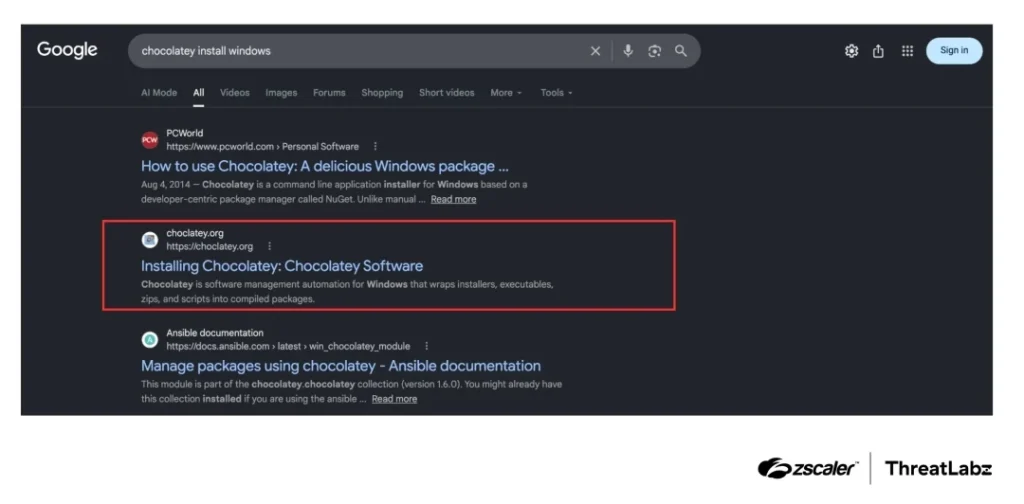
Google search results for “chocolatey install windows”.
TL;DR
In September 2026, the Zscaler Threat Hunting team uncovered an SEO poisoning campaign that used fake Chocolatey and Microsoft Activation Scripts websites to spread Armorsteal malware. When victims copied and ran the displayed PowerShell installation commands, the script silently deployed a Python 3.11 runtime and three obfuscated Python Armorsteal malware modules. Together, these modules give attackers remote control, keystroke and clipboard surveillance, and broad credential theft across Windows systems.
Delivery and Attribution
The campaign relied on two typosquatted domains pushed toward the top of Google search results. Specifically, users searching for Chocolatey installation commands landed on a fake Chocolatey page registered on September 1, 2026. Similarly, users looking for Microsoft Activation Scripts or Massgrave reached a spoofed Massgrave page registered on August 30, 2026. Both lure pages instructed visitors to open an administrative PowerShell prompt and paste a one-line installation command. To avoid raising suspicion, the fake Chocolatey script also ran the real Chocolatey installer so the software worked as expected. The fake Massgrave site went offline on September 25, 2026, and the fake Chocolatey domain followed around October 1, 2026.
Confirmed Versus Suspected Attribution
Confirmed technical attribution ties both the Chocolatey and Massgrave lures to a single threat actor. According to the Zscaler Threat Hunting report, “The shared malware components, task-signing key, and C2 infrastructure link both lures to the same operation.” However, suspected attribution to a previously named cybercrime group does not apply at this time. While Zscaler did not publish a total victim count, the malware targets 22 Discord client variants, 21 cryptocurrency wallets, and seven password managers, pointing to a clear financial motive.
Infection Chain
Once executed, the malicious PowerShell script requests administrator privileges, hides its console window, and downloads a ZIP archive into a fake system health update folder inside the Windows directory. That archive unpacks a standalone Python 3.11 environment alongside scripts protected by the trial version of Pyarmor 9.1.7. As the researchers explained, “The trial runtime is operationally useful to the threat actor because it provides code obfuscation without requiring a commercial Pyarmor license.”
Scheduled Tasks and Cloud Evasion
To survive reboots, the installer creates two scheduled tasks named SysCheck2 and SysCheckX. The first task launches the remote access script at user logon with high privileges, while the second runs the script as the SYSTEM account 45 seconds after boot. Before starting its main routine, the Python Armorsteal malware queries an IP lookup service to identify the host network. If the IP address belongs to Google, Amazon, Microsoft, or Azure, the script shows a fake insufficient memory alert and closes immediately to evade cloud sandboxes.
Command-and-Control and Data-Exfiltration Behavior
The primary remote access module generates a unique machine ID from the motherboard serial number and checks a hardcoded list of four HTTPS command servers. Every 60 seconds, the script polls the active server for global and victim-specific Python tasks. Before running any downloaded code in memory, the Armorsteal malware verifies an attached RSA-2048 signature using an embedded public key. It also checks local version files to ensure old tasks never run twice.
Surveillance and Stealer Modules
Next, the remote access script fetches two secondary ZIP packages containing the surveillance and stealer modules. In early October 2026, the operator rotated command domains and added a required verification token header to these module download requests. The surveillance script logs keystrokes across English, French, Spanish, and German layouts while recording active window titles. It also checks the Windows clipboard every 0.5 seconds to swap copied wallet addresses for Bitcoin, Ethereum, Solana, Monero, Litecoin, TRON, XRP, Dogecoin, and TON. When specific cryptocurrency or cloud keywords appear on screen, the module takes a screenshot, encrypts the image using a 32-byte XOR key derived from a SHA-256 hash, and uploads it alongside gzip-compressed keystroke logs. Additionally, it displays fake transaction pop-ups mimicking MetaMask, Phantom, and Exodus.
Meanwhile, the information stealer module scans local drives from A to Z for BIP39 seed phrases and grabs SSH keys and Steam files. To steal browser cookies, it launches browsers with remote debugging enabled on port 9222. For saved passwords, the Python Armorsteal malware downloads a public decryption tool designed to bypass Chrome App-Bound Encryption. It also extracts vaults from KeePass, 1Password, Bitwarden, Dashlane, RoboForm, Password Safe, and Enpass before uploading the compressed archive to the command server.
Defense and Detection Guidance
Security teams should hunt for the SysCheck2 and SysCheckX scheduled tasks and inspect the Windows directory for unauthorized SystemHealth update folders. Defenders can also review endpoint logs for browser processes launched with the remote debugging port 9222 flag and check PowerShell history for connections to typosquatted Chocolatey or Massgrave domains. Finally, administrators should remove unauthorized Microsoft Defender exclusions on the Windows directory and require staff to verify software domains before running terminal commands.
Support Our Threat Intelligence
Find our threat intelligence and malware analysis helpful? Support our work today and unlock a 100% ad-free reading experience!
 Buy Me a Coffee
